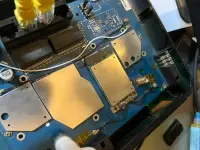
Boosteven R281 (OpenWrt Build)

tingnan muna lang dito.
Link: You do not have permission to view the full content of this post. Log in or register now.
Bossing wala pong relay option sa protocol.

Bossing wala pong relay option sa protocol.
Never mind this. Meron palang relay but still boss may problem pa din.

Bossing wala pong relay option sa protocol.
Never mind this. Meron palang relay but still boss may problem pa din.

Bossing wala pong relay option sa protocol.
Never mind this. Meron palang relay but still boss may problem pa din.

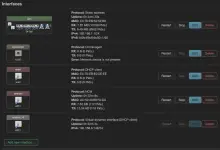
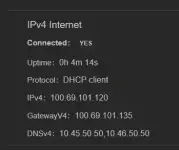
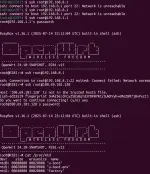
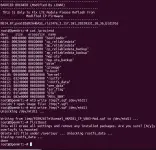
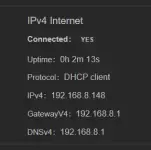
Ganyang setup po sana. I'm still getting trouble po. Na setup ko na sya as extender at successful naman lumalbas naman ung portal ni AP doon sa r281. Kaya lng, kapag na authorize ko ung r281 kay AP at na ok na ung internet niya, nag mamatic na lahat din ng mag coconnect kay r281 may internet na. Di na lumalabas ung portal nya.

https://phcorner.org/threads/how-to-make-openwrt-r281-as-extender.2331506/
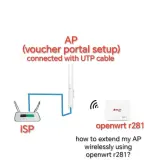
 

Attachments

  • IMG_20250704_134747.webp
    IMG_20250704_134747.webp
    29.3 KB · Views: 37
Pano po to i flash?

need mo ng access sa ssh and flash mo gamit You do not have permission to view the full content of this post. Log in or register now.
kung wala kang access sa ssh tingnan mo dun sa isa kung thread.
Boosteven R281 (Exploit & Enable SSH)

bago ang lahat kunin muna ang AT+CHECKATVALID ng iyong modem.
• mag login sa ssh/telnet at i-run ang command na
Code:
echo 'cat /dev/log_radio|grep "CHECKATVALID">>/tmp/log_radio' >> /etc/rc.local && reboot
• after mag reboot login ulit sa ssh/telnet at i-run ang command na
Code:
cat /tmp/log_radio
• i-save ang output ng cat katulad ng ganito
ex: AT+CHECKATVALID=6961560367461053

dapat nasa 5 ang mtdblock bago mag flash
• mag login sa ssh/telnet i-irun ang command na
Code:
fw_printenv bootargs
• kung ang mtdblock niya ay nasa 6 kaylangang i-set sa 5 i-run ang command na
Code:
fw_setenv bootargs "console=ttyS1,57600n8 root=/dev/mtdblock5"

kung nagawa na ang nasa taas
• i-download ang notion_r281-squashfs-factory.bin at i-flash gamit ang Tftpd
Video: https://youtu|.be/IprqyJMvBkY

kung hindi nag flash gamit tftpd64.
need mo pang i-downgrade yung Bootloader niya.

upload mo itong file sa /tmp
You do not have permission to view the full content of this post. Log in or register now.
at flash mo gamit mtd sa terminal ng 192.168.1.1
Code:
mtd write /tmp/openwrt-ramips-mt7621-sxx-u-boot.img /dev/mtd1
tapos poweroff mo lang at i-trigger yung recovery habang pina-poweron.
 
Hi, Boss Lenar. Thank you for the great OpenWrt support for the R281.
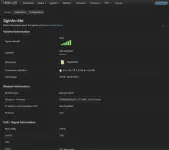
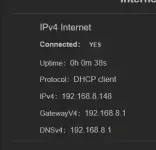
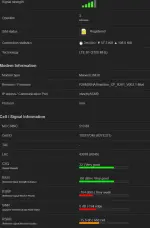
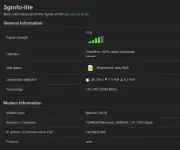
i have issue, the network cell is ready connect., but i see on wwan_4 just local ip 192.168.8.0/24. so when i try to ping 8.8.8.8 or google.com there no internet connection.
is it related to checkatvalid, because im not putting on ncm.json? i dont have a backup, and all my original/stock mtd already erase:
cat /proc/mtd
dev: size erasesize name
mtd0: 00080000 00020000 "u-boot"
mtd1: 00020000 00020000 "u-boot-env"
mtd2: 00040000 00020000 "factory"
mtd3: 07dc0000 00020000 "firmware"
mtd4: 00400000 00020000 "kernel"
mtd5: 079c0000 00020000 "ubi"
mtd6: 00080000 00020000 "stock-env"

but im already flash the lte module to modded v002 that you provided.


Screenshot 2025-08-27 at 22.26.57.webp
Screenshot 2025-08-27 at 22.26.27.webp
Screenshot 2025-08-27 at 22.26.57.webp
Screenshot 2025-08-27 at 22.26.27.webp
 
Hi, Boss Lenar. Thank you for the great OpenWrt support for the R281.
i have issue, the network cell is ready connect., but i see on wwan_4 just local ip 192.168.8.0/24. so when i try to ping 8.8.8.8 or google.com there no internet connection.
is it related to checkatvalid, because im not putting on ncm.json? i dont have a backup, and all my original/stock mtd already erase:
cat /proc/mtd
dev: size erasesize name
mtd0: 00080000 00020000 "u-boot"
mtd1: 00020000 00020000 "u-boot-env"
mtd2: 00040000 00020000 "factory"
mtd3: 07dc0000 00020000 "firmware"
mtd4: 00400000 00020000 "kernel"
mtd5: 079c0000 00020000 "ubi"
mtd6: 00080000 00020000 "stock-env"

but im already flash the lte module to modded v002 that you provided.


View attachment 3878990View attachment 3878991View attachment 3878990View attachment 3878991
i think you need to flash cp and module
 
Hi, Boss Lenar. Thank you for the great OpenWrt support for the R281.
i have issue, the network cell is ready connect., but i see on wwan_4 just local ip 192.168.8.0/24. so when i try to ping 8.8.8.8 or google.com there no internet connection.
is it related to checkatvalid, because im not putting on ncm.json? i dont have a backup, and all my original/stock mtd already erase:
cat /proc/mtd
dev: size erasesize name
mtd0: 00080000 00020000 "u-boot"
mtd1: 00020000 00020000 "u-boot-env"
mtd2: 00040000 00020000 "factory"
mtd3: 07dc0000 00020000 "firmware"
mtd4: 00400000 00020000 "kernel"
mtd5: 079c0000 00020000 "ubi"
mtd6: 00080000 00020000 "stock-env"

but im already flash the lte module to modded v002 that you provided.


View attachment 3878990View attachment 3878991View attachment 3878990View attachment 3878991
you don't need to add checkatvalid if you're using modded firmware.
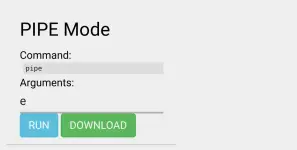
can you try to enable pipe mode in System/Custom Commnands
1000073177.webp

why are you using PLDT firmware why not HKM
 
i cant follow install P28M26ITelkomsel_HKM281_CP_V003.sqf, because i don't have rootfs partitions now:

mtd0: 00080000 00020000 "u-boot"

mtd1: 00020000 00020000 "u-boot-env"

mtd2: 00040000 00020000 "factory"

mtd3: 07dc0000 00020000 "firmware"

mtd4: 00400000 00020000 "kernel"

mtd5: 079c0000 00020000 "ubi"

mtd6: 00080000 00020000 "stock-env"


also in mediafire CP folder, there only CP PLDT, and CP Smartbro. or do you have for HKM now? how correctly install for HKM281.

my state now, reflash CP to smartbro and i feel its fast to connect to cell tower than before. try pipe e reset factory, result 0 success. but still get local dns & ip


Screenshot 2025-08-28 092208.webp

Screenshot 2025-08-28 092530.webp
 
i cant follow install P28M26ITelkomsel_HKM281_CP_V003.sqf, because i don't have rootfs partitions now:

mtd0: 00080000 00020000 "u-boot"

mtd1: 00020000 00020000 "u-boot-env"

mtd2: 00040000 00020000 "factory"

mtd3: 07dc0000 00020000 "firmware"

mtd4: 00400000 00020000 "kernel"

mtd5: 079c0000 00020000 "ubi"

mtd6: 00080000 00020000 "stock-env"


also in mediafire CP folder, there only CP PLDT, and CP Smartbro. or do you have for HKM now? how correctly install for HKM281.

my state now, reflash CP to smartbro and i feel its fast to connect to cell tower than before. try pipe e reset factory, result 0 success. but still get local dns & ip


View attachment 3879203

View attachment 3879205
i think you just break your cpimage from your lte module.
just wait i modified the binfile for HKM
 
Thank you lenar, im happy to wait.
little clue, i remember 192.168.8.1/24 is default DHCP when device in Stock rom. Telkomsel Orbit Pro HKM281.
but i have no idea, it set to virtual wwan_4. maybe its related wwan assign to eth1 when wwan iface already up and running.
my br-lan is normal 192.168.1.1.

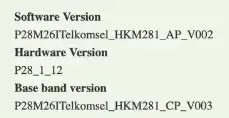
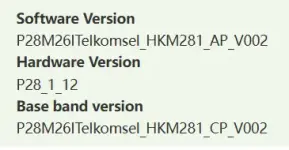
i attach my Base band version when it on stock rom.


Screenshot 2025-08-28 094921.webp
 
Thank you lenar, im happy to wait.
little clue, i remember 192.168.8.1/24 is default DHCP when device in Stock rom. Telkomsel Orbit Pro HKM281.
but i have no idea, it set to virtual wwan_4. maybe its related wwan assign to eth1 when wwan iface already up and running.
my br-lan is normal 192.168.1.1.

i attach my Base band version when it on stock rom.


View attachment 3879229
here's the modified file You do not have permission to view the full content of this post. Log in or register now. but you need to reflash the CP Firmware.
try to access the 192.168.8.1 using ssh.
Code:
ssh root@192.168.8.1
the password is notion
and upload the You do not have permission to view the full content of this post. Log in or register now.
Code:
scp -O /path/of/P28M26ITelkomsel_HKM281_CP_V003-Mod.sqf root@192.168.8.1:/tmp/
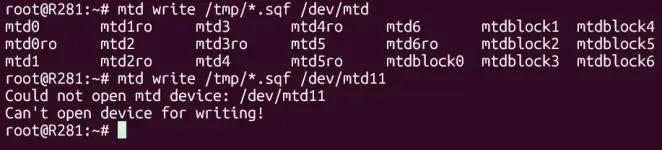
and flash it to mtd11
Code:
mtd write /tmp/*.sqf /dev/mtd11
 
i just flash the CP and it fix the issue,
i cant write to mtd11 becaouse i dont have. and it cant be force, it must be available before write.
Thank you Boss Lenar your update CP, fix my problem.


Screenshot 2025-08-28 105026.webp

Screenshot 2025-08-28 105104.webp

Screenshot 2025-08-28 105152.webp
 
i just flash the CP and it fix the issue,
i cant write to mtd11 becaouse i dont have. and it cant be force, it must be available before write.
Thank you Boss Lenar your update CP, fix my problem.


View attachment 3879271

View attachment 3879272

View attachment 3879273
your running the command from AP side not the CP side.
you need to access the CP side using this command.
Code:
ssh root@192.168.8.1
and you still need to disable PIPE Mode to access the CP and i recommend to disable it so you won't lose internet connection randomly.
 
where is to disable PIPE mode?
i try without disable first, ya 8.1 cant be reach.
so the goal ssh to AP x.x.1.1, inside ap ssh again to x.x.8.1 right?


View attachment 3879296
to disable pipe mode goto You do not have permission to view the full content of this post. Log in or register now.
System/Custom Commnands
1000073192.webp

you can directly run ssh in terminal and not inside the AP.
or you can use ssh client software like You do not have permission to view the full content of this post. Log in or register now..
 
sorry wait to long, i need to reboot after PIPE d,
flash to mtd11 done.
now how to enable again? is it 'e' argument?


Screenshot 2025-08-28 120700.webp

Screenshot 2025-08-28 121304.webp

Thank you Lenar, it works after PIPE e.
final question i have old hkm281 version. without soldering LTE module. do you think is possible to swap to another higher cat module. without making significant adjustment?

Fibocom L850-GL, Modem lt4220,dw5821e​


Attachments

  • IMG_6679.webp
    IMG_6679.webp
    102 KB · Views: 31
need mo ng access sa ssh and flash mo gamit You do not have permission to view the full content of this post. Log in or register now.
kung wala kang access sa ssh tingnan mo dun sa isa kung thread.
Boosteven R281 (Exploit & Enable SSH)


kung hindi nag flash gamit tftpd64.
need mo pang i-downgrade yung Bootloader niya.

upload mo itong file sa /tmp
You do not have permission to view the full content of this post. Log in or register now.
at flash mo gamit mtd sa terminal ng 192.168.1.1
Code:
mtd write /tmp/openwrt-ramips-mt7621-sxx-u-boot.img /dev/mtd1
tapos poweroff mo lang at i-trigger yung recovery habang pina-poweron.
Hi Lenar, i have different device with identical hardware version like the devices success before. but start with different stock rom version. the initramfs successfully booted up, but when try to sysupgrade failed to boot. when i see uart log its stuck with message "bad magic number 55424923", so i think its bootloader issue, when i try flash the u-boot.img to /dev/mtd1 as per your guide, i got error "Writing from /tmp/openwrt-ramips-mt7621-sxx-u-boot.img to /dev/mtd1 ... [e]Failed to get erase block status". do you have suggestions to fix this issue?
 
Hi Lenar, i have different device with identical hardware version like the devices success before. but start with different stock rom version. the initramfs successfully booted up, but when try to sysupgrade failed to boot. when i see uart log its stuck with message "bad magic number 55424923", so i think its bootloader issue, when i try flash the u-boot.img to /dev/mtd1 as per your guide, i got error "Writing from /tmp/openwrt-ramips-mt7621-sxx-u-boot.img to /dev/mtd1 ... [e]Failed to get erase block status". do you have suggestions to fix this issue?
Did you change the location of mtdblock or not?
 
im not sure, but i do see mtd structure like this. after exploit got ssh access.
root@cpe:/# cat /proc/mtd
dev: size erasesize name
mtd0: 07f80000 00020000 "ALL"
mtd1: 00080000 00020000 "Bootloader"
mtd2: 00080000 00020000 "Config"
mtd3: 00040000 00020000 "Factory"
mtd4: 026c0000 00020000 "firmware1"
mtd5: 026c0000 00020000 "firmware2"
mtd6: 025291da 00020000 "rootfs"
mtd7: 01d00000 00020000 "rootfs_data"
mtd8: 03040000 00020000 "ota"
mtd9: 00080000 00020000 "Configbak"

so my step is:
1. got ssh access.
2. full backup nand ssh -o KexAlgorithms=+diffie-hellman-group14-sha1 -o HostKeyAlgorithms=+ssh-rsa root@192.168.8.1 "dd if=/dev/mtdblock0" > full_stock_firmware.bin
3. boot initramfs
4. flash sysupgrade, no dhcp after restart for long time.
5. re-boot initramfs, try flash mt7621-sxx-u-boot.img. got error "Failed to get erase block status"
6. try flash without UART with flow hold reset and flash tftfp with firmware: You do not have permission to view the full content of this post. Log in or register now. , got success normal boot.
7. try boot again initramfs
8. flash sysupgrade still stuck, no dhcp for long time.

i mean different CP version. here is my screenshoot when it stockrom.
Screenshot 2025-08-29 162719.webp
 
im not sure, but i do see mtd structure like this. after exploit got ssh access.
root@cpe:/# cat /proc/mtd
dev: size erasesize name
mtd0: 07f80000 00020000 "ALL"
mtd1: 00080000 00020000 "Bootloader"
mtd2: 00080000 00020000 "Config"
mtd3: 00040000 00020000 "Factory"
mtd4: 026c0000 00020000 "firmware1"
mtd5: 026c0000 00020000 "firmware2"
mtd6: 025291da 00020000 "rootfs"
mtd7: 01d00000 00020000 "rootfs_data"
mtd8: 03040000 00020000 "ota"
mtd9: 00080000 00020000 "Configbak"

so my step is:
1. got ssh access.
2. full backup nand ssh -o KexAlgorithms=+diffie-hellman-group14-sha1 -o HostKeyAlgorithms=+ssh-rsa root@192.168.8.1 "dd if=/dev/mtdblock0" > full_stock_firmware.bin
3. boot initramfs
4. flash sysupgrade, no dhcp after restart for long time.
5. re-boot initramfs, try flash mt7621-sxx-u-boot.img. got error "Failed to get erase block status"
6. try flash without UART with flow hold reset and flash tftfp with firmware: You do not have permission to view the full content of this post. Log in or register now. , got success normal boot.
7. try boot again initramfs
8. flash sysupgrade still stuck, no dhcp for long time.

i mean different CP version. here is my screenshoot when it stockrom.
View attachment 3880942
change the mtdblock to 4 before you flash.
check mtdblock
Code:
fw_printenv
and set mtdblock to 4
Code:
fw_setenv bootargs console=ttyS1,57600n8 root=/dev/mtdblock4
 

About this Thread

  • 434
    Replies
  • 46K
    Views
  • 73
    Participants
Last reply from:
L E N A R

Online now

Members online
1,148
Guests online
1,279
Total visitors
2,427

Forum statistics

Threads
2,271,636
Posts
28,936,855
Members
1,238,711
Latest member
iaiz01812345
Back
Top