 PH
PHjcamanansala
Enthusiast
You do not have permission to view the full content of this post.
Log in or register now.
For all Rain101 users who use cyanide firmware experiencing an issue where the Band Lock settings are not saved after the device reboots.
REQUIREMENTS:
-- Rain101 V7.2.03g
-- PC/Desktop/Laptop with Telnet access
-- Brain
INSTRUCTIONS:
1. Open the exe file.
2. Input your IP Address. (default is 192.168.0.1)
3. Input your SSH username (root), port: 22 and your password.
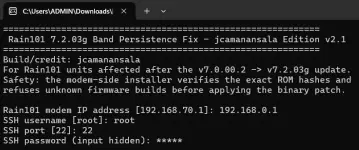
4. Follow the instructions and check if "Compatible Pass" was shown same on below screenshot.
5. Press Y to confirm

6. Go back to your Web UI Dashboard and try to set new bandlock settings. Reboot your router and check if the settings retained.
FEEDBACK IF IT WORKS TO YOU!
For all Rain101 users who use cyanide firmware experiencing an issue where the Band Lock settings are not saved after the device reboots.
REQUIREMENTS:
-- Rain101 V7.2.03g
-- PC/Desktop/Laptop with Telnet access
-- Brain
INSTRUCTIONS:
1. Open the exe file.
2. Input your IP Address. (default is 192.168.0.1)
3. Input your SSH username (root), port: 22 and your password.
4. Follow the instructions and check if "Compatible Pass" was shown same on below screenshot.
5. Press Y to confirm
6. Go back to your Web UI Dashboard and try to set new bandlock settings. Reboot your router and check if the settings retained.
FEEDBACK IF IT WORKS TO YOU!


