 PH
PHOK brokisito92 when you get the good firmware or driver for L02C v005 for vodafone cameroon shangai boost modem, please upload it.
-
Welcome to PHCorner Forums! Sign up for free to unlock full access and exclusive privileges, including:
- Asking questions about computer and mobile issues
- Discovering internet tips for your mobile network and computer
You are using an out of date browser. It may not display this or other websites correctly.
You should upgrade or use an alternative browser.
You should upgrade or use an alternative browser.
Can I get a link to the Ugandan firmware? I'm facing same error and I need to get it off my device. Also, how do I know it's at 100% when the flash speed is as quick as silver.So..
I tried it and I'm glad I did. To anyone else who tried flashing the dreaded Uganda Vodafone firmware, reflash the same firmware and make sure to tick the'Erase All Flash' option and keep your eyes fixed on the progress bar. When it say 100% during the 'erasing' phase, unplug the device and don't wait for it to finish.
I've managed to get rid of the Uganda Vodafone firmware this way. I have flashed a certain Smart Bro firmware (FX_PR2L_FNL_VER) and it's working just fine except for the part where I can't get it to detect any network.
Anywho.. it's a work in progress.
Maybe I need to mix and match different RFBN/RBLI/OSLO.
Have you tried searching the threads?Can I get a link to the Ugandan firmware? I'm facing same error and I need to get it off my device. Also, how do I know it's at 100% when the flash speed is as quick as silver.
Keep your eyes fixed on the progress bar on the bottom of SWDownloader. If you've selected the "Erase all flash" option, it'll take almost a minute to wipe the whole device. What was the last firmware you burned on your modem? Use that.
Unfortunately I don't. I'm still struggling to get mine up and running.Xof have you a New trick for M028T L02C
usherachilles
Leecher
hey try this link: https://phcorner.org/t/smart-bro-evoluzn-fx-pr2l-unlocking-reviving-update-12-01-16.216720/page-7Unfortunately I don't. I'm still struggling to get mine up and running.
seem like arnoldET solved this issue before for those like us with the L02C devices. But i can't download that Airtel_MY2108CL_Chiva_L02C_v002_2.97.000_20141209_2000 file.
HELP!!!
There is 2version of L02C the one from February to now is still unlockable !!!hey try this link: https://phcorner.org/t/smart-bro-evoluzn-fx-pr2l-unlocking-reviving-update-12-01-16.216720/page-7
seem like arnoldET solved this issue before for those like us with the L02C devices. But i can't download that Airtel_MY2108CL_Chiva_L02C_v002_2.97.000_20141209_2000 file.
HELP!!!
I used the L02B_M028T_vodafone_Cameroun in the initial flashing. But afterwards nothing seem to flash again including the above mentioned. And when I select "Erase all" option it takes just about 2 seconds for the error message to pop up. Also I've gone through the threads but can't seem to find a link to the Ugandan firmware, that's why I asked.Have you tried searching the threads?
Keep your eyes fixed on the progress bar on the bottom of SWDownloader. If you've selected the "Erase all flash" option, it'll take almost a minute to wipe the whole device. What was the last firmware you burned on your modem? Use that.
usherachilles
Leecher
There is 2version of L02C the one from February to now is still unlockable !!!
The release date of firmware that came with my L02C device is showing October 2016. I don't know if this is not unlockable. All the firmware i tried giving me error FBF
Thanks.. I'll download and flash.hey try this link: https://phcorner.org/t/smart-bro-evoluzn-fx-pr2l-unlocking-reviving-update-12-01-16.216720/page-7
seem like arnoldET solved this issue before for those like us with the L02C devices. But i can't download that Airtel_MY2108CL_Chiva_L02C_v002_2.97.000_20141209_2000 file.
HELP!!!
Okay.. I have that firmware somewhere. I'll upload it for you before the end of the day God willing.I used the L02B_M028T_vodafone_Cameroun in the initial flashing. But afterwards nothing seem to flash again including the above mentioned. And when I select "Erase all" option it takes just about 2 seconds for the error message to pop up. Also I've gone through the threads but can't seem to find a link to the Ugandan firmware, that's why I asked.
usherachilles
Leecher
if you succesfully flash, let me know...Thanks.. I'll download and flash.
You do not have permission to view the full content of this post. Log in or register now.Okay.. I have that firmware somewhere. I'll upload it for you before the end of the day God willing.
No network with that firmware. It's for hardware version L02C_1_21. What's worse is that the screen doesn't even turn on when you burn this firmware. It just stays off and you have to rely on the web interface.if you succesfully flash, let me know...
usherachilles
Leecher
mean we will never unlock our device?No network with that firmware. It's for hardware version L02C_1_21. What's worse is that the screen doesn't even turn on when you burn this firmware. It just stays off and you have to rely on the web interface.
crying......
but that guy arnoldET said no screen but that there were signal and he used FX version PR2L to reactivate screen. And with help of Argotron, seem like all went back to normal. I tried to ask to arnoldET how he proceed to succes but he never reply to me
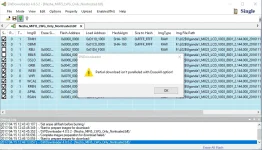
Done downloading and I get a "Partial download isn't paralleled with EraseAll option!" error when I select the "Erase All Flash" option because I think the RBLI and RBLR files fail to load.You do not have permission to view the full content of this post. Log in or register now.
Any help?

Attachments
It would be great if we knew what they did to get a signal but I guess we would never know.mean we will never unlock our device?
crying......
but that guy arnoldET said no screen but that there were signal and he used FX version PR2L to reactivate screen. And with help of Argotron, seem like all went back to normal. I tried to ask to arnoldET how he proceed to succes but he never reply to me
I'm still hopeful though.. someday this thing will work.
You should tick those two checkboxes, RBLI and RBLR then proceed.Done downloading and I get a "Partial download isn't paralleled with EraseAll option!" error when I select the "Erase All Flash" option because I think the RBLI and RBLR files fail to load.
Any help?
So..
I flashed a certain "L02HSmile_M028A_LCD_NT_V001_8801_2.157.000_20160830_1800.zip" because mixing the RFBN files wasn't yielding any results.
The good news:
I was able to get an LTE signal with the above firmware (other non-LTE signals/3G/2G) couldn't be detected.
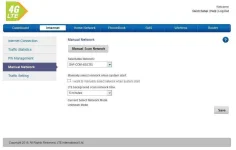
The bad news:
The firmware is locked and requires a key. I'm also stuck with this firmware and I can't get it out (WTPTP Error)
My theory is that newer firmwares employ some sort of 'check' based on the date the firmware one is trying to burn was signed. If the sign date is higher/recent compared to the one inside the modem, it burns the firmware. And if it isn't, it throws an error.
Anywho.. I'm searching for newer firmwares that were signed not later than the 30th of August, 2016 to test this theory as the current firmware that I'm running was signed on this date.
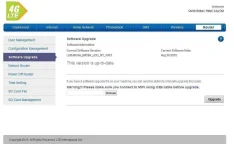
I flashed a certain "L02HSmile_M028A_LCD_NT_V001_8801_2.157.000_20160830_1800.zip" because mixing the RFBN files wasn't yielding any results.
The good news:
I was able to get an LTE signal with the above firmware (other non-LTE signals/3G/2G) couldn't be detected.
The bad news:
The firmware is locked and requires a key. I'm also stuck with this firmware and I can't get it out (WTPTP Error)
My theory is that newer firmwares employ some sort of 'check' based on the date the firmware one is trying to burn was signed. If the sign date is higher/recent compared to the one inside the modem, it burns the firmware. And if it isn't, it throws an error.
Anywho.. I'm searching for newer firmwares that were signed not later than the 30th of August, 2016 to test this theory as the current firmware that I'm running was signed on this date.
Similar threads
-
-
-
Comsol Multiphysics The Complete Beginner's Guide
- Started by rapidgator5
- Replies: 0
-
[UDEMY] Prompt Engineering for Claude Models: A Practitioner's Guide
- Started by flex012
- Replies: 0
-
👨🏫 Tutorial AI Ethics and Responsible Use of AI A Practical Guide
- Started by WSODownload
- Replies: 0
About this Thread
-
316Replies
-
99KViews
-
86Participants
Last reply from:
rowel pagalan
rowel pagalan
New Topics
-
Looking for unli global e sim
- Started by ryujun11
- Replies: 2
- ❓ Mobile Network Discussion & Support
-
About Creating vpn account
- Started by benseman
- Replies: 0
- ❓ Mobile Network Discussion & Support
-
Pano ba gamitin ang tiktok paylater?
- Started by jaleeebean
- Replies: 1
- ❓ Mobile Network Discussion & Support
-
SULIT NA PROMO USING VPN?
- Started by Ash2k20
- Replies: 0
- ❓ Mobile Network Discussion & Support
-
May pang extend pa ba ng promo sa globe?
- Started by Andrew west
- Replies: 0
- ❓ Mobile Network Discussion & Support
-
-
Dito connectivity issue help
- Started by Seannnnnn
- Replies: 2
- ❓ Mobile Network Discussion & Support
-
Unlidata ng Smart
- Started by Ruyi
- Replies: 3
- ❓ Mobile Network Discussion & Support
-
Possible na ma block parin
- Started by PHC JM1302
- Replies: 1
- ❓ Mobile Network Discussion & Support
Trending Topics
Online now
- Members online
- 356
- Guests online
- 7,282
- Total visitors
- 7,638