PH
PHusherachilles
Leecher
For those with locked firmware, how can we activate or unlock MEP setting page so that we can put the 123456 to unlock device?
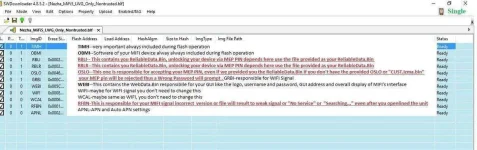
I think it has something to do with the attached image. Credits to kamputs for the image and his porting guide.For those with locked firmware, how can we activate or unlock MEP setting page so that we can put the 123456 to unlock device?
Worked now. Thanks blood. For everything.You should tick those two checkboxes, RBLI and RBLR then proceed.
I can use any firmware of M028T device? or is better to look for the openline firmware?Worked now. Thanks blood. For everything.
how to proceed to get to those 2 options? i can't see. It is on option tab?Worked now. Thanks blood. For everything.
What two options do you mean bro?how to proceed to get to those 2 options? i can't see. It is on option tab?
i mean RBLI and RBLR. how do i arrive to those box pages and via which firmware?.What two options do you mean bro?
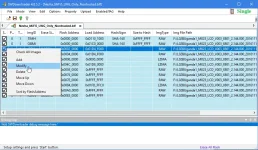
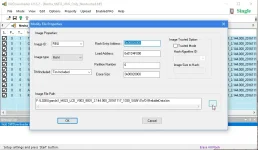
thank for reply.Just right click the file you want to change and select "Modify" from the pop up dialog. Another pop up box will open, select 'browse'(...) and navigate to the folder where you have your other flash files you want to use and choose the files("RBLI", "RBLR" in your case) from there and click "OK".
I can't tell the precise firmware for your device but for me I'm in Ghana and I used this firmware https://drive.google.com/file/d/0B7wb9gQ7PymeaklSTXREdms1dXM/view to unlock mine. The "PH-NET PIN" after flash is 123456.
My device board is M028T with L02B system board.
I am lost. I don't even know what to modify there. Flash always show FBF error. crying.....Just right click the file you want to change and select "Modify" from the pop up dialog. Another pop up box will open, select 'browse'(...) and navigate to the folder where you have your other flash files you want to use and choose the files("RBLI", "RBLR" in your case) from there and click "OK".
I can't tell the precise firmware for your device but for me I'm in Ghana and I used this firmware https://drive.google.com/file/d/0B7wb9gQ7PymeaklSTXREdms1dXM/view to unlock mine. The "PH-NET PIN" after flash is 123456.
My device board is M028T with L02B system board.
ok thankHmph! Contact zedicus I think he will be able to help.
Facing the same issue WTPTP FBF ERROR.even though I have flashed m028t before with no issues, any help?ok thank
i have another question. which windows you used to flash your device because for me, when i use windows 7, nothing happen. it say F SENDPREAMBLE FAILED BOOT DEVICE TYPE. something like that.
when i use windows xp, i get the WTPTP FBF ERROR.
I feel that is problem of driver but not sure
Where in Accra are you,this my what's up number,0243384311Hmph! Contact zedicus I think he will be able to help.
You're welcome.Worked now. Thanks blood. For everything.
I used Windows 10 Enterprise. But I doubt if it's the OS you are using because from my little experience in phone flashing, Windows XP and Windows 7 are better in terms of driver installation and compatiblity. I quite remember I had a really difficult time to even realize how to install unsigned drivers in Windows 8 likewise 10.ok thank
i have another question. which windows you used to flash your device because for me, when i use windows 7, nothing happen. it say F SENDPREAMBLE FAILED BOOT DEVICE TYPE. something like that.
when i use windows xp, i get the WTPTP FBF ERROR.
I feel that is problem of driver but not sure
Follow xof's tutorial back on page 5, it might help you.Facing the same issue WTPTP FBF ERROR.even though I have flashed m028t before with no issues, any help?
I'm at Kasoa by the way and I will WhatsApp you right after this message.Where in Accra are you,this my what's up number,0243384311
ok bro,following his procedures word by word,will give feedback ASAPFollow xof's tutorial back on page 5, it might help you.