 PH
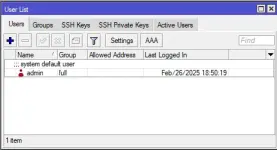
PHNeed help mga boss, may client kasi na may issue kasi yung tech ginawa nyang full admin yung sarili nya tapos pinapatay patay yung system para mag pa service ulit. Paano kaya best way para ma tanggal access nung tech? or kung meron dito magaling mag Mikrotik configuration yung set-up tlga hindi lang lagay ng config tapos lagi padin may issue, DM kayo sakin.
-
Welcome to PHCorner Forums! Sign up for free to unlock full access and exclusive privileges, including:
- Asking questions about computer and mobile issues
- Discovering internet tips for your mobile network and computer
Similar threads
-
-
-
NETMOD CONFIG PREMIUM KANINO PO PWEDE MAG AVAIL? YUNG PANG BYPASS SA GLOBE PROMO LIKE GOUNLITIKTOK99
- Started by Damsangpinas2021
- Replies: 0
-
DIY Piso WIFI - major components: Mikrotik, ESP-12E, Comfast, Coinslot
- Started by jcdgreatest
- Replies: 28
-
❓ Help Patulong mag config g mikrotik haplite v7
- Started by Akaneee22
- Replies: 8