👨‍🏫 Tutorial The101 5G Globe At Home Developer Mode (For All) FREE

oks na goods na pero di ko pa natry palitan ang imei nya
Ayaw magpalit ng IMEI after how many reboots. :(
View attachment 3979072

Ayaw din mag download gamit ang update list. :(

View attachment 3979061View attachment 3979058

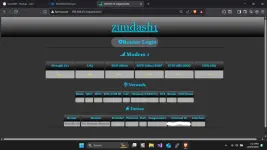
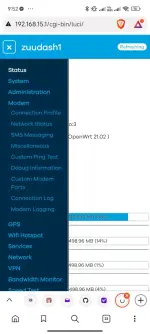
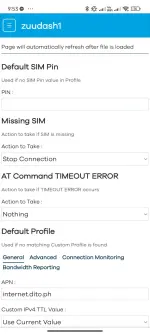
Ganito rin ba laman ng interface niyo?
View attachment 3979069
napagana mo na lodi? at last naka access na din ako kay luci.

anyways baka gusto mo ito i-try AT+EGMREXT=1.7, "<IMEI>" try at your own risk

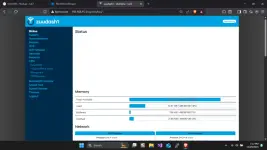
kaparehas pala sya ng interface ng openwrt na ito
1764414770679.webp


1764414883112.webp
 
Nice, good to know na working sa version nayan.

if nagana ung tempermonkey na script pwede din maka pagpalit ng imei.

Tested lang sa RA_M2_v3.6.06g


⚠️ IMPORTANT: Back up your own IMEI before proceeding.

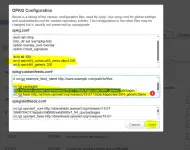
⚙️VIA STARTUP CONFIG
  • Access the Startup Configuration:Navigate to the following address in your web browser:
  • Locate Local Startup: Click on the "local startup" option.
  • Add the Script: Insert the following command beforethe exit 0 line:
    • mipc_wan_cli --at_cmd 'AT+EGMR=1,7,"IMEI"'
  • Save Changes: Click the "save" button.
  • Reboot (Twice): Perform two reboots. A second reboot is required after the first boot sequence is complete.
EXAMPLE NEW IMEI: 356726380000059
mipc_wan_cli --at_cmd 'AT+EGMR=1,7,"356726380000059"'

View attachment 3978514
Ito lang sundan natin, need Kasi mag 2x reboot si 101, and may timing sa pag reboot, nagtry Ako pero no luck dahil Mali process ko, pero sya gumawa ng script kaya thank you roeru1601 lodi
 
Ito lang sundan natin, need Kasi mag 2x reboot si 101, and may timing sa pag reboot, nagtry Ako pero no luck dahil Mali process ko, pero sya gumawa ng script kaya thank you roeru1601 lodi

Yes po need mag wait, di ko nalagay, wait nalang mag karoon ng internet bago mag pangalawang reboot para sure na nag run na yung local startup script.

1st boot - run script
2nd boot - apply IMEI


Via SSH (one reboot only)
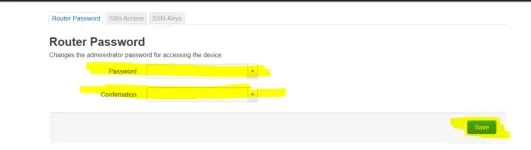
  1. Change the router password here:
    You do not have permission to view the full content of this post. Log in or register now.
    1764475755584.webp
  2. Download and install PuTTY:
    You do not have permission to view the full content of this post. Log in or register now.
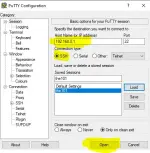
  3. Open PuTTY
    Host Name: 192.168.0.1
    Connection Type: SSH
    Then click “Open”.
    1764475808771.webp
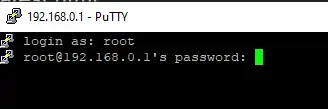
  4. Login
    Username: root
    Password: your new password
    1764475877916.webp
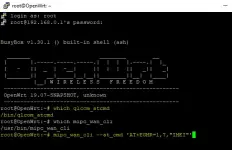
  5. Run the command
    mipc_wan_cli --at_cmd 'AT+EGMR=1,7,"IMEI"'
    or
    qlcom_atcmd AT+EGMR=1,7 "New IMEI#"
    1764476143918.webp
  6. Reboot the router to apply the changes.


    Can't connect to SSH (bug)?
    Go to:
    You do not have permission to view the full content of this post. Log in or register now.
    Look for dropbear and click Stop, then Start.
 
Ayaw magpalit ng IMEI after how many reboots. :(
View attachment 3979072

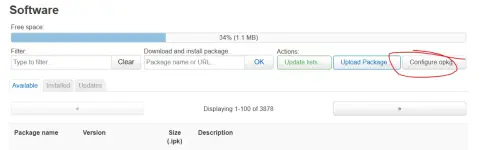
Ayaw din mag download gamit ang update list. :(

View attachment 3979061View attachment 3979058

Ganito rin ba laman ng interface niyo?
View attachment 3979069

re:update opkg list

source: You do not have permission to view the full content of this post. Log in or register now.

1764476874710.webp

# /etc/opkg.conf
arch all 100
arch aarch64_cortex-a55_neon-vfpv4 200
arch aarch64_generic 300

# /etc/opkg/customfeeds.conf
src/gz packages You do not have permission to view the full content of this post. Log in or register now.
src/gz base You do not have permission to view the full content of this post. Log in or register now.
src/gz luci You do not have permission to view the full content of this post. Log in or register now.

1764477007034.webp
 
Yes po need mag wait, di ko nalagay, wait nalang mag karoon ng internet bago mag pangalawang reboot para sure na nag run na yung local startup script.

1st boot - run script
2nd boot - apply IMEI


Via SSH (one reboot only)
  1. Change the router password here:
    You do not have permission to view the full content of this post. Log in or register now.
    View attachment 3980209
  2. Download and install PuTTY:
    You do not have permission to view the full content of this post. Log in or register now.
  3. Open PuTTY
    Host Name: 192.168.0.1
    Connection Type: SSH
    Then click “Open”.
    View attachment 3980210
  4. Login
    Username: root
    Password: your new password
    View attachment 3980211
  5. Run the command
    mipc_wan_cli --at_cmd 'AT+EGMR=1,7,"IMEI"'
    or
    qlcom_atcmd AT+EGMR=1,7 "New IMEI#"
    View attachment 3980213
  6. Reboot the router to apply the changes.


    Can't connect to SSH (bug)?
    Go to:
    You do not have permission to view the full content of this post. Log in or register now.
    Look for sshd and click Stop, then Start.View attachment 3980217

lodi question? Anong script i-run sa 1st reboot UNG default ni 101 or need ilagay script mo? And familiar ka ba Kay rooter by any chance?
 
lodi question? Anong script i-run sa 1st reboot UNG default ni 101 or need ilagay script mo? And familiar ka ba Kay rooter by any chance?

yung step by step na nilagay ko yun lang need gawin para makapag palit ng imei, kung di nagana yung mipc_wan_cli pwede mo try yung qlcom_atcmd.

familiar? no, inexplore ko lang ung os ng router kasi ayaw ko mag pa lagay ng custom at ayaw mag bayad :V
 
yung step by step na nilagay ko yun lang need gawin para makapag palit ng imei, kung di nagana yung mipc_wan_cli pwede mo try yung qlcom_atcmd.

familiar? no, inexplore ko lang ung os ng router kasi ayaw ko mag pa lagay ng custom at ayaw mag bayad :V
thank you lodi ok na. All goods na ako kay 101 changeable na din imei ko nag work sakin ung una mo na method
version 5.2.0 for reference ng ibang kaphc. with adblock na din
 
Yes po need mag wait, di ko nalagay, wait nalang mag karoon ng internet bago mag pangalawang reboot para sure na nag run na yung local startup script.

1st boot - run script
2nd boot - apply IMEI


Via SSH (one reboot only)
  1. Change the router password here:
    You do not have permission to view the full content of this post. Log in or register now.
    View attachment 3980209
  2. Download and install PuTTY:
    You do not have permission to view the full content of this post. Log in or register now.
  3. Open PuTTY
    Host Name: 192.168.0.1
    Connection Type: SSH
    Then click “Open”.
    View attachment 3980210
  4. Login
    Username: root
    Password: your new password
    View attachment 3980211
  5. Run the command
    mipc_wan_cli --at_cmd 'AT+EGMR=1,7,"IMEI"'
    or
    qlcom_atcmd AT+EGMR=1,7 "New IMEI#"
    View attachment 3980213
  6. Reboot the router to apply the changes.


    Can't connect to SSH (bug)?
    Go to:
    You do not have permission to view the full content of this post. Log in or register now.
    Look for sshd and click Stop, then Start.
    View attachment 3980217

Gumana yung opkg update at nakapag upgrade ako.

pero di parin mapalitan yung:
1. IMEI (ginamit ko na each command)
2. Di parin maaccess yung ssh (stop/start)
3. Nagchange ako ng router password (then reboot) via openwrt pero yung lumang password parin ang tinatanggap.

hindi kaya patched na yung commands sa v5.3.03?
 
Gumana yung opkg update at nakapag upgrade ako.

pero di parin mapalitan yung:
1. IMEI (ginamit ko na each command)
2. Di parin maaccess yung ssh (stop/start)
3. Nagchange ako ng router password (then reboot) via openwrt pero yung lumang password parin ang tinatanggap.

hindi kaya patched na yung commands sa v5.3.03?
hindi pala yung SSHD. yung dropbear pala stop at start mo, then try mo na ulit mag ssh gamit putty.

the101.a ba yung router mo or yung the101?
 
Napalitan ko na yung IMEI via ssh. Ginamit ko unang command.
BUT. Yung globe na sim na kasama sa router ay di na makapag internet. Haha.

Nakalock ata yung SIM sa IMEI ng router. Triny ko rin ilagay yung SIM sa phone pero di rin makapagnet. 😆
 
Napalitan ko na yung IMEI via ssh. Ginamit ko unang command.
BUT. Yung globe na sim na kasama sa router ay di na makapag internet. Haha.

Nakalock ata yung SIM sa IMEI ng router. Triny ko rin ilagay yung SIM sa phone pero di rin makapagnet. 😆
Try mo balik ung dating IMEI nya, buti nalang di ko pa ginamit at niregister UNG sim na kasama
 

Similar threads

About this Thread

  • 148
    Replies
  • 18K
    Views
  • 58
    Participants
Last reply from:
PHC_Cyber

Online now

Members online
1,070
Guests online
1,074
Total visitors
2,144

Forum statistics

Threads
2,278,031
Posts
28,980,427
Members
1,228,200
Latest member
carito2020
Back
Top