PH
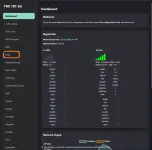
PH1. Mag-log-in sa customized dashboard at i-click si DNS section.
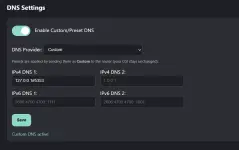
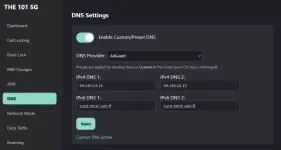
2. Siguraduhig naka-on ang Enable Custom/Preset DNS at ang DNS Provider ay naka-set sa AdGuard. (Dito ako natagalan at nalito kasi expect ko is ilagay yung mga IP for IPv4/6 gaya nung naka-litaw sa AdGuard Setup guide. (127.0.0.1:5353 / [::1]:5353). Ganun din kasi nung nag-deploy ako ng Pihole pero hindi pala. Matic na siya gagana basta naka-set to AdGuard yung DNS section.)
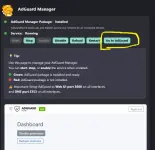
3. Punta naman tayo dito sa Adguard section. Installed na’to by default pero if hindi siya. Punta kayo sa Package section at i-install siya.
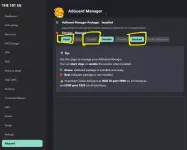
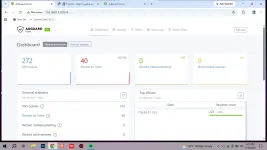
Note: Para mas-optimize ang pag-control mo, click the Go To AdGuard button at may new tab na mag-open. Si You do not have permission to view the full content of this post. Log in or register now. paki-bookmark na lang para madali ma-access if needed.
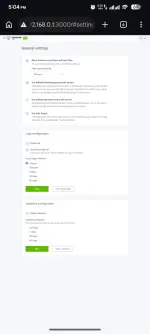
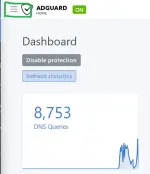
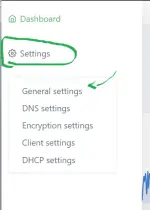
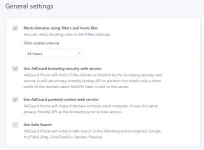
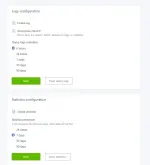
5. Habang nasa AdGuard Home tab. Click mo si menu sa top left (3 horizontal lines tabi ni AdGuard Home Logo. Click settings, then General muna tayo. Feel free to copy mine basta ang recommended is naka-uncheck is Enable log at Enable statistics para di ma-stress at malaspag ang storage chip ni the101
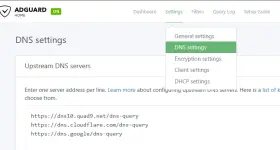
6. Sa DNS settings naman ni AdGuard. Etong tatlo ang recommended upstream servers at bootstrap DNS servers ko.
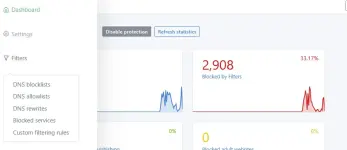
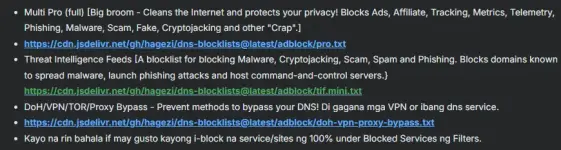
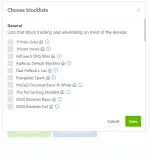
7. After ma-setup ang general settings ni AdGuard, click the menu again sa top left, and click si Filters, then si DNS Blocklists. Dito i-se-setup ang gagamiting list/host file to blocks ads and such kagaya sa ginagamit ni ublock. Feel free to copy mine, choose from AdGuards default listings, or use your own preferred listing. Sa Pi-hole ko kasi before, mas gusto ko yung list na gawa ni HAGEZI.
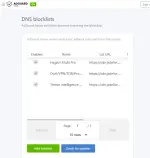
I use;
And that's it. Na-setup mo na ang built-in AdGuard Home s the101 5G modem gamit ang Fusion firmware.
2. Siguraduhig naka-on ang Enable Custom/Preset DNS at ang DNS Provider ay naka-set sa AdGuard. (Dito ako natagalan at nalito kasi expect ko is ilagay yung mga IP for IPv4/6 gaya nung naka-litaw sa AdGuard Setup guide. (127.0.0.1:5353 / [::1]:5353). Ganun din kasi nung nag-deploy ako ng Pihole pero hindi pala. Matic na siya gagana basta naka-set to AdGuard yung DNS section.)
3. Punta naman tayo dito sa Adguard section. Installed na’to by default pero if hindi siya. Punta kayo sa Package section at i-install siya.
- Habang nasa Adguard section, siguraduhing naka-enable muna, then start or restart at hintaying mag-green ang service status.
- Then kapag sine-setup niyo na siya, make sure na yung nasa interfaces section (pinaka-unang box) ay naka-set sa 3000 ang web-ui port. Ito ang magbibigay ng access via You do not have permission to view the full content of this post. Log in or register now. (kapag na-click si Go To AdGuard or naka-bookmark to save time.)
- Then sa next naman is dapat naka 5353 yung DNS port instead na 53 lamang.
- Note: Failure to do this change (3000 and 5353 will result to failure. Diko alam pano i-fully reset si AdGuard kasi kahit i-uninstall ko na, naka-save pa rin yung last config ko after install. Baka need ng full firmware flash para ma-reset lahat.
Note: Para mas-optimize ang pag-control mo, click the Go To AdGuard button at may new tab na mag-open. Si You do not have permission to view the full content of this post. Log in or register now. paki-bookmark na lang para madali ma-access if needed.
5. Habang nasa AdGuard Home tab. Click mo si menu sa top left (3 horizontal lines tabi ni AdGuard Home Logo. Click settings, then General muna tayo. Feel free to copy mine basta ang recommended is naka-uncheck is Enable log at Enable statistics para di ma-stress at malaspag ang storage chip ni the101
6. Sa DNS settings naman ni AdGuard. Etong tatlo ang recommended upstream servers at bootstrap DNS servers ko.
- You do not have permission to view the full content of this post. Log in or register now.
- You do not have permission to view the full content of this post. Log in or register now.
- You do not have permission to view the full content of this post. Log in or register now.
- 9.9.9.10
- 149.112.112.10
- 2620:fe::10
- 2620:fe::fe:10
- 8.8.8.8
- 8.8.4.4
- 2001:4860:4860::8888
- 2001:4860:4860::8844
- 1.1.1.1
- 1.0.0.1
- 2606:4700:4700::1111
- 2606:4700:4700::1001
7. After ma-setup ang general settings ni AdGuard, click the menu again sa top left, and click si Filters, then si DNS Blocklists. Dito i-se-setup ang gagamiting list/host file to blocks ads and such kagaya sa ginagamit ni ublock. Feel free to copy mine, choose from AdGuards default listings, or use your own preferred listing. Sa Pi-hole ko kasi before, mas gusto ko yung list na gawa ni HAGEZI.
I use;
- Multi Pro (full) [Big broom - Cleans the Internet and protects your privacy! Blocks Ads, Affiliate, Tracking, Metrics, Telemetry, Phishing, Malware, Scam, Fake, Cryptojacking and other "Crap".]
- You do not have permission to view the full content of this post. Log in or register now.
- Threat Intelligence Feeds [A blocklist for blocking Malware, Cryptojacking, Scam, Spam and Phishing. Blocks domains known to spread malware, launch phishing attacks and host command-and-control servers.}
You do not have permission to view the full content of this post. Log in or register now. - DoH/VPN/TOR/Proxy Bypass - Prevent methods to bypass your DNS! Di gagana mga VPN or ibang dns service.
- You do not have permission to view the full content of this post. Log in or register now.
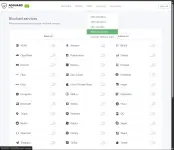
- Kayo na rin bahala if may gusto kayong i-block na service/sites ng 100% under Blocked Services ng Filters.
And that's it. Na-setup mo na ang built-in AdGuard Home s the101 5G modem gamit ang Fusion firmware.
Looking ka pa rin ba sa kung anong magandang modem pang-back-up man or main internet use? Feel free to visit and check this compilation for your convenience.
You do not have permission to view the full content of this post. Log in or register now.