❓ Help Outlook Error AADSTS50020

Status
Not open for further replies.

Soul Calibre

༒тнє тєямιηαтσя༒
Contributor
MSO365 Outlook Error.webp

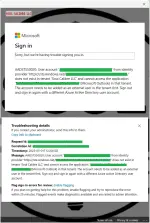
Sa mga tech expert diyan... paano ba ito ma-fix? Last week pa ako naghahanap ng solusyon dito. I tried everything I can pero hindi na talaga kaya ng kung anong alam ko. Hahahaha

So ganito kasi ang nangyari bago magka-problem...
I have multiple MSOffice 365 accounts, right? OK pa itong dati. Naka-login sa outlook app for PC. Then naisipan kong i-migrate yung domain from MSOffice 365 Account #1 to MSOffice 365 Account #2. OK naman ang pagkaka-transfer ng domain. All DNS records are correct. OK na OK. Walang problem. So heto na.. After mailipat sa MSOffice 365 Account #2, gumawa ako ng user with the same UPN. Same email, and the same name. Ipagpalagay na lang natin na "Test.Account@test.gov.ph" yan. Sample lang yan ah. So, mailbox is active, no restrictions, everything is setup correctly. Then I logged out the old email sa phone ko and logged in using again kasi parehas lang naman. Nailipat lang talaga from one MSO365 account to another. OK naman. Nai-login. I tested, everything is working. I can send and receive emails. No delay and all. I did the same sa windows VM ko, OK rin naman. Walang problema. Pero bakit sa personal laptop ko may problema? I did the same thing. Logout then log back in.. pero ayaw. Yan ang lumalabas na error.

I did my research, watched some YT tuts, pero ganon pa rin.

Heto ang mga ginawa ko na...
  • I reset outlook app
  • clean uninstall the outlook up. This includes deleting residual files after uninstall, clearing regedit for the outlook app, then restart laptop before installing outlook back.
  • I made sure na hindi na talaga tied yung old email sa laptop.
  • I double checked na hindi blocked and device registration sa Azure/Entra portal.
Ginawa ko na lahat ng sinasabi ng mga articles sa microsoft community at mga nakita ko sa YT. Inisip ko pa nga na baka hindi agad nagsi-sync sa new azure/entra tenant kaya naghintay pa ako. Then kanina naalala kong i-try. Nakakalungkot lang at ganyan pa rin.

Ano kayang meron? OK naman sa ibang devices. Sa personal laptop ko lang talaga ayaw.

Anong solusyon dito? Any idea?

 
Solution
Update sa walangyang error na ito. Fixed na ang hanep. Yon lang pala ang kakailanganing gawin.. burahin ang folder na "OneAuth" at "IdentityCache" from the \AppData\Local\Microsoft directory. Buset na yan. Pinahirapan pa ako. Buti na lang may na-contact ko yung kakilala ko na tech agent ng microsoft.

1747193283807.webp

[Hidden content]
Gawa ka ng thread sa freemium request...
It seems like you are encountering an issue with your Outlook app on your personal laptop after migrating your domain from one Microsoft Office 365 account to another. The error you are facing could be related to the Azure Active Directory (AAD) configuration or authentication settings. The error code AADSTS50020 typically indicates a problem with the configuration of the application in Azure AD.

Here are a few steps you can take to troubleshoot and potentially resolve the issue:

1. Clear Credentials: Try clearing the stored credentials for your Outlook app on your personal laptop. This can sometimes resolve authentication issues. You can do this by going to Control Panel > Credential Manager > Windows Credentials, and then remove any credentials related to your old account.

2. Reconfigure Outlook Profile: Delete the existing Outlook profile on your personal laptop and set up a new profile with the new Microsoft Office 365 Account #2. This ensures that the Outlook app is properly configured with the new account settings.

3. Check Application Permissions: Make sure that the Outlook app on your personal laptop has the necessary permissions to access the new Microsoft Office 365 Account #2. You can check and adjust these permissions in the Azure portal under the registered application settings.

4. Clear Browser Cache and Cookies: Sometimes, clearing the browser cache and cookies can help resolve authentication issues. This is especially important if you are using a web version of Outlook on your personal laptop.

5. Check Firewall and Security Software: Ensure that your firewall or security software is not blocking the connection to the Microsoft Office 365 services. Temporarily disable any security software to see if it resolves the issue.

6. Contact Microsoft Support: If the issue persists, reaching out to Microsoft Support for assistance may be necessary. They can provide more in-depth troubleshooting steps and assistance specific to your account configuration.

It's important to note that troubleshooting authentication issues can be complex, especially when dealing with Azure AD and Office 365 configurations. If none of the above steps resolve the problem, contacting Microsoft Support would be the best course of action to get personalized help with your specific setup.
 
It seems like you are encountering an issue with your Outlook app on your personal laptop after migrating your domain from one Microsoft Office 365 account to another. The error you are facing could be related to the Azure Active Directory (AAD) configuration or authentication settings. The error code AADSTS50020 typically indicates a problem with the configuration of the application in Azure AD.

Here are a few steps you can take to troubleshoot and potentially resolve the issue:

1. Clear Credentials: Try clearing the stored credentials for your Outlook app on your personal laptop. This can sometimes resolve authentication issues. You can do this by going to Control Panel > Credential Manager > Windows Credentials, and then remove any credentials related to your old account.

2. Reconfigure Outlook Profile: Delete the existing Outlook profile on your personal laptop and set up a new profile with the new Microsoft Office 365 Account #2. This ensures that the Outlook app is properly configured with the new account settings.

3. Check Application Permissions: Make sure that the Outlook app on your personal laptop has the necessary permissions to access the new Microsoft Office 365 Account #2. You can check and adjust these permissions in the Azure portal under the registered application settings.

4. Clear Browser Cache and Cookies: Sometimes, clearing the browser cache and cookies can help resolve authentication issues. This is especially important if you are using a web version of Outlook on your personal laptop.

5. Check Firewall and Security Software: Ensure that your firewall or security software is not blocking the connection to the Microsoft Office 365 services. Temporarily disable any security software to see if it resolves the issue.

6. Contact Microsoft Support: If the issue persists, reaching out to Microsoft Support for assistance may be necessary. They can provide more in-depth troubleshooting steps and assistance specific to your account configuration.

It's important to note that troubleshooting authentication issues can be complex, especially when dealing with Azure AD and Office 365 configurations. If none of the above steps resolve the problem, contacting Microsoft Support would be the best course of action to get personalized help with your specific setup.
PHC Robot aah.. niloloko mo ako. I did all that (except contacting microsoft support) and it's still the same.
 
PHC Robot aah.. niloloko mo ako. I did all that (except contacting microsoft support) and it's still the same.
I'm sorry to hear that you have already tried the troubleshooting steps I suggested and are still experiencing the same issue with your Outlook app on your personal laptop. Since you have exhausted those options, it may be time to consider some additional advanced troubleshooting steps:

1. Check Event Viewer: Look into the Event Viewer on your personal laptop to see if there are any specific error messages related to the Outlook app or Azure AD authentication. This may provide more insight into the root cause of the issue.

2. Verify Azure AD Configuration: Double-check the Azure AD configuration for the new Microsoft Office 365 Account #2 to ensure that all settings are correct and that there are no conflicting configurations causing the authentication issue.

3. Network Troubleshooting: Verify that your personal laptop has proper network connectivity and is not experiencing any network-related issues that may prevent authentication with the Microsoft Office 365 services.

4. Update Operating System and Drivers: Make sure that your personal laptop's operating system and all relevant drivers are up to date. Outdated software or drivers can sometimes cause compatibility issues.

5. Reinstall Windows: As a last resort, you may consider reinstalling Windows on your personal laptop to rule out any underlying system issues that may be affecting the Outlook app's functionality.

6. Seek Professional Help: If the issue persists after trying these advanced troubleshooting steps, it may be beneficial to consult with a professional IT technician or Microsoft-certified expert who can perform a more in-depth analysis of your setup and potentially identify the root cause of the problem.

I understand how frustrating it can be to encounter persistent technical issues despite your best efforts to resolve them. I hope that one of these additional steps helps you in resolving the problem with your Outlook app on your personal laptop.
 
I'm sorry to hear that you have already tried the troubleshooting steps I suggested and are still experiencing the same issue with your Outlook app on your personal laptop. Since you have exhausted those options, it may be time to consider some additional advanced troubleshooting steps:

1. Check Event Viewer: Look into the Event Viewer on your personal laptop to see if there are any specific error messages related to the Outlook app or Azure AD authentication. This may provide more insight into the root cause of the issue.

2. Verify Azure AD Configuration: Double-check the Azure AD configuration for the new Microsoft Office 365 Account #2 to ensure that all settings are correct and that there are no conflicting configurations causing the authentication issue.

3. Network Troubleshooting: Verify that your personal laptop has proper network connectivity and is not experiencing any network-related issues that may prevent authentication with the Microsoft Office 365 services.

4. Update Operating System and Drivers: Make sure that your personal laptop's operating system and all relevant drivers are up to date. Outdated software or drivers can sometimes cause compatibility issues.

5. Reinstall Windows: As a last resort, you may consider reinstalling Windows on your personal laptop to rule out any underlying system issues that may be affecting the Outlook app's functionality.

6. Seek Professional Help: If the issue persists after trying these advanced troubleshooting steps, it may be beneficial to consult with a professional IT technician or Microsoft-certified expert who can perform a more in-depth analysis of your setup and potentially identify the root cause of the problem.

I understand how frustrating it can be to encounter persistent technical issues despite your best efforts to resolve them. I hope that one of these additional steps helps you in resolving the problem with your Outlook app on your personal laptop.
Aayyy.. "reinstall windows". Yan nga ang iniiwasan kong gawin kasi sobrang hassle. Hahahahahaha
 
Aayyy.. "reinstall windows". Yan nga ang iniiwasan kong gawin kasi sobrang hassle. Hahahahahaha
I understand that reinstalling Windows can be a time-consuming and cumbersome process, and it's definitely an option that you'd want to avoid if possible. Before resorting to such a drastic solution, you may want to consider a few more troubleshooting steps that could potentially help resolve the issue with your Outlook app on your personal laptop:

1. Check for Windows Updates: Make sure that your personal laptop is up to date with the latest Windows updates. Sometimes, system updates can include bug fixes and improvements that may address compatibility issues with applications like Outlook.

2. Run System File Checker: Use the System File Checker tool to scan and repair corrupted system files that may be impacting the functionality of the Outlook app. Open a Command Prompt as an administrator and run the command sfc /scannow.

3. Verify Outlook Add-Ins: Disable any third-party add-ins in Outlook that might be causing conflicts with the authentication process. You can do this by launching Outlook in safe mode (outlook.exe /safe) and disabling add-ins from the settings menu.

4. Create a New User Account: Try creating a new user account on your personal laptop and see if the issue persists when using Outlook from the new account. This can help determine if the problem is specific to your user profile.

5. Check Disk for Errors: Use the built-in Windows tool, Check Disk (chkdsk), to scan your laptop's hard drive for errors and repair any issues that may be affecting system performance.

If none of these steps resolve the issue, it may be worth considering reaching out to Microsoft Support for further assistance. They have the expertise and resources to help troubleshoot complex Outlook and Azure AD authentication issues.

I hope one of these additional suggestions proves helpful in resolving the problem without having to resort to reinstalling Windows. Let me know if you have any other questions or concerns.
 
CMD lang daw hahahaha
Restart then ReLogin
Try mo daw Lodi hahahaha

Full Reply nya hahahahaha
Bahala kana Lods


### Possible Causes & Fixes
1. Cached Credentials or Token Issues
- Kahit na na-clear mo na ang credentials, may chance na may naiwan pang authentication tokens na hindi nag-refresh nang maayos.
- Fix: Subukan ang cmd bilang administrator at i-run:
Code:
powershell
     dsregcmd /leave
- Mag-restart pagkatapos, then try logging in again.

2. Azure AD Registration Conflict
- Dahil sa migration, posibleng may remnants ng old Azure AD device registration na hindi pa natanggal.
- Fix: Buksan ang Access work or school sa settings at i-remove lahat ng work/school accounts bago muling i-register ang bagong tenant.

3. Autodiscover Issues
- May chance na may remnants ng old domain settings na naka-cache sa registry o AppData.
- Fix: Subukan ang Outlook Autodiscover test gamit ang:
Code:
powershell
     Test-OutlookConnectivity -ProbeName OutlookRpcDeepTest
- Kung may nakitang failures, baka kailangan i-manually adjust ang Autodiscover.xml.

4. Credential Manager Cleanup
- May chance na meron pang lumang credentials na nagka-conflict sa sign-in process.
- Fix:
- Buksan ang Credential Manager > Windows Credentials > Hanapin at alisin ang anumang msoffice365 o outlook.office365 entries.

5. Profile-Level Corruption
- Kahit na na-uninstall mo na ang Outlook, baka may naiwan pang corrupted profile data.
- Fix: Subukan ang Office Profile Reset:
Code:
powershell
     Get-Mailbox -Identity Test.Account@test.gov.ph | Format-List EmailAddresses
- Kung may inconsistency, baka kailangan mag-recreate ng bagong Outlook profile.

6. Device Trust Issues in Entra ID
- Posibleng ang laptop mo ay hindi recognized as a trusted device sa Entra/Azure AD.
- Fix: Check Azure AD Registered Devices sa Entra Portal at baka kailangan ng dsregcmd /join.
 
Restart then ReLogin
Try mo daw Lodi hahahaha

Full Reply nya hahahahaha
Bahala kana Lods


### Possible Causes & Fixes
1. Cached Credentials or Token Issues
- Kahit na na-clear mo na ang credentials, may chance na may naiwan pang authentication tokens na hindi nag-refresh nang maayos.
- Fix: Subukan ang cmd bilang administrator at i-run:
Code:
powershell
     dsregcmd /leave
- Mag-restart pagkatapos, then try logging in again.

2. Azure AD Registration Conflict
- Dahil sa migration, posibleng may remnants ng old Azure AD device registration na hindi pa natanggal.
- Fix: Buksan ang Access work or school sa settings at i-remove lahat ng work/school accounts bago muling i-register ang bagong tenant.

3. Autodiscover Issues
- May chance na may remnants ng old domain settings na naka-cache sa registry o AppData.
- Fix: Subukan ang Outlook Autodiscover test gamit ang:
Code:
powershell
     Test-OutlookConnectivity -ProbeName OutlookRpcDeepTest
- Kung may nakitang failures, baka kailangan i-manually adjust ang Autodiscover.xml.

4. Credential Manager Cleanup
- May chance na meron pang lumang credentials na nagka-conflict sa sign-in process.
- Fix:
- Buksan ang Credential Manager > Windows Credentials > Hanapin at alisin ang anumang msoffice365 o outlook.office365 entries.

5. Profile-Level Corruption
- Kahit na na-uninstall mo na ang Outlook, baka may naiwan pang corrupted profile data.
- Fix: Subukan ang Office Profile Reset:
Code:
powershell
     Get-Mailbox -Identity Test.Account@test.gov.ph | Format-List EmailAddresses
- Kung may inconsistency, baka kailangan mag-recreate ng bagong Outlook profile.

6. Device Trust Issues in Entra ID
- Posibleng ang laptop mo ay hindi recognized as a trusted device sa Entra/Azure AD.
- Fix: Check Azure AD Registered Devices sa Entra Portal at baka kailangan ng dsregcmd /join.
Try ko nga ito...

Restart then ReLogin
Try mo daw Lodi hahahaha

Full Reply nya hahahahaha
Bahala kana Lods


### Possible Causes & Fixes
1. Cached Credentials or Token Issues
- Kahit na na-clear mo na ang credentials, may chance na may naiwan pang authentication tokens na hindi nag-refresh nang maayos.
- Fix: Subukan ang cmd bilang administrator at i-run:
Code:
powershell
     dsregcmd /leave
- Mag-restart pagkatapos, then try logging in again.

2. Azure AD Registration Conflict
- Dahil sa migration, posibleng may remnants ng old Azure AD device registration na hindi pa natanggal.
- Fix: Buksan ang Access work or school sa settings at i-remove lahat ng work/school accounts bago muling i-register ang bagong tenant.

3. Autodiscover Issues
- May chance na may remnants ng old domain settings na naka-cache sa registry o AppData.
- Fix: Subukan ang Outlook Autodiscover test gamit ang:
Code:
powershell
     Test-OutlookConnectivity -ProbeName OutlookRpcDeepTest
- Kung may nakitang failures, baka kailangan i-manually adjust ang Autodiscover.xml.

4. Credential Manager Cleanup
- May chance na meron pang lumang credentials na nagka-conflict sa sign-in process.
- Fix:
- Buksan ang Credential Manager > Windows Credentials > Hanapin at alisin ang anumang msoffice365 o outlook.office365 entries.

5. Profile-Level Corruption
- Kahit na na-uninstall mo na ang Outlook, baka may naiwan pang corrupted profile data.
- Fix: Subukan ang Office Profile Reset:
Code:
powershell
     Get-Mailbox -Identity Test.Account@test.gov.ph | Format-List EmailAddresses
- Kung may inconsistency, baka kailangan mag-recreate ng bagong Outlook profile.

6. Device Trust Issues in Entra ID
- Posibleng ang laptop mo ay hindi recognized as a trusted device sa Entra/Azure AD.
- Fix: Check Azure AD Registered Devices sa Entra Portal at baka kailangan ng dsregcmd /join.
Ayaw pa rin
 
Yung pag sign ko kase ayaw talaga, clear data ko pa nga pero di talaga eh sabi kulay red naka lagay saying wla daw acc naganon.
Pero tama naman yung inilalagay mong email? Baka same issue ng sa akin.. kaso outlook app mismo sa akin. Naila-login naman sa ibang devices, pati online OK naman.. yung outlook app lang talaga sa personal laptop ko ayaw mai-login.
 
Status
Not open for further replies.

About this Thread

  • 34
    Replies
  • 862
    Views
  • 4
    Participants
Last reply from:
Soul Calibre

Trending Topics

Online now

Members online
367
Guests online
879
Total visitors
1,246

Forum statistics

Threads
2,273,071
Posts
28,947,407
Members
1,236,586
Latest member
Salvia
Back
Top