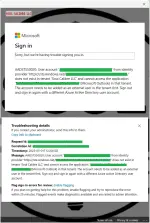
❓ Help Outlook Error AADSTS50020

Status
Not open for further replies.

Soul Calibre

༒тнє тєямιηαтσя༒
Contributor
MSO365 Outlook Error.webp

Sa mga tech expert diyan... paano ba ito ma-fix? Last week pa ako naghahanap ng solusyon dito. I tried everything I can pero hindi na talaga kaya ng kung anong alam ko. Hahahaha

So ganito kasi ang nangyari bago magka-problem...
I have multiple MSOffice 365 accounts, right? OK pa itong dati. Naka-login sa outlook app for PC. Then naisipan kong i-migrate yung domain from MSOffice 365 Account #1 to MSOffice 365 Account #2. OK naman ang pagkaka-transfer ng domain. All DNS records are correct. OK na OK. Walang problem. So heto na.. After mailipat sa MSOffice 365 Account #2, gumawa ako ng user with the same UPN. Same email, and the same name. Ipagpalagay na lang natin na "Test.Account@test.gov.ph" yan. Sample lang yan ah. So, mailbox is active, no restrictions, everything is setup correctly. Then I logged out the old email sa phone ko and logged in using again kasi parehas lang naman. Nailipat lang talaga from one MSO365 account to another. OK naman. Nai-login. I tested, everything is working. I can send and receive emails. No delay and all. I did the same sa windows VM ko, OK rin naman. Walang problema. Pero bakit sa personal laptop ko may problema? I did the same thing. Logout then log back in.. pero ayaw. Yan ang lumalabas na error.

I did my research, watched some YT tuts, pero ganon pa rin.

Heto ang mga ginawa ko na...
  • I reset outlook app
  • clean uninstall the outlook up. This includes deleting residual files after uninstall, clearing regedit for the outlook app, then restart laptop before installing outlook back.
  • I made sure na hindi na talaga tied yung old email sa laptop.
  • I double checked na hindi blocked and device registration sa Azure/Entra portal.
Ginawa ko na lahat ng sinasabi ng mga articles sa microsoft community at mga nakita ko sa YT. Inisip ko pa nga na baka hindi agad nagsi-sync sa new azure/entra tenant kaya naghintay pa ako. Then kanina naalala kong i-try. Nakakalungkot lang at ganyan pa rin.

Ano kayang meron? OK naman sa ibang devices. Sa personal laptop ko lang talaga ayaw.

Anong solusyon dito? Any idea?

 
Solution
Update sa walangyang error na ito. Fixed na ang hanep. Yon lang pala ang kakailanganing gawin.. burahin ang folder na "OneAuth" at "IdentityCache" from the \AppData\Local\Microsoft directory. Buset na yan. Pinahirapan pa ako. Buti na lang may na-contact ko yung kakilala ko na tech agent ng microsoft.

1747193283807.webp

[Hidden content]
Gawa ka ng thread sa freemium request...
Diay, usel talaga mga works mo sir. Actually, lately may deped acc yung aunt ko success naman pag apply ko CFE kaso lang di pwede ma invite yung mga normal email haha. Saklap talaga.
Baka "Cαиνα For Education" pa lang yung nakalagay? I-convert mo into "Cαиνα For Education Schools". Makikita mo yung option dun sa may PLAN mismo
 
Update sa walangyang error na ito. Fixed na ang hanep. Yon lang pala ang kakailanganing gawin.. burahin ang folder na "OneAuth" at "IdentityCache" from the \AppData\Local\Microsoft directory. Buset na yan. Pinahirapan pa ako. Buti na lang may na-contact ko yung kakilala ko na tech agent ng microsoft.

1747193283807.webp

[Hidden content]
Gawa ka ng thread sa freemium request...
 
Solution
Status
Not open for further replies.

About this Thread

  • 34
    Replies
  • 863
    Views
  • 4
    Participants
Last reply from:
Soul Calibre

Trending Topics

Online now

Members online
373
Guests online
890
Total visitors
1,263

Forum statistics

Threads
2,273,073
Posts
28,947,419
Members
1,236,586
Latest member
Salvia
Back
Top