❓ Help Converge 300mbps on main router, 100mbps capped on LAN cable connected router/repeater

Meron ba dito same na naka experience na nag cacapping yung speed ng wifi extender router gamit lan cable? sa akin kasi pag unang saksak pa lang yung repeater, 300mbps pa naman, pero after few minutes mag cacap na siya sa 100mbps, na try ko na yung mga solutions na magpalit ng bagong lan cable, ilipat lipat ng port yung cable, saka naka unlimited naman yung speed settings sa admin, ganun pa din talaga. Pero sa main router, 300mbps pa din ang speed.
 
Sa experience ko, ang pag-capping ng speed sa wifi extender router gamit ang LAN cable ay maaaring mangyari dahil sa ilang posibleng kadahilanan. Narito ang ilan sa mga posibleng rason kung bakit nagkakaroon ng capping sa speed ng wifi extender router:

1. Hardware Limitation: Ang ilang wifi extender routers ay may mga hardware limitations pagdating sa maximum speed na kaya nitong i-extend. Kung ang iyong wifi extender router ay hindi kaya mag-handle ng 300mbps na speed, maaaring mag-capped ito sa 100mbps.

2. Signal Interference: Posibleng may interference sa signal na nagiging sanhi ng pagbaba ng speed sa wifi extender router. Maaaring subukan mo itong ilagay sa ibang lugar o ilayo sa mga possible sources ng interference tulad ng electronic devices o metal objects.

3. Firmware Issues: Minsan, ang firmware ng wifi extender router ay maaaring maging sanhi ng speed capping. Siguraduhin na updated ang firmware ng iyong wifi extender router para maibsan ang posibleng isyu sa speed.

4. Configuration Settings: Baka may mga settings sa wifi extender router na kailangan i-adjust para ma-maximize ang speed. Siguraduhin na tama ang configuration settings ng iyong wifi extender router at nakaset ito sa tamang mode (e.g., bridge mode, repeater mode).

Kung sinusubukan mo nang solusyunan ang problema pero patuloy pa rin ang speed capping, maaaring mag-consult ka sa technical support ng manufacturer ng iyong wifi extender router para makatanggap ng agarang tulong at maayos ang isyu sa speed.
 
if you're using the Tenda A18 repeater, I think it only has a 100 Mbps port. sakto sa obserbasyon mo. so kahit AP mode with Ethernet backhaul, eh sagad na 'yun.
not sure how you're reading 300mbps "pag unang saksak". how did you measure this?

anyway, itong mga "wifi repeater/extender" na di gumagamit ng "mesh technology" (dedicated backhaul radio), usually mga walang kwenta - naghahati sa radio spectrum 'yung wifi clients at 'yung backhaul back to the main router. they're terrible. pag connect ng client anlakas ng signal (malapit sa repeater), pero wala namang backhaul to the main router (and the rest of the internet).
 
if you're using the Tenda A18 repeater, I think it only has a 100 Mbps port. sakto sa obserbasyon mo. so kahit AP mode with Ethernet backhaul, eh sagad na 'yun.
not sure how you're reading 300mbps "pag unang saksak". how did you measure this?

anyway, itong mga "wifi repeater/extender" na di gumagamit ng "mesh technology" (dedicated backhaul radio), usually mga walang kwenta - naghahati sa radio spectrum 'yung wifi clients at 'yung backhaul back to the main router. they're terrible. pag connect ng client anlakas ng signal (malapit sa repeater), pero wala namang backhaul to the main router (and the rest of the internet).
AC2100 po, its not actually a repeater, router siya na ginawa ko lang repeater through lan cable, capable siya up to 1733mbps on 5ghz, and 300mbps for 2.4ghz bands.
 
ah, i see... i would expect better than that in AP mode (not WiFi Extender mode) with wired backhaul.

paano mo na-measure 'yung 100 MHz? is this from a wired (connected to Tenda via Ethernet cable) or wireless client? if wireless, you can use apps that tell you if the channel b/w of your WiFi connection, e.g. WiFi Overview 360.
If you're on a 20 MHz link, this could explain it. Setting your router to a fixed 40 MHz channel (rather than 20/40/80) for 5GHz might help.

if you tested with a wireless client connected to the Tenda, maybe try testing with a wired client to test the backhaul from it to your main router?

maraming possible causes nito, and tbh, 100 Mbps is not that bad. although, i do understand that you want to maximize what you're paying for.
 
ah, i see... i would expect better than that in AP mode (not WiFi Extender mode) with wired backhaul.

paano mo na-measure 'yung 100 MHz? is this from a wired (connected to Tenda via Ethernet cable) or wireless client? if wireless, you can use apps that tell you if the channel b/w of your WiFi connection, e.g. WiFi Overview 360.
If you're on a 20 MHz link, this could explain it. Setting your router to a fixed 40 MHz channel (rather than 20/40/80) for 5GHz might help.

if you tested with a wireless client connected to the Tenda, maybe try testing with a wired client to test the backhaul from it to your main router?

maraming possible causes nito, and tbh, 100 Mbps is not that bad. although, i do understand that you want to maximize what you're paying for.
measured it both sa PC (via LAN cable) and all of my wifi devices (wireless), nag cacapping pareho sa 100mbps, also na try ko na din galaw galawin yung mHz channels, walang effect sa speed, ang isa ko nalang na pinaghihinalaan na reason is baka mahina ang power supply, hindi ko lang sure kung may effect yon sa internet speed kasi minsan nawawala wala yung wifi signal niya, like nadidisconnect yung mga devices ko pero naka turn on pa din naman yung router, and hindi naman siya nag rerestart kasi after few seconds lalabas ulit yung wifi signal.
 
aba, mukhang mas mahiwaga ang issue mo, ah. 😁

i think we should start with the backhaul. kasi kung 100 Mbps lang dumarating sa Tenda, wala s'yang chance to offer anything better.

from the same device, e.g. laptop:
  • connected to RSP router = 300 Mbps
  • connected to Tenda router = 100 Mbps
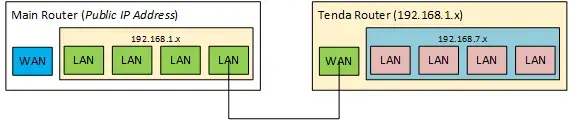
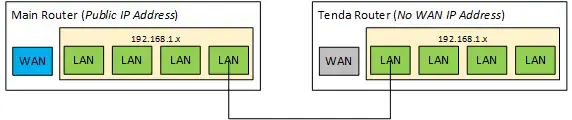
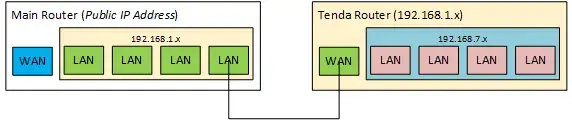
pa'no ang connection nilang dalawa? wired, right? is the Tenda acting as a router or an access point for the converge router? it'll be doing more work as a router, which may impact its performance (long shot kasi AC capable dapat ito).
  • router
1740541144730.webp


  • AP (I think in 'AP Mode', some Tenda routers allow you to use the WAN port in this scenario, too)
1740541172887.webp


1740541087743.webp
 
aba, mukhang mas mahiwaga ang issue mo, ah. 😁

i think we should start with the backhaul. kasi kung 100 Mbps lang dumarating sa Tenda, wala s'yang chance to offer anything better.

from the same device, e.g. laptop:
  • connected to RSP router = 300 Mbps
  • connected to Tenda router = 100 Mbps
pa'no ang connection nilang dalawa? wired, right? is the Tenda acting as a router or an access point for the converge router? it'll be doing more work as a router, which may impact its performance (long shot kasi AC capable dapat ito).
  • router


  • AP (I think in 'AP Mode', some Tenda routers allow you to use the WAN port in this scenario, too)


View attachment 3560875
Sa WAN port ng tenda naka connect from LAN ng main router since ginamit ko din siya as NAS before, pero tinanggal ko na yung NAS.

hindi ko pa natry ikabit mula Main Router LAN Port to Tenda Router LAN Port, try ko mamaya pag uwi galing office kung ano effect niya, and yes, working naman yung AP mode ni tenda kahit sa WAN port nakakabit, pero ayon nga, no effect, 100mbps capped.

Sa WAN port ng tenda naka connect from LAN ng main router since ginamit ko din siya as NAS before, pero tinanggal ko na yung NAS.

hindi ko pa natry ikabit mula Main Router LAN Port to Tenda Router LAN Port, try ko mamaya pag uwi galing office kung ano effect niya, and yes, working naman yung AP mode ni tenda kahit sa WAN port nakakabit, pero ayon nga, no effect, 100mbps capped.
Update: tried it Lan - Lan port, still 100mbps capped
 
at this point, sure ka na ok 'yung converge router kasi naibibigay n'ya 'yung 300 Mbps. anong specific model number nung Tenda? would like to see the user manual (usually pwede i-download).

the other thing is - meron ka bang spare router that you can try/test with?

usual sa ganitong 'capped at 100 Mbps' issue ay dahil sa (1) port/interface is Fast Ethernet, o kaya (2) bad cable. mukhang nalampasan mo na 'yun sa troubleshooting.
 
at this point, sure ka na ok 'yung converge router kasi naibibigay n'ya 'yung 300 Mbps. anong specific model number nung Tenda? would like to see the user manual (usually pwede i-download).

the other thing is - meron ka bang spare router that you can try/test with?

usual sa ganitong 'capped at 100 Mbps' issue ay dahil sa (1) port/interface is Fast Ethernet, o kaya (2) bad cable. mukhang nalampasan mo na 'yun sa troubleshooting.
AC23/AC2100, same model lang siya na CN version.
 
measured it both sa PC (via LAN cable) and all of my wifi devices (wireless), nag cacapping pareho sa 100mbps, also na try ko na din galaw galawin yung mHz channels, walang effect sa speed, ang isa ko nalang na pinaghihinalaan na reason is baka mahina ang power supply, hindi ko lang sure kung may effect yon sa internet speed kasi minsan nawawala wala yung wifi signal niya, like nadidisconnect yung mga devices ko pero naka turn on pa din naman yung router, and hindi naman siya nag rerestart kasi after few seconds lalabas ulit yung wifi signal.
same sa amin lalo na pag may dumaan na tao, sa hagdanan , extender gamit ko Lan cable. na didisconnect siya ,. kaya kuya ko kahit malakas yung wifi sa taas kasi magkalapit lang kami ng room e, sa main rounter parin siya coconnect kasi naddc daw sa ml 🤪
 

About this Thread

  • 41
    Replies
  • 3K
    Views
  • 12
    Participants
Last reply from:
jonileponce

Trending Topics

Online now

Members online
1,119
Guests online
1,746
Total visitors
2,865

Forum statistics

Threads
2,269,863
Posts
28,931,744
Members
1,241,619
Latest member
mroxas
Back
Top