PLDT Boosteven R281 (Band Locking)

Status
Not open for further replies.
Config file lang kasi yan. Dapat yung pxa1826.img
Meron din Lods Kaso sa R051 pero ayaw din. May nakapag downgrade na dito ng firmware kaso ayaw niya yata i share modified firmware niya R281 Baseband 2.1 yata.

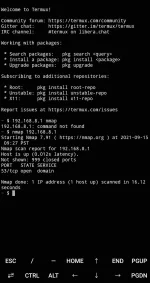
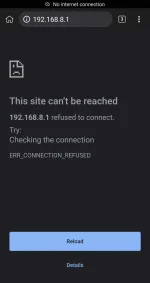
192.168.8.1 isang port lang bukas port 53

Screenshot_20210915-093632_Termux.jpg
Screenshot_20210915-095903_Kiwi Browser.webp
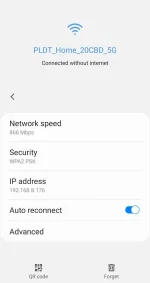
Screenshot_20210915-095923_Settings.webp
 
try mo mag freq lock lods gamit at*cell. Sabihan mo ako kapag gumana kasi kapag 3/xx ang lumalabas kailangan i remove freq lock. Pero kapag gumana eh di ayos.

Ganyan gamit ko pre. Gumagana nman 3/28 sa office namin. Pero sa bahay 3/xx lng at 28/3. Pero ngayun d ko alam bat bigla nawala si 28. Nag lockband ako sa 28 wala na signal. Kahit saang area.
 
Meron din Lods Kaso sa R051 pero ayaw din. May nakapag downgrade na dito ng firmware kaso ayaw niya yata i share modified firmware niya R281 Baseband 2.1 yata.

192.168.8.1 isang port lang bukas port 53
I did some research on openwrt on 192.168.1.1
So what is known at the moment:
Router R281 consists of two devices:
1.Router on a MediaTek MT7621A chip (available at 192.168.1.1)
2. LTE modem on the Marvell pxa1826 chip (it was previously available at 192.168.8.1 when connected via USB via RNDIS connection)

Router and modem have two independent firmware based on different OpenWRT
At the moment, we only have access to the firmware of the router. This is P28PLDT_AP_R281_V004.2 firmware based on Openwrt version 15.05 (chaos calmer) for MT7621
You do not have permission to view the full content of this post. Log in or register now.
PLDT adds various opkg packages that are unavailable in the standard openwrt repository. These packages allow some access and information to be obtained from the Marvel lte modem, which is plugged into the router as an RNDIS USB device. In the router, this modem use eth1 interface

To disable the ota, fota, tr069 services, the method of changing the /etc/init.d/services.init file works. Thanks L E N A R

We can also customize opkg and install any other packages like UI luci, htop, tftp and many more

If you really want to, you can build a new openwrt firmware and reflash the router, but there is not much point in this.

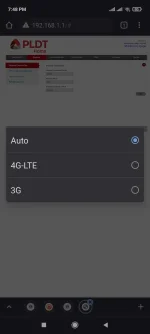
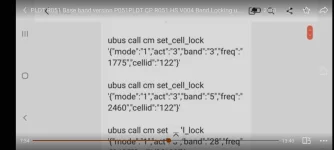
We can send AT commands to the lte modem this allows band lock, cell lock, disable and enable bands.

However, we do not have direct access to the marvel lte modem

LTE Marvel modem has the address 192.168.8.1 however after updating to P28M26HAPLDT_CP_R281_V002.2 is no longer available, has only one open port 53 (DNS)

The lte modem uses a different openwrt firmware based on version 14.07 (Barrier Bracker) for the PXA1826
This firmware has its own additional modules for modem control. In addition, the tr069 and ota services are running there. It is also possible that automatic updates are configured there (fota service)

Therefore, now we need to focus on getting access to the lte modem via 192.168.8.1, otherwise there is a possibility that the modem will be updated in the near future and we will lose the ability to execute AT commands from the router, which means that again goodbye band locking
Having gained access to 192.168.8.1, it will be possible to openline and permanently disable automatic updates and remote control
Probably worth investigating all additional packages that are installed in 192.168.1.1 and through some of them e
there is a possibility to get access to the lte modem or disable the firewall on the modem
 
I did some research on openwrt on 192.168.1.1
So what is known at the moment:
Router R281 consists of two devices:
1.Router on a MediaTek MT7621A chip (available at 192.168.1.1)
2. LTE modem on the Marvell pxa1826 chip (it was previously available at 192.168.8.1 when connected via USB via RNDIS connection)

Router and modem have two independent firmware based on different OpenWRT
At the moment, we only have access to the firmware of the router. This is P28PLDT_AP_R281_V004.2 firmware based on Openwrt version 15.05 (chaos calmer) for MT7621
You do not have permission to view the full content of this post. Log in or register now.
PLDT adds various opkg packages that are unavailable in the standard openwrt repository. These packages allow some access and information to be obtained from the Marvel lte modem, which is plugged into the router as an RNDIS USB device. In the router, this modem use eth1 interface

To disable the ota, fota, tr069 services, the method of changing the /etc/init.d/services.init file works. Thanks L E N A R

We can also customize opkg and install any other packages like UI luci, htop, tftp and many more

If you really want to, you can build a new openwrt firmware and reflash the router, but there is not much point in this.

We can send AT commands to the lte modem this allows band lock, cell lock, disable and enable bands.

However, we do not have direct access to the marvel lte modem

LTE Marvel modem has the address 192.168.8.1 however after updating to P28M26HAPLDT_CP_R281_V002.2 is no longer available, has only one open port 53 (DNS)

The lte modem uses a different openwrt firmware based on version 14.07 (Barrier Bracker) for the PXA1826
This firmware has its own additional modules for modem control. In addition, the tr069 and ota services are running there. It is also possible that automatic updates are configured there (fota service)

Therefore, now we need to focus on getting access to the lte modem via 192.168.8.1, otherwise there is a possibility that the modem will be updated in the near future and we will lose the ability to execute AT commands from the router, which means that again goodbye band locking
Having gained access to 192.168.8.1, it will be possible to openline and permanently disable automatic updates and remote control
Probably worth investigating all additional packages that are installed in 192.168.1.1 and through some of them e
there is a possibility to get access to the lte modem or disable the firewall on the modem
Thank you Master Eugene.
 
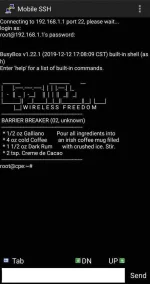
SSH access when the Firmware was Baseband 2.1 where we had an access with IP 192.168.8.1 admin panel.

4825447_Screenshot_20210613-204220_Mobile_SSH.webp


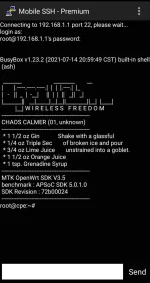
Now we got this for Baseband 2.2 hoping they are not gonna block our access if they are planning to update their modem to stop the AT commands.

Screenshot_20210915-170212_Mobile SSH - ρrémíùm.webp
 
Ayaw Lods na try ko na R051. nag try din ako pxa1826_cfg.tar at mkt_cfg.tar

Nice Try Lodi, R051 Bin file ba yung sinubukan mo ipasok. Working kaya yung Winscp Lods, yung ginamit sa flashing ng R01 at R051. Same lang ba gamit Winscp at Yung Ssh Telnet👍👍

GOODLUCK Lodi mukhang nangangamoy na Unlock At admin, anjan na rin c Master Eugene💪💪👍👍

Kahit edit Bin Files Using zarchiever at notepad++, mga Lods mas madali sa ZLT S10G, yung ginawa ni sir Jhowel sa yt Napalabas nya admin etc...
https://m.y😊utube.com/watch?v=eDN15jvoZgw&t=47s
 
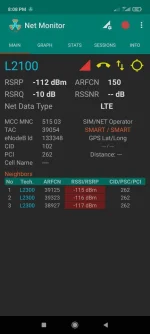
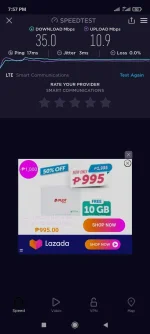
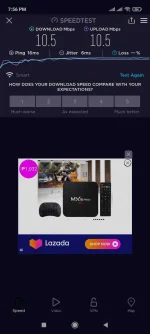
mga lods..tanong ko lang ,may paraan ba para malaman kung naka 4G+ ang signal ng R051?...pansin ko kase mas mabilis pa connection ko pag naka CP ako eh na naka 4G+...gamit ko pala ay tnt sim unli data 299...check nyo sa picture ang difference ..data connection vs wifi connection
 

Attachments

  • Screenshot_2021-09-15-20-08-53-918_ru.v_a_v.netmonitor.webp
    Screenshot_2021-09-15-20-08-53-918_ru.v_a_v.netmonitor.webp
    74.5 KB · Views: 43
  • Screenshot_2021-09-15-19-57-10-762_org.zwanoo.android.speedtest.webp
    Screenshot_2021-09-15-19-57-10-762_org.zwanoo.android.speedtest.webp
    74.1 KB · Views: 34
  • Screenshot_2021-09-15-19-56-26-646_org.zwanoo.android.speedtest.webp
    Screenshot_2021-09-15-19-56-26-646_org.zwanoo.android.speedtest.webp
    80.3 KB · Views: 32
  • Screenshot_2021-09-15-19-48-35-382_com.android.chrome.webp
    Screenshot_2021-09-15-19-48-35-382_com.android.chrome.webp
    30.4 KB · Views: 44
mga lods..tanong ko lang ,may paraan ba para malaman kung naka 4G+ ang signal ng R051?...pansin ko kase mas mabilis pa connection ko pag naka CP ako eh na naka 4G+...gamit ko pala ay tnt sim unli data 299...check nyo sa picture ang difference ..data connection vs wifi connection
Sa Dashboard lods nakalagay dun data signal indicator ng modem mo.
 
mga lods..tanong ko lang ,may paraan ba para malaman kung naka 4G+ ang signal ng R051?...pansin ko kase mas mabilis pa connection ko pag naka CP ako eh na naka 4G+...gamit ko pala ay tnt sim unli data 299...check nyo sa picture ang difference ..data connection vs wifi connection
4G+ po means Carrier Aggregation support, and wala support ng ganon ang R051 so expect mo talaga na mas mabagal connection kasi single band lang; ang R281 po ang may CA.
 
mga master pa off ulet...subukan ko sana mag band locking sa R051 ko gamit ssh app...baka may magshare po ng command po like dito sa pic. para copy/paste ko nalang po..maraming salamat po in advance
 

Attachments

  • Screenshot_2021-09-15-21-51-07-365_com.UCMobile.intl.webp
    Screenshot_2021-09-15-21-51-07-365_com.UCMobile.intl.webp
    52.1 KB · Views: 48
Status
Not open for further replies.

About this Thread

  • 5K
    Replies
  • 426K
    Views
  • 368
    Participants
Last reply from:
-Synntaxx

Online now

Members online
394
Guests online
1,902
Total visitors
2,296

Forum statistics

Threads
2,271,647
Posts
28,937,047
Members
1,238,756
Latest member
aqwty901
Back
Top