PH
PHclayntouch
Enthusiast
gumana sa akin pero hnd sa coc bot ko and beta pa pla to. nagtry ako download ng 0.9 kitkat.. nagstock ako sa bluescreen ng bluestacks...Gumagana Sakin
Feedback Nalang Sa Iba
gumana sa akin pero hnd sa coc bot ko and beta pa pla to. nagtry ako download ng 0.9 kitkat.. nagstock ako sa bluescreen ng bluestacks...Gumagana Sakin
Feedback Nalang Sa Iba
How to Install Bluestacks App Player with 1GB Ram Or Without Graphic Card
While install Bluestacks App player there may be many people who might be suffering from errors like “Graphic card should be updated”, “Graphic card not supported” or “Insufficient memory or hardware error” while installing Bluestacks in their low specs system.
But Now there is a solution !!!
All you need is an application and you are good to go.You will be running Bluestacks in your Low specs Pc in no time.
Just follow the Steps Below.
Steps to install Bluestacks in low specs system:
At first, download Bluestacks Offline installer from You do not have permission to view the full content of this post. Log in or register now.
How to Install BlueStacks ?
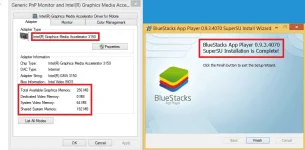
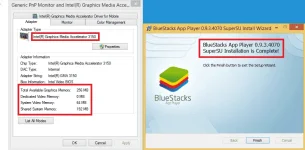
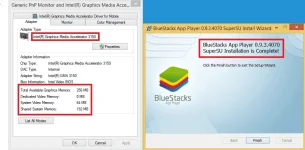
Screens:
- Download and Install Orca.
- Download the BlueStack Offline Installer File.
- Go to the directory where you downloaded the Offline Installer.
- Right click on the Bluestacks Installer and Select “Edit with Orca”.
- A new window will open in orca.
- Click on “Launch Condition” and select “Installed Or Physical Memory >= 1024″
- Delete this option and press OK.
- Now go to “InstallExecuteSequence” and select “CheckMsiSignature”.
- Delete this option also and press OK.
- Now go to “Property” and double click on the “TRUE” value of GLMODE.Replace it will “FALSE” and press enter.
- Now click on Save button icon and close Orca software.
- Now try installing bluestacks using offline installer.
- Hopefully it will run on your system sucessfully this time.
FAQ
1. My Screen goes black after opening Bluestacks: As your PC has < 1 GB RAM and no onboard graphics, therefore, it might be possible that your screen would go black . But don’t worry. Just restart Bluestacks or your system and try opening Bluestacks again. Most of the time it solves the problem. If it also does not solve your problem then uninstall Bluestacks and reinstall it again. Then, try to run it.
2. The Bluestacks get hung and slows down my PC: You could not do anything for it. Just wait for some time. If takes longer time then open Task Manager and close Bluestacks. Then, reopen it.
3. I can not download any apps: Try using GetJar or 1 Mobile or You do not have permission to view the full content of this post. Log in or register now. to download apps. If it does not work then use apk files of apps.
How to Install Bluestacks App Player with 1GB Ram Or Without Graphic Card
While install Bluestacks App player there may be many people who might be suffering from errors like “Graphic card should be updated”, “Graphic card not supported” or “Insufficient memory or hardware error” while installing Bluestacks in their low specs system.
But Now there is a solution !!!
All you need is an application and you are good to go.You will be running Bluestacks in your Low specs Pc in no time.
Just follow the Steps Below.
Steps to install Bluestacks in low specs system:
At first, download Bluestacks Offline installer from You do not have permission to view the full content of this post. Log in or register now.
How to Install BlueStacks ?
Screens:
- Download and Install Orca.
- Download the BlueStack Offline Installer File.
- Go to the directory where you downloaded the Offline Installer.
- Right click on the Bluestacks Installer and Select “Edit with Orca”.
- A new window will open in orca.
- Click on “Launch Condition” and select “Installed Or Physical Memory >= 1024″
- Delete this option and press OK.
- Now go to “InstallExecuteSequence” and select “CheckMsiSignature”.
- Delete this option also and press OK.
- Now go to “Property” and double click on the “TRUE” value of GLMODE.Replace it will “FALSE” and press enter.
- Now click on Save button icon and close Orca software.
- Now try installing bluestacks using offline installer.
- Hopefully it will run on your system sucessfully this time.
FAQ
1. My Screen goes black after opening Bluestacks: As your PC has < 1 GB RAM and no onboard graphics, therefore, it might be possible that your screen would go black . But don’t worry. Just restart Bluestacks or your system and try opening Bluestacks again. Most of the time it solves the problem. If it also does not solve your problem then uninstall Bluestacks and reinstall it again. Then, try to run it.
2. The Bluestacks get hung and slows down my PC: You could not do anything for it. Just wait for some time. If takes longer time then open Task Manager and close Bluestacks. Then, reopen it.
3. I can not download any apps: Try using GetJar or 1 Mobile or You do not have permission to view the full content of this post. Log in or register now. to download apps. If it does not work then use apk files of apps.
loading lng din sa akin, but thanks sa sharing..
How to Install Bluestacks App Player with 1GB Ram Or Without Graphic Card
While install Bluestacks App player there may be many people who might be suffering from errors like “Graphic card should be updated”, “Graphic card not supported” or “Insufficient memory or hardware error” while installing Bluestacks in their low specs system.
But Now there is a solution !!!
All you need is an application and you are good to go.You will be running Bluestacks in your Low specs Pc in no time.
Just follow the Steps Below.
Steps to install Bluestacks in low specs system:
At first, download Bluestacks Offline installer from You do not have permission to view the full content of this post. Log in or register now.
How to Install BlueStacks ?
Screens:
- Download and Install Orca.
- Download the BlueStack Offline Installer File.
- Go to the directory where you downloaded the Offline Installer.
- Right click on the Bluestacks Installer and Select “Edit with Orca”.
- A new window will open in orca.
- Click on “Launch Condition” and select “Installed Or Physical Memory >= 1024″
- Delete this option and press OK.
- Now go to “InstallExecuteSequence” and select “CheckMsiSignature”.
- Delete this option also and press OK.
- Now go to “Property” and double click on the “TRUE” value of GLMODE.Replace it will “FALSE” and press enter.
- Now click on Save button icon and close Orca software.
- Now try installing bluestacks using offline installer.
- Hopefully it will run on your system sucessfully this time.
FAQ
1. My Screen goes black after opening Bluestacks: As your PC has < 1 GB RAM and no onboard graphics, therefore, it might be possible that your screen would go black . But don’t worry. Just restart Bluestacks or your system and try opening Bluestacks again. Most of the time it solves the problem. If it also does not solve your problem then uninstall Bluestacks and reinstall it again. Then, try to run it.
2. The Bluestacks get hung and slows down my PC: You could not do anything for it. Just wait for some time. If takes longer time then open Task Manager and close Bluestacks. Then, reopen it.
3. I can not download any apps: Try using GetJar or 1 Mobile or You do not have permission to view the full content of this post. Log in or register now. to download apps. If it does not work then use apk files of apps.