 PH
PHMore Info and Download: You do not have permission to view the full content of this post.
Log in or register now.
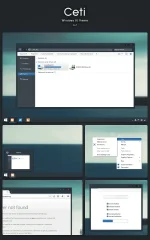
This is Ceti for Windows 8.1, a port of the popular GTK theme: You do not have permission to view the full content of this post. Log in or register now.
Credits goes to for making the original theme and for letting me port it
Sharing is OK, but please give credit where it is needed and link back to this page. Redistribution of the theme is prohibited without consent. See FAQs if you're updating this theme from an older version.
Matching skin for QTTabBar can be found here: You do not have permission to view the full content of this post. Log in or register now.
Matching iTunes skin can be found here: You do not have permission to view the full content of this post. Log in or register now.
FAQs:
Q: What is Ceti?
A: Ceti is a port of a GTK theme to Windows 8.1
Q: Theme doesn't look like the screenshot!
A: Make sure you patched your system and you have shadows enable (this is required).
Q: There's a white bar in explorer, how do you get rid of it?
A: You need to use ONE or Ribbon Disabler to get rid of the whitebar.
Q: How can I download this?
A: Press the download button on the right side of the page.
Q: How can I install this theme?
A: Take the content of the zip folder you downloaded and place it in C:\Windows\Resources\Themes. Make sure you ρá†ch your computer using UXThemePatcher or UXStyle.
Q: The inactive tabs' texts in firefox are unreadable, how do you fix this?
A: Install this userstyle in firefox: You do not have permission to view the full content of this post. Log in or register now.
Q: How do I update the theme?
A: First, make a restore point to make sure you can always go back if anything goes wrong. Afterwards, change your theme to another theme such as the default aero theme. Log off and on, then insert the new theme files in the appropriate location (see above). Apply the theme and you're good to go!
Q: Help! The theme isn't applying and I am getting a grey basic theme!
A: Make sure to ρá†ch/override your uxtheme.dll file using UXStyle or UXtheme Ultra patcher.
Q: Will there be a windows 7 version?
A: Possibly, but I currently don't have Windows 7.
Q: Internet Explorer looks odd, how do I fix this?
A: There is not fix for this currently. I suggest using another browser until someone has a solution.
Q: May I use this theme in my transformation/customization pack? May I make a mirror/redistribute it? Could I modify it for public use?
A: Absolutely no, unless you have permission from me.
Changelog:
This is Ceti for Windows 8.1, a port of the popular GTK theme: You do not have permission to view the full content of this post. Log in or register now.
Credits goes to
for making the original theme and for letting me port it Sharing is OK, but please give credit where it is needed and link back to this page. Redistribution of the theme is prohibited without consent. See FAQs if you're updating this theme from an older version.
Matching skin for QTTabBar can be found here: You do not have permission to view the full content of this post. Log in or register now.
Matching iTunes skin can be found here: You do not have permission to view the full content of this post. Log in or register now.
FAQs:
Q: What is Ceti?
A: Ceti is a port of a GTK theme to Windows 8.1
Q: Theme doesn't look like the screenshot!
A: Make sure you patched your system and you have shadows enable (this is required).
Q: There's a white bar in explorer, how do you get rid of it?
A: You need to use ONE or Ribbon Disabler to get rid of the whitebar.
Q: How can I download this?
A: Press the download button on the right side of the page.
Q: How can I install this theme?
A: Take the content of the zip folder you downloaded and place it in C:\Windows\Resources\Themes. Make sure you ρá†ch your computer using UXThemePatcher or UXStyle.
Q: The inactive tabs' texts in firefox are unreadable, how do you fix this?
A: Install this userstyle in firefox: You do not have permission to view the full content of this post. Log in or register now.
Q: How do I update the theme?
A: First, make a restore point to make sure you can always go back if anything goes wrong. Afterwards, change your theme to another theme such as the default aero theme. Log off and on, then insert the new theme files in the appropriate location (see above). Apply the theme and you're good to go!
Q: Help! The theme isn't applying and I am getting a grey basic theme!
A: Make sure to ρá†ch/override your uxtheme.dll file using UXStyle or UXtheme Ultra patcher.
Q: Will there be a windows 7 version?
A: Possibly, but I currently don't have Windows 7.
Q: Internet Explorer looks odd, how do I fix this?
A: There is not fix for this currently. I suggest using another browser until someone has a solution.
Q: May I use this theme in my transformation/customization pack? May I make a mirror/redistribute it? Could I modify it for public use?
A: Absolutely no, unless you have permission from me.
Changelog:
- 8/27/2014:
- Initial Release.
- 8/30/2014
- Improved Taskbar
- Improved Navigation Buttons
- Added NoCommandBar files in zip
- 7/2/2014
- Fixed breadcrumb bugs
