 PH
PHHi everyone,
I'd like to share my tool called WinCraft v1.0, the first release of the tool, I've been putting together for working with Windows installation images. It grew out of the usual routine — convert an ESD, rename a couple of images, drop the ones you don't need, rebuild, repack to ISO — and out of getting tired of doing each of those steps in a different place. It's one window, one executable, and everything it needs is inside it.
It is heavily inspired by Win Toolkit in how it lays things out, and it leans on DISM, wimgapi and oscdimg to do the actual work, so nothing about the images it produces is unusual or proprietary.
From there:
Mounting is read-only by default, which you can turn off in Settings if you actually intend to change the image.
The source file is only ever read. Nothing is written back to it, so a failed or cancelled conversion can't cost you the original.
Optional: write integrity data, and overwrite the destination if it already exists.
One limitation worth stating plainly: an ESD that came down through Windows Update is encrypted, and no tool can convert it until it has been decrypted first. WinCraft tells you that is what happened, rather than failing with a vague DISM error.
Six sections — Setup, Accounts, Explorer, System, Personalization, Apps — and it writes a proper autounattend.xml across the windowsPE, specialize and oobeSystem passes.
You can also import an existing answer file to start from, and there's a button that opens the full web generator when you need something the page doesn't cover. For anything unusual, use the web generator — it is more complete and always will be.
Four boot layouts:
Microsoft's official free links
Requires Windows 10 or 11, and it asks for administrator rights — DISM cannot mount an image without them.
This project is independently developed and is not affiliated with or endorsed by the organizations, developers, or projects listed above.
WinCraft v1.0 (Initial Release) Created by Juztin(a.k.a Vortex) (from Philippines) © 2026 • All rights reserved
Feedback, bug reports and feature requests are all welcome in this thread.
I'd like to share my tool called WinCraft v1.0, the first release of the tool, I've been putting together for working with Windows installation images. It grew out of the usual routine — convert an ESD, rename a couple of images, drop the ones you don't need, rebuild, repack to ISO — and out of getting tired of doing each of those steps in a different place. It's one window, one executable, and everything it needs is inside it.
It is heavily inspired by Win Toolkit in how it lays things out, and it leans on DISM, wimgapi and oscdimg to do the actual work, so nothing about the images it produces is unusual or proprietary.
Features
WIM Editor
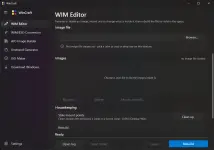
The page I use most. Point it at a .wim and it lists every image inside — index, name, description and size — read straight out of the file.From there:
- Rename an image or change its description.
- Delete images you don't want to ship.
- Mount and edit an image to a folder, poke around in it, then Save changes or Discard changes.
- Clean up stale mount points when a previous session (or another tool) left one behind.
- Rebuild the file to actually reclaim the space deleted images were using.
Mounting is read-only by default, which you can turn off in Settings if you actually intend to change the image.
WIM/ESD Conversion
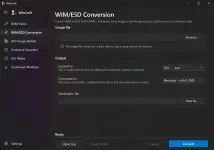
Convert WIM to ESD and ESD to WIM, either direction. There's no image picker — every image in the file goes across, because in practice that's what you always want, and a half-converted file is a trap.The source file is only ever read. Nothing is written back to it, so a failed or cancelled conversion can't cost you the original.
Optional: write integrity data, and overwrite the destination if it already exists.
One limitation worth stating plainly: an ESD that came down through Windows Update is encrypted, and no tool can convert it until it has been decrypted first. WinCraft tells you that is what happened, rather than failing with a vague DISM error.
AIO Image Builder
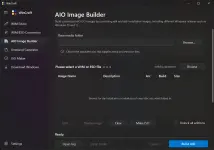
Modelled closely on Win Toolkit's AIO Creator. You build up a table of source images — browse to as many WIMs or ESDs as you like — and WinCraft combines them into one file.- Mix x64 and x86.
- Mix different Windows releases, so Windows 10 and Windows 11 editions can live in the same image list.
- Edit an entry's name and description, Delete one, or Clear the lot.
- Make ISO hands the finished build straight to the ISO Maker.
Unattend Generator (by cschneegans)
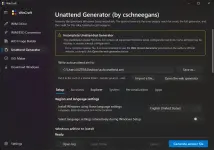
This one needs its credit stated up front: the concept, the research and the real generator are cschneegans' work at schneegans.de/windows/unattend-generator/. WinCraft's page is a convenience layer that mirrors the sections most people actually reach for, so you don't have to leave the app for a routine answer file.Six sections — Setup, Accounts, Explorer, System, Personalization, Apps — and it writes a proper autounattend.xml across the windowsPE, specialize and oobeSystem passes.
You can also import an existing answer file to start from, and there's a button that opens the full web generator when you need something the page doesn't cover. For anything unusual, use the web generator — it is more complete and always will be.
ISO Maker
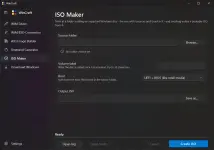
Point it at a folder holding an unpacked Windows disc — the one with \sources and \boot in it — and oscdimg writes a bootable ISO from it.Four boot layouts:
- UEFI + BIOS (what retail media does)
- UEFI only
- BIOS only
- Not bootable
Download Windows
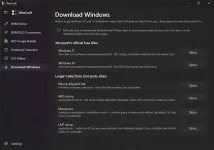
Deliberately not a downloader. WinCraft doesn't fetch Windows for you and doesn't re-host anything. The page is a set of buttons that open, in your browser:Microsoft's official free links
- Windows 11 — microsoft.com/software-download/windows11
- Windows 10 — microsoft.com/software-download/windows10
- files.rg-adguard.net — the most complete collection, every file with its name, size and hashes
- MVS dump — the Visual Studio subscriber catalogue, where LTSC and Server media are listed
- Massgrave — a written guide to where each edition is published
- UUP dump — builds an ISO on your own machine from Windows Update's files, so Insider and interim builds are reachable
Settings
- General — write integrity data, overwrite an existing destination file, mount images read-only, open the destination folder when a job finishes, and the working folder used for mounts and scratch space.
- Appearance — Theme (Auto / Light / Dark) and Backdrop (Mica / Mica Alt / Acrylic).
- Processes — separate priority for DISM, for external tools such as oscdimg, and for WinCraft itself (Idle through High), plus a DISM affinity slider that caps how many cores DISM is allowed to use. Handy when you want to convert a large ESD without the machine becoming unusable.
- About — credits.
Under the hood
Every long job runs on a background worker, so the window never greys out. Progress is real progress read out of DISM, not a marquee. Cancel actually cancels. There's a full log you can save, and the log is where the real DISM error text goes when something fails.Requires Windows 10 or 11, and it asks for administrator rights — DISM cannot mount an image without them.
Honest note
It's a v1.0. It has been tested on real images, but it hasn't had years of other people's edge cases thrown at it. Keep a backup of anything irreplaceable before you point a rebuild at it. Bug reports in this thread are very welcome, especially with the log file attached.Credits
This project was made possible with the help, tools, research, and inspiration provided by the following organizations, developers, and projects:- Microsoft — Windows operating system, deployment, servicing, and related technologies
- Legolash2o — creator of Win Toolkit, which provided valuable inspiration for Windows image customization
- cschneegans — creator of the Windows Unattended Answer File Generator
- Chuyu-Team — developers of Dism++, a Windows image servicing and optimization utility
This project is independently developed and is not affiliated with or endorsed by the organizations, developers, or projects listed above.
WinCraft v1.0 (Initial Release) Created by Juztin(a.k.a Vortex) (from Philippines) © 2026 • All rights reserved
Feedback, bug reports and feature requests are all welcome in this thread.