PH
SingOke v3.0.34
Updated (See last comment) for features
Kung gusto mo mas customizable yun experience, try mo tong app ko.
Same song codes with known app, may mga additional features na pwede mo ma enjoy
SingOke is a free Windows karaoke application for personal use.
Offline to mga tol. Pero kung gusto mo i add yun youtube link, kung wala yun songs sa list, may option na i add mo lang yun link. Or just download mo as video then lagay mo sa songs folder, automatic madedetect
Kahit di ka na din bumili ng remote, pwede na yun cp mo, scan mo lang sa phone, makaka reserve, play, stop, pause ka
kung natatamad ka naman, may voice commands na built in
Basahin mo nlng help file anudn naman
Maglagay k ng sf files gang gusto mo mag add, pwede ka mamili.
Background, palitan mo kung gusto mo, font, positioning, etc.
Basta bahala na kayo mag explore, sandamak mak na features na nilagay ko dyan.
Enjoy!!!
Thanks sa mga vidoke app dahil na inspire Ako gumawa neto. Not a replacement sa mga fav nyo na app.
Free lng to so enjoy!
Updated. If nadownload or install nyo na. Go to the same link.
Download the update zip
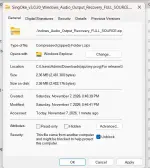
After download, Right click > properties, unblock if blocked.
Then extract the files
Copy the contents to the original folder
Replace the same file on the SingOke folder when asked
MAIN FEATURES
Version 3.0.20 includes improved song searching, voice commands, remote navigation, reservation notifications

mysoundandsoul fb page for video demos
Instructions:
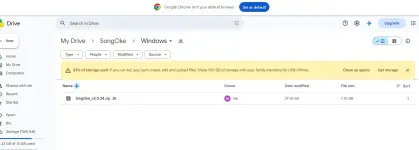
Download the file
Before extracting, right click properties, check if this is blocked, pag naka block, unblock mo since the app is unsigned, so it is expected
Once na extract mo na, click mo lang exe, portable naman to.
Just wait for a while if initial use since need nya i read yun 47k songs
Updated (See last comment) for features
Kung gusto mo mas customizable yun experience, try mo tong app ko.
Same song codes with known app, may mga additional features na pwede mo ma enjoy
SingOke is a free Windows karaoke application for personal use.
Offline to mga tol. Pero kung gusto mo i add yun youtube link, kung wala yun songs sa list, may option na i add mo lang yun link. Or just download mo as video then lagay mo sa songs folder, automatic madedetect
Kahit di ka na din bumili ng remote, pwede na yun cp mo, scan mo lang sa phone, makaka reserve, play, stop, pause ka
kung natatamad ka naman, may voice commands na built in
Basahin mo nlng help file anudn naman
Maglagay k ng sf files gang gusto mo mag add, pwede ka mamili.
Background, palitan mo kung gusto mo, font, positioning, etc.
Basta bahala na kayo mag explore, sandamak mak na features na nilagay ko dyan.
Enjoy!!!
Thanks sa mga vidoke app dahil na inspire Ako gumawa neto. Not a replacement sa mga fav nyo na app.
Free lng to so enjoy!
Updated. If nadownload or install nyo na. Go to the same link.
Download the update zip
After download, Right click > properties, unblock if blocked.
Then extract the files
Copy the contents to the original folder
Replace the same file on the SingOke folder when asked
MAIN FEATURES
- Supports MIDI, KAR, MP3, and MP4 karaoke files
- Large song library with fast search and A–Z browsing
- Search songs by title, artist, or song number
- Song reservation and automatic queue playback
- Fullscreen karaoke with customizable lyrics
- Custom photo, video, and GIF backgrounds
- MIDI instrument mixer with individual volume controls
- Key transpose, tempo, and audio adjustments
- Karaoke scoring with customizable sounds and animations
- Microphone recording and audio controls
- TV Karaoke Mode with separate laptop controls
- Dual-screen and duplicate-screen support
- Smartphone remote through QR pairing
- Voice search and voice navigation commands
- Optional offline voice recognition
- Keyboard and compatible remote-control navigation
- Custom themes, shortcuts, and display settings
Version 3.0.20 includes improved song searching, voice commands, remote navigation, reservation notifications
mysoundandsoul fb page for video demos
Instructions:
Download the file
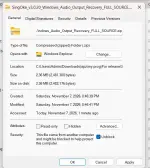
Before extracting, right click properties, check if this is blocked, pag naka block, unblock mo since the app is unsigned, so it is expected
Once na extract mo na, click mo lang exe, portable naman to.
Just wait for a while if initial use since need nya i read yun 47k songs
You do not have permission to view the full content of this post. Log in or register now.