 PH
PHGusto ko lang ishare itong bagong tools na nadiscover ko ngayon ngayon lang..
hopefully makatulong ..
Driver Easy will automatically recognize your system and find the correct drivers for it. You don’t need to know exactly what system your computer is running, you don’t need to risk downloading and installing the wrong driver, and you don’t need to worry about making mistake when installing.
You can update your drivers automatically with either the FREE or the Pro version of Driver Easy. But with the Pro version, it takes just 2 clicks (and you will get full support and a 30-day money back guarantee).
1) You do not have permission to view the full content of this post. Log in or register now. and install Driver Easy.
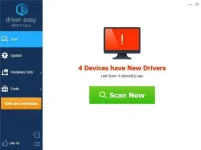
2) Run Driver Easy and click the Scan Now button. Driver Easy will then scan your computer and detect any problem drivers.
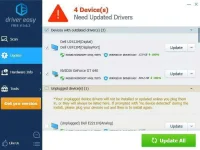
3) Click the Update button next to the flagged device to automatically download the correct version of the driver (you can do this with the FREE version), then install the driver in your computer.
Or click Update All to automatically download and install the correct version of all the drivers that are missing or out of date on your system (this requires the You do not have permission to view the full content of this post. Log in or register now. – you’ll be prompted to upgrade when you click Update All).
4) After updating, restart your computer to take effect.
hopefully makatulong ..
Driver Easy will automatically recognize your system and find the correct drivers for it. You don’t need to know exactly what system your computer is running, you don’t need to risk downloading and installing the wrong driver, and you don’t need to worry about making mistake when installing.
You can update your drivers automatically with either the FREE or the Pro version of Driver Easy. But with the Pro version, it takes just 2 clicks (and you will get full support and a 30-day money back guarantee).
1) You do not have permission to view the full content of this post. Log in or register now. and install Driver Easy.
2) Run Driver Easy and click the Scan Now button. Driver Easy will then scan your computer and detect any problem drivers.
3) Click the Update button next to the flagged device to automatically download the correct version of the driver (you can do this with the FREE version), then install the driver in your computer.
Or click Update All to automatically download and install the correct version of all the drivers that are missing or out of date on your system (this requires the You do not have permission to view the full content of this post. Log in or register now. – you’ll be prompted to upgrade when you click Update All).
4) After updating, restart your computer to take effect.