 PH
PHUnlocker 1.9.2 Cannot delete file
Ever had such an annoying message given by Windows?
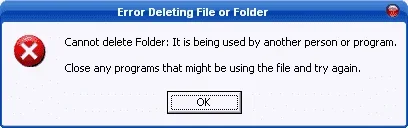
It has many other flavors:
Cannot delete file: Access is denied
There has been a sharing violation.
The source or destination file may be in use.
The file is in use by another program or user.
Make sure the disk is not full or write-protected and that the file is not currently in use.
Ever had such an annoying message given by Windows?
Unlocker is the solution!
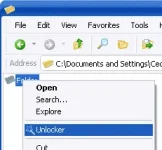
1. Simply right click the folder or file and select Unlocker
2. If the folder or file is locked, a window listing of lockers will appear
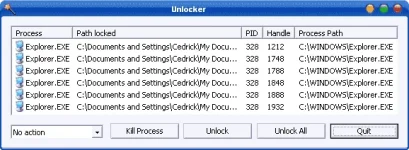
3. Simply click Unlock All and you are done!
Requirements: Windows 2000 / XP / 2003 / Vista / Windows7
You do not have permission to view the full content of this post. Log in or register now.
You do not have permission to view the full content of this post. Log in or register now.
Ever had such an annoying message given by Windows?
It has many other flavors:
Cannot delete file: Access is denied
There has been a sharing violation.
The source or destination file may be in use.
The file is in use by another program or user.
Make sure the disk is not full or write-protected and that the file is not currently in use.
Ever had such an annoying message given by Windows?
Unlocker is the solution!
1. Simply right click the folder or file and select Unlocker
2. If the folder or file is locked, a window listing of lockers will appear
3. Simply click Unlock All and you are done!
Requirements: Windows 2000 / XP / 2003 / Vista / Windows7
You do not have permission to view the full content of this post. Log in or register now.
You do not have permission to view the full content of this post. Log in or register now.
You do not have permission to view the full content of this post. Log in or register now.You do not have permission to view the full content of this post. Log in or register now.You do not have permission to view the full content of this post. Log in or register now.
