 PH
PHronnieverse
Fanatic
Download Vivo V5 Lite stock ROM from here, flash it in your device and enjoy the native Android experience again. The download file contains the qCom flash tool and the firmware files.

Download Vivo V5 Lite Firmware
Stock ROM File Name: Vivo_V5_Lite_MT6750_PD1612BF_EX_A_2.4.0.zip
Stock ROM File Size: 2 GB
Android OS Version: 6.0
You do not have permission to view the full content of this post. Log in or register now.
Stock ROM File Name: Vivo_V5_Lite_MT6750_PD1612BF_EX_A_2.4.2.zip
Stock ROM File Size: 2 GB
Android OS Version: 6.0
You do not have permission to view the full content of this post. Log in or register now.
How To Flash Stock ROM Firmware On Vivo V5 Lite
Step 1: Download the stock ROM zip file given above and extract it on your computer. You will find SP flash tool and Android scatter file after extracting.
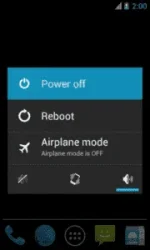
Step 2: Next, switch off your Vivo V5 Lite smartphone and remove the battery (it is removable).
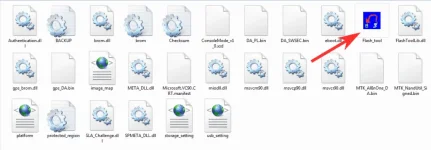
Step 3: Now go to the extracted folder in Step 1 and open up the You do not have permission to view the full content of this post. Log in or register now. sub-folder. You will find “Flash_tool.exe” file in it. Launch it.
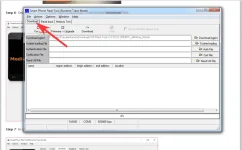
Step 4: Once SP Flash tool is launched, click on “Download” tab.
Step 5: Now, click on “scatter-loading” button in the download tab.
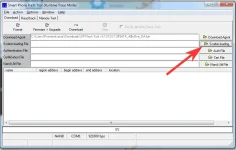
Step 6: Next, click on “Open Scatter File” and select the scatter file from Step 1. For reference see the image given below.

Step 7: Now click on the “Download” button to start the flashing process.
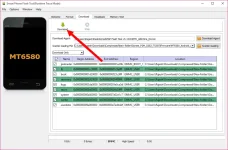
Step 8: Next, connect your Vivo V5 Lite Android device to your computer through original USB cable (without battery – if it is battery removable) and press volume up or volume downbutton.
Step 9: The flashing process will begin momentarily and it will get completed in a minute or two. Once it is over, you will see the “Download OK” green ring in SP Flash Tool.

Step 10: Now, close SP Flash tool on your computer and unplug your smartphone.
That’s it. Now you have successfully flashed stock ROM firmware on your Vivo V5 Lite Android device.

Download Vivo V5 Lite Firmware
Stock ROM File Name: Vivo_V5_Lite_MT6750_PD1612BF_EX_A_2.4.0.zip
Stock ROM File Size: 2 GB
Android OS Version: 6.0
You do not have permission to view the full content of this post. Log in or register now.
Stock ROM File Name: Vivo_V5_Lite_MT6750_PD1612BF_EX_A_2.4.2.zip
Stock ROM File Size: 2 GB
Android OS Version: 6.0
You do not have permission to view the full content of this post. Log in or register now.
How To Flash Stock ROM Firmware On Vivo V5 Lite
Step 1: Download the stock ROM zip file given above and extract it on your computer. You will find SP flash tool and Android scatter file after extracting.
Step 2: Next, switch off your Vivo V5 Lite smartphone and remove the battery (it is removable).
Step 3: Now go to the extracted folder in Step 1 and open up the You do not have permission to view the full content of this post. Log in or register now. sub-folder. You will find “Flash_tool.exe” file in it. Launch it.
Step 4: Once SP Flash tool is launched, click on “Download” tab.
Step 5: Now, click on “scatter-loading” button in the download tab.
Step 6: Next, click on “Open Scatter File” and select the scatter file from Step 1. For reference see the image given below.
Step 7: Now click on the “Download” button to start the flashing process.
Step 8: Next, connect your Vivo V5 Lite Android device to your computer through original USB cable (without battery – if it is battery removable) and press volume up or volume downbutton.
Step 9: The flashing process will begin momentarily and it will get completed in a minute or two. Once it is over, you will see the “Download OK” green ring in SP Flash Tool.
Step 10: Now, close SP Flash tool on your computer and unplug your smartphone.
That’s it. Now you have successfully flashed stock ROM firmware on your Vivo V5 Lite Android device.