 PH
PHPHC_PHNTM30
Fanatic
UPDATE: The Media Creation Tool now downloads the latest You do not have permission to view the full content of this post.
Log in or register now. build 14393 (Version 1607).
Finally the day has come when You do not have permission to view the full content of this post. Log in or register now. is being delivered to public for download and free upgrade from Windows 7 and 8.1 operating systems.
You do not have permission to view the full content of this post. Log in or register now.
If you are using genuine Windows 7 or Windows 8.1 OS in your computer, you'll be able to upgrade to Windows 10 for free. The free upgrade will be done with the help of a small app "You do not have permission to view the full content of this post. Log in or register now." which sits in Taskbar notification area. It'll automatically download Windows 10 setup files on your computer and will notify you once the download completes. After that you can install Windows 10 in your computer.
You do not have permission to view the full content of this post. Log in or register now.
But there are many users who don't have "Get Windows 10" app in their computers. To fix the issue, we have posted a troubleshooting guide at following link:
You do not have permission to view the full content of this post. Log in or register now.
But if you still can't see the app and its icon, then you'll be unable to take advantage of free Windows 10 upgrade offer. Fortunately, Microsoft has released a Media Creation Tool to download Windows 10 setup ISO files as well as to create installation media such as bootable USB drive or DVD.
This tool will help you in downloading the correct You do not have permission to view the full content of this post. Log in or register now. and type such as 32-bit or 64-bit.
You can download the official tool from following link:
You do not have permission to view the full content of this post. Log in or register now.
You do not have permission to view the full content of this post. Log in or register now.
After downloading the setup files of Windows 10 using this tool, you can upgrade your existing OS to Windows 10 or you can create bootable USB drive or DVD to install Windows 10 later. You can also save the setup files in offline ISO file format if you wish.
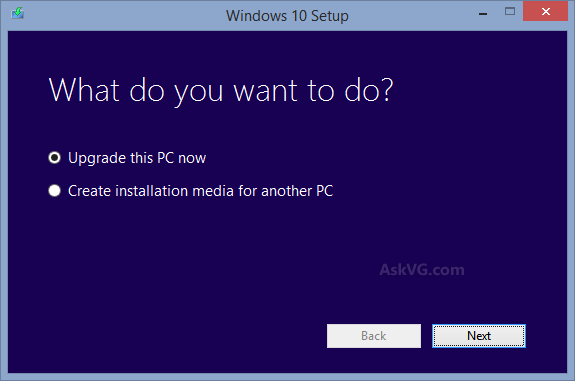
Once you create installation media or save ISO file, you can use them to install Windows 10 in other computers as well.
NOTE: If you upgrade your existing Windows 7/8.1 to Windows 10 using this tool, then you can use the bootable USB drive or DVD or ISO created by this tool to perform clean installation of Windows 10. But if you don't upgrade existing OS to Windows 10 and try to direct install Windows 10 using bootable USB drive or DVD, it'll ask for Windows 10 product key which you'll not have obviously.
So first upgrade your existing Windows 7/8.1 to Windows 10 so that it can be successfully activated by Microsoft servers. After that you can perform a clean installation. If you do this, product key will still be asked at installation time but you can skip the key and Windows will be automatically activated by Microsoft after installation.
Finally the day has come when You do not have permission to view the full content of this post. Log in or register now. is being delivered to public for download and free upgrade from Windows 7 and 8.1 operating systems.
You do not have permission to view the full content of this post. Log in or register now.
If you are using genuine Windows 7 or Windows 8.1 OS in your computer, you'll be able to upgrade to Windows 10 for free. The free upgrade will be done with the help of a small app "You do not have permission to view the full content of this post. Log in or register now." which sits in Taskbar notification area. It'll automatically download Windows 10 setup files on your computer and will notify you once the download completes. After that you can install Windows 10 in your computer.
You do not have permission to view the full content of this post. Log in or register now.
But there are many users who don't have "Get Windows 10" app in their computers. To fix the issue, we have posted a troubleshooting guide at following link:
You do not have permission to view the full content of this post. Log in or register now.
But if you still can't see the app and its icon, then you'll be unable to take advantage of free Windows 10 upgrade offer. Fortunately, Microsoft has released a Media Creation Tool to download Windows 10 setup ISO files as well as to create installation media such as bootable USB drive or DVD.
This tool will help you in downloading the correct You do not have permission to view the full content of this post. Log in or register now. and type such as 32-bit or 64-bit.
You can download the official tool from following link:
You do not have permission to view the full content of this post. Log in or register now.
You do not have permission to view the full content of this post. Log in or register now.
After downloading the setup files of Windows 10 using this tool, you can upgrade your existing OS to Windows 10 or you can create bootable USB drive or DVD to install Windows 10 later. You can also save the setup files in offline ISO file format if you wish.
Once you create installation media or save ISO file, you can use them to install Windows 10 in other computers as well.
NOTE: If you upgrade your existing Windows 7/8.1 to Windows 10 using this tool, then you can use the bootable USB drive or DVD or ISO created by this tool to perform clean installation of Windows 10. But if you don't upgrade existing OS to Windows 10 and try to direct install Windows 10 using bootable USB drive or DVD, it'll ask for Windows 10 product key which you'll not have obviously.
So first upgrade your existing Windows 7/8.1 to Windows 10 so that it can be successfully activated by Microsoft servers. After that you can perform a clean installation. If you do this, product key will still be asked at installation time but you can skip the key and Windows will be automatically activated by Microsoft after installation.