 PH
PH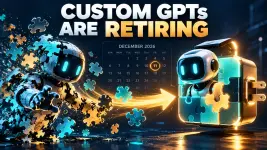
Custom GPTs Are Retiring: What to Do and When
OpenAI is retiring custom GPTs and replacing them with plugins (instructions + reference files + connected apps). The big deadline is December 11, 2026. If you built a GPT, you need to migrate it before then. If you just use other people's GPTs, check their notices for a replacement.
Key dates
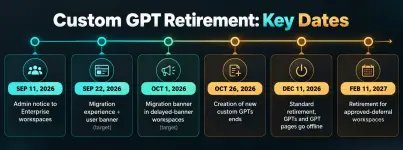
This affects all ᑕᕼᗩTGᑭT plans, and migration timing may vary by account or workspace. Check your in-product notice for your exact timeline.
If you created a GPT
1. Find it under My GPTs and choose Migrate to plugin when the option appears (rollout is gradual — no button yet just means it's not your turn).
2. Finish essential edits before migrating. Migration uses the latest published version; drafts and unpublished edits don't transfer. After migration the original becomes read-only (you can't even delete it).
3. Test the replacement with your familiar prompts, including one hard case. The plugin may respond differently, so verify it picks the right skill, uses the right reference files, and produces the output format you need.
4. The plugin starts private. Migration doesn't carry over sharing settings or grant existing users access — you'll need to coordinate the switchover.
What transfers (and what doesn't)
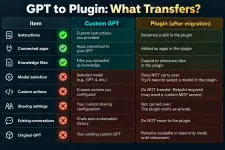
Custom actions are likely to be the biggest issue for some users. Custom actions do not transfer. Anything depending on them won't work in the plugin until you rebuild it — which may mean a custom MCP server and technical setup. Give yourself real lead time here.
If you use someone else's GPT
You can't migrate it yourself — permission to use a GPT doesn't give you permission to migrate it. Check the GPT's notice and the creator's guidance for a replacement. Also note: access to the original doesn't automatically mean access to the replacement plugin, and public GPTs created in affected Enterprise workspaces are included in the transition even if you access them from a personal account.
Enterprise notes
- Creator or workspace admin can migrate a GPT (must be published; drafts can't migrate directly).
- Using a migrated GPT without apps in Instant Chat has no incremental cost; creating/editing plugins uses Work or Codex, and actions in Work consume credits.
- Sharing needs the right permissions: Share plugins to share with people/groups, Publish plugins to workspace for the workspace directory, Use plugins to actually use one.
Final takeaway
The retirement of custom GPTs is a major transition for anyone who has built, shared, or regularly used them. The good news: your core instructions, knowledge files, and connected apps can move into OpenAI's new plugin system.
But the migration is not fully automatic. Conversations, model selections, sharing settings, drafts, and custom API actions all need separate attention — and custom actions are the real trap, since anything wired to an external service won't work until you rebuild it.
The safest approach: back up your work now, make sure your final version is published (drafts don't transfer), migrate when the option appears in your account, and thoroughly test the plugin before the December 11, 2026 deadline.
This post is a condensed overview. For the full migration guidelines and FAQ, see OpenAI's official guide:
You do not have permission to view the full content of this post. Log in or register now.
You do not have permission to view the full content of this post. Log in or register now.
Here's what I did (with screenshots)
I migrated one of my own GPTs so you can see exactly what the process looks like:
You do not have permission to view the full content of this post. Log in or register now.
Your feedback is highly appreciated

Support my other posts 
- Google just KILLED Photoshop!
- 50 Brilliant Ways to Supercharge Creativity with Nano Banana
- Nano Banana Prompt Gallery
- AI Fashion Studio: AI Virtual Try-On Powered By Nano Banana
- Free Image Upscaler up to 16K Quality!
- ᑕᕼᗩTGᑭT Prompt Packs
- Perplexity at Work
- DumPDF: PDF Editor
- LuxPDF: Open Source PDF Tools
- Gemini Edu ID Card Generator
- Create UNCENS0RED/NSFW AI Characters
- Student ID Card Prompt
- Nano Banana Pro Image And Prompt Gallery
- Create 4K Nano Banana Pro Images
- Create Pro-Grade Infographics
- IHatePDF: Toolkit For Everyday Documents
- Stunning Nano Banana Prompts Gallery
- Create City Map Posters
- Nano Banana 2: ProLevel Image Generation at Flash Speed
- Microsoft's New MAI Stack
- VEO 3.1 Free on Google Vids
- StreameX: Free Movies, TV Shows and Anime
- 10 Google Gemini Photography Gems
- 12K+ Nano Banana Prompts
- Introducing Google Flow Music
- SplitAnImage Image Splitting Tool
- Introducing ChätGPT Image 2
- 1000+ GPT Image 2 Prompts
- MeiGen Prompts Gallery
- GPT 2 Image Prompt Generator
- MovieNova Free Movie Streaming Site
- NextFlicks - A Strealined Streaming Platform
- Meet Gemini Omni
- Google I/O 2026: Everything Announced
- FREE AI Image Watermark Remover
- Ideogram 4.0 Is Here
- Meta Launches Muse Image
- Introducing GPT-Live
- Remove Gemini Watermarks
- Flixdale FREE Movies and TV Shows Streaming
- How to Turn Off Gemini's Visible AI Watermark in Images, Videos, and Music
- FREE 1 Year Google Gemini AI Pro/Plus
- FREE 4 Months ᑕᕼᗩTGᑭT Plus for US Students
- Introducing GPT-6 Astra
- Introducing GPT Images 2.5
- Introducing GPT-6 Sol and Luna
