 PH
PH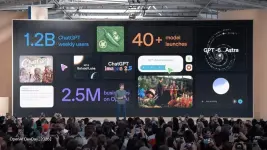
OpenAI DevDay 2026: 24 Major Announcements
OpenAI DevDay 2026 was a major expansion of the company’s AI ecosystem, covering persistent agents, shared workspaces, faster models, developer APIs, Codex upgrades, plugins, and enterprise privacy. The big theme: ᑕᕼᗩTGᑭT is evolving from a chatbot into a place where people, AI agents, and third-party tools can work together.
ᑕᕼᗩTGᑭT and collaboration
1. Dots — Always-on AI agents powered by GPT‑6 Astra. They can retain context, connect with approved apps, work on ongoing tasks, and use their own cloud computer.

2. ᑕᕼᗩTGᑭT Space — A shared workspace for teams, ᑕᕼᗩTGᑭT, and Dots to collaborate using common files, knowledge, instructions, and project context.
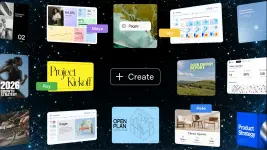
3. Pages — Editable, collaborative documents inside Space. Teams can write together, comment, mention ᑕᕼᗩTGᑭT or a Dot, and add generated content, charts, and interactive elements.
4. Teams and team automations — Shared team workflows for assigning work, running recurring tasks, and coordinating AI activity across a workspace.
5. ᑕᕼᗩTGᑭT in Slack and Microsoft Teams — Users can call on ᑕᕼᗩTGᑭT with an
@ᑕᕼᗩTGᑭT mention inside Slack or Teams conversations, including access to connected workspace tools where enabled.6. Meetings plugin (beta) — A macOS desktop beta that creates meeting notes and action items, saves them to Space, and deletes meeting audio after the notes are prepared.
7. Shareable profiles — Public-facing profiles that can collect and display a user’s Sites and plugins. Profiles are private by default.
Models and plans
8. GPT‑6.1 Sol — A new model focused on agentic coding, computer use, and professional work. OpenAI says it approaches Astra-level capability while costing one-fifth as much in standard input and output tokens.

9. GPT‑6 Astra Ultrafast — A premium speed mode built for latency-sensitive work. OpenAI says it can generate up to 300 tokens per second in Codex, or up to 8× faster than standard generation, with up to 6× speed in the API.
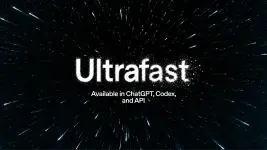
10. Pro 500 — A new $500-per-month ᑕᕼᗩTGᑭT tier with OpenAI’s highest usage allowance—25× the Plus allowance—and access to Ultrafast. Pro 200 also reopened for new subscribers, although its allowances differ from older grandfathered plans.
Platform and Codex
11. Sign in with ᑕᕼᗩTGᑭT — Third-party apps can support ᑕᕼᗩTGᑭT account sign-in without receiving users’ private chats or memory. Eligible Plus and Pro users can also use part of their ᑕᕼᗩTGᑭT plan allowance inside participating partner apps, subject to app-specific limits.

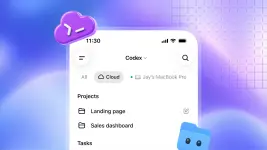
12. Codex cloud environments — Persistent, isolated cloud workspaces where coding agents can keep running even if a user’s local computer is asleep or offline.
13. Refreshed Codex CLI — An updated command-line experience with voice support and
/agents, designed to make coding-agent workflows easier to launch and manage.14. Code Review, automatic reviews, and GitLab support — Codex can review pull requests and support more automated code-review workflows, with GitLab joining the supported developer workflow.
15. Codex Security Cloud — A research-preview security layer that can inspect connected GitHub repositories on demand, on a schedule, or after commits; validate findings; reduce duplicates; and prepare patches as draft pull requests.
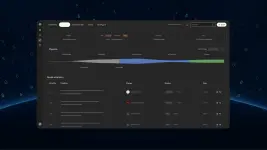
16. Computer use in the Agents API — Developers can build agents that interact with software interfaces and browser-based workflows as part of an agentic application.
17. Bedrock Managed Agents powered by OpenAI — Amazon Web Services customers can use OpenAI models through Bedrock’s managed-agent infrastructure.
Plugins, MCP, and APIs
18. Decisions API — A limited-preview API for extremely fast, constrained decision-making. Rather than generating open-ended text, it can classify, route, or choose from pre-defined actions.
19. Plugin extensions — Developers can embed native experiences in ᑕᕼᗩTGᑭT, including sidebars, conversation panels, file viewers, editors, and forms.

20. Plugin submission and discovery updates — Improvements to how developers build, submit, publish, and help users discover plugins.
21. MCP Events for automations — Event-driven automations using the Model Context Protocol, allowing a plugin or connected service to trigger an action when something changes in another app.
22. MCP extension SDKs for Python and Node — Official SDK support intended to make it easier for developers to create MCP extensions and integrations.
23. Plugins and MCP hosting in Sites — OpenAI Sites can now host plugins, expanding them from shareable AI-built pages into more interactive app-like experiences.
Enterprise privacy
24. ZDR with Private Safety Processing — Zero Data Retention for frontier models is now paired with automated safety monitoring that does not give OpenAI personnel access to the underlying customer content. OpenAI also previewed Private Inference, which is intended to combine confidential computing with verifiable privacy controls.
Bottom line
The announcements fall into three clear directions:
- Persistent AI workers: Dots, team tasks, meeting notes, computer-use agents, and cloud Codex push AI toward autonomous but supervised ongoing work.
- A shared AI workspace: Space, Pages, Slack/Teams integrations, and embedded plugins make ᑕᕼᗩTGᑭT a collaboration layer rather than only a standalone app.
- An open developer ecosystem: Sign in with ᑕᕼᗩTGᑭT, plugin extensions, MCP Events, SDKs, Sites hosting, and the Agents API aim to make ᑕᕼᗩTGᑭT a distribution platform for external AI tools.
For AI creators and developers, the shift is especially important: success may increasingly depend not just on prompts or model choice, but on building connected workflows where AI has useful context, the right tools, clear permissions, and human review at the moments that matter.
Want the full breakdown?
Read OpenAI’s official DevDay 2026 recap and watch the complete DevDay 2026 keynote here:
You do not have permission to view the full content of this post. Log in or register now.
Your feedback is highly appreciated

Support my other posts 
- Google just KILLED Photoshop!
- 50 Brilliant Ways to Supercharge Creativity with Nano Banana
- Nano Banana Prompt Gallery
- AI Fashion Studio: AI Virtual Try-On Powered By Nano Banana
- Free Image Upscaler up to 16K Quality!
- ᑕᕼᗩTGᑭT Prompt Packs
- Perplexity at Work
- DumPDF: PDF Editor
- LuxPDF: Open Source PDF Tools
- Gemini Edu ID Card Generator
- Create UNCENS0RED/NSFW AI Characters
- Student ID Card Prompt
- Nano Banana Pro Image And Prompt Gallery
- Create 4K Nano Banana Pro Images
- Create Pro-Grade Infographics
- IHatePDF: Toolkit For Everyday Documents
- Stunning Nano Banana Prompts Gallery
- Create City Map Posters
- Nano Banana 2: ProLevel Image Generation at Flash Speed
- Microsoft's New MAI Stack
- VEO 3.1 Free on Google Vids
- StreameX: Free Movies, TV Shows and Anime
- 10 Google Gemini Photography Gems
- 12K+ Nano Banana Prompts
- Introducing Google Flow Music
- SplitAnImage Image Splitting Tool
- Introducing ChätGPT Image 2
- 1000+ GPT Image 2 Prompts
- MeiGen Prompts Gallery
- GPT 2 Image Prompt Generator
- MovieNova Free Movie Streaming Site
- NextFlicks - A Strealined Streaming Platform
- Meet Gemini Omni
- Google I/O 2026: Everything Announced
- FREE AI Image Watermark Remover
- Ideogram 4.0 Is Here
- Meta Launches Muse Image
- Introducing GPT-Live
- Remove Gemini Watermarks
- Flixdale FREE Movies and TV Shows Streaming
- How to Turn Off Gemini's Visible AI Watermark in Images, Videos, and Music
- FREE 1 Year Google Gemini AI Pro/Plus
- FREE 4 Months ᑕᕼᗩTGᑭT Plus for US Students
- Introducing GPT-6 Astra
- Introducing GPT Images 2.5
- Introducing GPT-6 Sol and Luna
- Custom GPTs Retirement
- Introducing GPT-6.1 Sol
- Meet Dots: OpenAI's Always-On AI Assistant
 GET 1 BILLION TOKENS WHEN YOU SIGN UP WITH MUSE AI