 PH
PH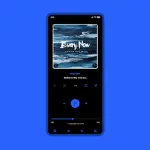
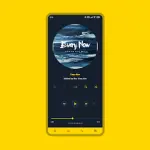
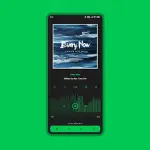
Luminous Black for Poweramp 3
Luminous Black is a highly customizable skin for Poweramp 3, featuring Material design elements, extensive color options, and diverse layout configurations. It includes support for Material You (Android 12+) and offers a range of aesthetic choices from minimalist white to deep black interfaces.Technical Specifications
| Requirement | Details |
|---|---|
| Minimum OS | Android 5.0+ |
| Poweramp Version | Poweramp 3 (Stable version) |
| Version | 10.5.9 |
| Architecture | Universal |
| DPI Support | 120dpi, 160dpi, 240dpi, 320dpi, 480dpi, 640dpi |
| MD5 Digest | 3c0f960593c8acda710699a1a69e2d60 |
| Language Support | English, Indonesian, Chinese (Simplified/Traditional), Russian, Japanese, Spanish |
Feature Set
Interface & Personalization- Color & Style: 36 Accent Colors, 17 Background Colors, Material You support, Flat UI, and Transparent Status Bar.
- Layouts: 3 Player UI Layouts, Track Title Alignment, and Offset Navbar.
- Backgrounds: Album Art Blur Background & Overlay, Transparent Background with Opacity control.
- Fonts: 28 Font Styles, customizable colors, sizes, and navigation text coloring.
- Icon Sets: Customizable sets for Library, Navigation, Bottom Buttons, Equalizer, V.T.R.S, and Header.
- Navigation: Force Black or Transparent Navigation Bar, Navigation Indicator Color, and custom Corner Radius.
- Knob & EQ: Multiple Knob and EQ styles, EQ Spectrum, customizable Thumb Styles, and Highlight options.
- Player Controls: Pro Buttons (custom shape, color, size), Wave Bars, Wave Seekbar, and Simple Seekbar.
- Volume Panel: Customizable Knob styles, Indicator styles, and Sizes.
- Album Art: Transition effects, Dynamic Corners, Shadow effects, and custom Player UI sizes.
- Library UI: Selected Track Color/Margins, Header Button Opacity, and Middle Left Track Title alignment.
- Visibility Toggles: Option to hide Album Artist, Album Art, Rating, Lyrics, Track Menu, V.T.R.S Buttons, and Time Duration.
Configuration & Troubleshooting
Optimal Blur Settings To maintain legibility on blur layouts, adjust the Background Intensity:Poweramp > Settings > Background > Set to 80%Post-Update Reset Procedure If issues occur after a version update:
- Open the skin from the app launcher and select Open Skin Settings.
- Disable the skin.
- Locate and re-configure any empty setting fields.
- Re-enable the skin.
- Incompatible with Huawei devices running Android 7.0 (Android 7.1+ is supported).
- Optimized for stable Poweramp releases; compatibility with beta builds is not guaranteed.
Changelog (v10.5.9)
- Small improvements to UI stability.
- Fixed Pro Button shape styles and color rendering.