 PH
PH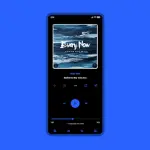
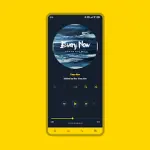
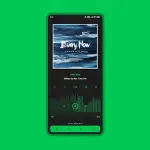
App Overview: Luminous & Luminous Black for Poweramp 3
Luminous and Luminous Black are comprehensive skins designed for Poweramp 3, offering extensive UI customization. Luminous focuses on material white, soft, and pastel interfaces with Material You support (Android 12+), while Luminous Black provides dark-themed aesthetics with various accent and background options.Technical Specifications
| Category | Details |
| Version | Luminous Black 10.5.8 |
| Compatibility | Poweramp 3 (Stable Version) |
| Android OS | 5.0+ (Incompatible with Huawei Android 7.0) |
| Architecture | Universal |
| Screen DPI | 120dpi, 160dpi, 240dpi, 320dpi, 480dpi, 640dpi |
| Languages | English, Indonesian, Chinese (Simplified/Traditional), Russian, Japanese, Spanish |
| MD5 Digest | 3c0f960593c8acda710699a1a69e2d60 |
Feature Set
UI & Personalization
- Color & Theme: 36 Accent Colors, 17 Background Colors, Material You support.
- Layouts: 3 Player UI layouts, alternative layout options, and track title alignment.
- Fonts: 28 styles, customizable colors/sizes, and navigation text styling.
- Backgrounds: Transparent options, blur background/overlay, and opacity controls.
Iconography & Elements
- Library: Custom icon sets, shapes, corner radii, and sizes.
- Navigation: Multiple styles, offset navbar, and indicator color controls.
- Equalizer & Knobs: Multiple styles, spectrum display, and custom volume panel knobs.
- Player Controls: Pro Buttons (custom shapes/colors), Wave Bars, and Wave/Simple Seekbar styles.
Album Art & Visibility
- Album Art: Dynamic corners, shadow effects, custom transitions, and size adjustments.
- Visibility Toggles: Option to hide Album Artist, Album Art, Rating, Lyrics, V.T.R.S buttons, and Time duration.
Configuration & Maintenance
Troubleshooting Update Issues
If the interface encounters errors after an update:- Launch the skin app and select Open Skin Settings.
- Disable the skin.
- Reset any empty or corrupted settings fields.
- Re-enable the skin.
Optimization Tips
- Blur Layouts: To maintain text readability, set Background Intensity to 80% via Poweramp > Settings > Background.
- Quick Access: Long-press the menu/hamburger button in Poweramp navigation to open skin settings instantly.
Changelog (v10.5.8)
- Fixed element overlapping in Alternative layout during landscape mode.
- Updated translations.