 PH
PH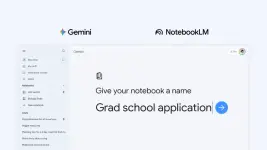
Google just announced Notebooks in Gemini — a new feature that turns the Gemini app into a more structured, project-aware workspace by merging it more deeply with NotebookLM.
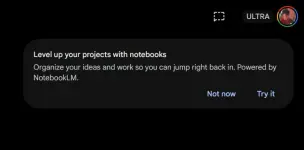
What Are Notebooks?
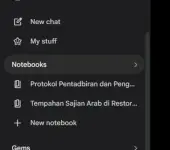
Notebooks are personal knowledge bases inside the Gemini app that give you a dedicated space to organize your chats, files, and custom instructions around a specific project or topic. You can find them in a new Notebooks section in the Gemini side panel, sitting between "My stuff" and "Gems." You can move past chats into a notebook, upload documents and PDFs, and give Gemini custom instructions on tone and behavior — all scoped to that notebook.
Gemini + NotebookLM Sync
The standout capability is the bidirectional sync between the Gemini app and NotebookLM. Any source you add in one app automatically appears in the other, meaning you can start a research session in Gemini and seamlessly switch to NotebookLM to generate Video Overviews, Infographics, or Audio Overviews from the same material. Chats from Gemini also appear as a source inside NotebookLM, keeping everything connected.
Key Features at a Glance
- Organize chats: Move existing conversations into a notebook to keep related threads in one place
- Add sources: Supports Files, Google Drive, Websites, and Copied text
- Custom instructions: Tell Gemini how to respond and what tone to use, per notebook
- Notebook memory toggle: Enable/disable "Use notebook memory" from the overflow menu
- Cross-app shortcut: A one-click button to open NotebookLM directly from within a notebook
- "Add to notebook": All existing Gemini chats now have this option in the overflow menu
Availability
Notebooks are rolling out this week on the web for Google AI Ultra, Pro, and Plus subscribers. Free users and mobile access — along with more countries in Europe — are expected in the coming weeks. Google described this as a "first step," signaling more notebook features a
re in development.
Learn more about this update at the Official You do not have permission to view the full content of this post.
Log in or register now.
Your feedback is highly appreciated

Support my other posts 
- Google just KILLED Photoshop!
- 50 Brilliant Ways to Supercharge Creativity with Nano Banana
- Nano Banana Prompt Gallery
- AI Fashion Studio: AI Virtual Try-On Powered By Nano Banana
- Free Image Upscaler up to 16K Quality!
- Travel the World with Nano Banana
- AI Profile Picture Generator
- AI Snapshot Generator
- ᑕᕼᗩTGᑭT Prompt Packs
- Perplexity at Work
- DumPDF: PDF Editor
- LuxPDF: Open Source PDF Tools
- Gemini Edu ID Card Generator
- CanVâ Education Invite Link 2
- Create UNCENS0RED/NSFW AI Characters
- Student ID Card Prompt
- Nano Banana Pro Image And Prompt Gallery
- Create 4K Nano Banana Pro Images
- Create Pro-Grade Infographics
- IHatePDF: Toolkit For Everyday Documents
- Stunning Nano Banana Prompts Gallery
- Lyria 3: Google's AI Music Studio
- Meet Gemini 3.1 Pro
- Create City Map Posters
- Seedream 5.0 Lite: A Smart, Web-Aware AI Image Model
- Nano Banana 2: ProLevel Image Generation at Flash Speed
- GPT‑5.4: OpenAI’s New Flagship GPT‑5‑Series Model
- Inside MAI‑Image‑2
- Meet Luma Uni-1
- Microsoft's New MAI Stack
- VEO 3.1 Free on Google Vids
- StreameX: Free Movies, TV Shows and Anime