 PH
PHbossing 3rd pa lang, pero nag no emulator found na, ano kaya na wala sa process?kuha ka lng ng gmail app password sa gmai lmo
-
Welcome to PHCorner Forums! Sign up for free to unlock full access and exclusive privileges, including:
- Asking questions about computer and mobile issues
- Discovering internet tips for your mobile network and computer
You are using an out of date browser. It may not display this or other websites correctly.
You should upgrade or use an alternative browser.
You should upgrade or use an alternative browser.
🔒 Closed [RELEASE] CROSSFIRE LEGENDS CHEYTAC AUTOFARM POINTS! | MOBILE FRIENDLY, NO ROOT, UNLIMITED POINTS! | CHISATO-CHAN
- Thread starter Chisato-Chan
- Start date
- Status
- Not open for further replies.
pwde idol gamitin yung, ginamit ko sa cfl flame coin?kuha ka lng ng gmail app password sa gmai lmo
chillapps04
Leecher
Kapag ganito? i run ko lang ba itong command?
pkg install python-numpy -y
pkg install x11-repo
pkg install opencv-python
pkg install dbus
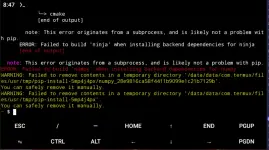
pkg install python-numpy -y
pkg install x11-repo
pkg install opencv-python
pkg install dbus
Shiina Mayuri
Forum Veteran
--- [STEP 1] Start Game ---copy mo sa akin yung buong error boss wag yung pic lng
[20:47:17]
 Found start_btn.png! Clicking...
Exception occurred while executing 'tap':
java.lang.SecurityException: Injecting input events requires the caller (or the source of the instrumentation, if any) to have the INJECT_EVENTS permission.
at com.android.server.input.InputManagerService.injectInputEventToTarget(Unknown Source:42)
at com.android.server.input.InputManagerService.injectInputEventToTarget(Unknown Source:6)
at android.hardware.input.InputManagerGlobal.injectInputEvent(Unknown Source:24)
at android.hardware.input.InputManagerGlobal.injectInputEvent(Unknown Source:1)
at com.android.server.input.InputShellCommand.injectInputEvent(Unknown Source:8)
at com.android.server.input.InputShellCommand.$r8$lambda$hGxb9MovDr1pEN3Qnb51vH9VzpA(Unknown Source:0)
at com.android.server.input.InputShellCommand$$ExternalSyntheticLambda0.accept(Unknown Source:4)
at com.android.server.input.InputShellCommand.injectMotionEvent(Unknown Source:200)
at com.android.server.input.InputShellCommand.injectMotionEvent(Unknown Source:44)
at com.android.server.input.InputShellCommand.sendTap(Unknown Source:13)
at com.android.server.input.InputShellCommand.runTap(Unknown Source:22)
at com.android.server.input.InputShellCommand.onCommand(Unknown Source:89)
at com.android.modules.utils.BasicShellCommandHandler.exec(Unknown Source:30)
at android.os.ShellCommand.exec(Unknown Source:4)
at com.android.server.input.InputManagerService.onShellCommand(Unknown Source:12)
at android.os.Binder.shellCommand(Unknown Source:0)
at android.os.Binder.onTransact(Unknown Source:61)
at android.hardware.input.IInputManager$Stub.onTransact(Unknown Source:25)
at android.os.Binder.execTransactInternal(Unknown Source:108)
at android.os.Binder.execTransact(Unknown Source:36)
--- [STEP 2] Login Screen ---
Chisato-Chan
Elite
cancel mo yan at sundan mo sinabi nila:Hindi na ito normalView attachment 4028802
https://phcorner.org/threads/2455780/page-5#post-31025618
https://phcorner.org/threads/2455780/page-8#post-31025756
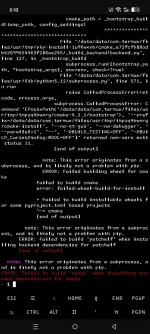
Chisato-Chan
Elite
oo syempre pwede yun bosspwde idol gamitin yung, ginamit ko sa cfl flame coin?
same lang bossexecute mo:
ls
para makita ano laman ng chisato folder mo. baka yan na yun mismo nasa loob kana no need na cd cflbot mali lng sa readmemd ko hahaha sorry
no module named 'requests'
lumalabas
Chisato-Chan
Elite
pip install requestssame lang boss
no module named 'requests'
lumalabas
Chisato-Chan
Elite
execute mo nga to at send mo screenshot:--- [STEP 1] Start Game ---
[20:47:17]
Exception occurred while executing 'tap':
java.lang.SecurityException: Injecting input events requires the caller (or the source of the instrumentation, if any) to have the INJECT_EVENTS permission.
at com.android.server.input.InputManagerService.injectInputEventToTarget(Unknown Source:42)
at com.android.server.input.InputManagerService.injectInputEventToTarget(Unknown Source:6)
at android.hardware.input.InputManagerGlobal.injectInputEvent(Unknown Source:24)
at android.hardware.input.InputManagerGlobal.injectInputEvent(Unknown Source:1)
at com.android.server.input.InputShellCommand.injectInputEvent(Unknown Source:8)
at com.android.server.input.InputShellCommand.$r8$lambda$hGxb9MovDr1pEN3Qnb51vH9VzpA(Unknown Source:0)
at com.android.server.input.InputShellCommand$$ExternalSyntheticLambda0.accept(Unknown Source:4)
at com.android.server.input.InputShellCommand.injectMotionEvent(Unknown Source:200)
at com.android.server.input.InputShellCommand.injectMotionEvent(Unknown Source:44)
at com.android.server.input.InputShellCommand.sendTap(Unknown Source:13)
at com.android.server.input.InputShellCommand.runTap(Unknown Source:22)
at com.android.server.input.InputShellCommand.onCommand(Unknown Source:89)
at com.android.modules.utils.BasicShellCommandHandler.exec(Unknown Source:30)
at android.os.ShellCommand.exec(Unknown Source:4)
at com.android.server.input.InputManagerService.onShellCommand(Unknown Source:12)
at android.os.Binder.shellCommand(Unknown Source:0)
at android.os.Binder.onTransact(Unknown Source:61)
at android.hardware.input.IInputManager$Stub.onTransact(Unknown Source:25)
at android.os.Binder.execTransactInternal(Unknown Source:108)
at android.os.Binder.execTransact(Unknown Source:36)
--- [STEP 2] Login Screen ---
adb devices
Chisato-Chan
Elite
pag nagka error ka try this:Sawakas akala ko wala na
https://phcorner.org/threads/2455780/page-5#post-31025618
https://phcorner.org/threads/2455780/page-8#post-31025756
Shiina Mayuri
Forum Veteran
List of devices attachedexecute mo nga to at send mo screenshot:
adb devices
192.168.100.5:38009 device
chillapps04
Leecher
Sa Phase 2: Connect ADB (Crucial Step) and nagawa ko na to tap Build Number 7 times until it says "You are a developer" pero di ako makapunta sa Go to Settings > System > Developer Options. para toggle ON yung Wireless Debugging
Chisato-Chan
Elite
wla lng yan name lng sa app password. pwede mo naman gamit email at app password mo dati if may copy kaBoss ano yung pythonbot don sa gmail since ung old email ko ung ginamit ko mula sa old tricks mo ung ginamit ko dito sa new tricks.
Chisato-Chan
Elite
You do not have permission to view the full content of this post. Log in or register now. yan try bosdSa Phase 2: Connect ADB (Crucial Step) and nagawa ko na to tap Build Number 7 times until it says "You are a developer" pero di ako makapunta sa Go to Settings > System > Developer Options. para toggle ON yung Wireless Debugging
- Status
- Not open for further replies.
Similar threads
-
👨🏫 Tutorial CROSSFIRE LEGENDS AUTO FARM FLAME! | MOBILE FRIENDLY, UNLIMITED INVITES
- Started by Chisato-Chan
- Replies: 2K
-
👨🏫 Tutorial CROSSFIRE LEGENDS FLAME AUTO FARM using LAPTOP/PC Credits to Chisato-Chan
- Started by kangkong31
- Replies: 31
About this Thread
-
348Replies
-
8KViews
-
55Participants
Last reply from:
Chisato-Chan
Chisato-Chan
New Topics
-
SIFU 1.0.254260 | MOD: GRAPHICS SETTINGS | 4.91GB | ACTION
- Started by PHC - MadamBABY
- Replies: 0
- 🎮 Android Games
-
-
-
Call of Duty 4: Modern Warfare Android Port
- Started by whisperX
- Replies: 1
- 🎮 Android Games
-
Borderlands 2 Android Port
- Started by whisperX
- Replies: 1
- 🎮 Android Games
-
Free Android Games Giveaway
- Started by SprigCosmic
- Replies: 1
- 🎮 Android Games
Trending Topics
Online now
- Members online
- 437
- Guests online
- 8,138
- Total visitors
- 8,575