PH
PHkangkong31
Fanatic
 Notice:
This tool is officially created by Chisato-Chan and released on phcorner.org only and free for all phcorner members.
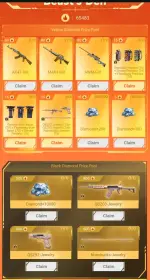
Disclaimer: I Chisato-Chan and phcorner are not liable for any misuse, result or unauthorized use of my tool.This tool will automate your Crossfire Legends invitation code infinitely with Web Dashboard!
 Features:
- 100% Free (DO NOT SELL MY TOOL)
- Auto Farm
- Auto Get Code
- Fast performing task
- Web Dashboard
- Mobile Friendly
- No Network Busy
- Real Time Logs
- Captcha Detector
- Wake Lock Screen
- Auto On/Off Wakelock
- Captcha Alarm
- Unlimited Use
- Free Proxy to bypass Captcha (tutorial)
- Open Source Code
Setup+Tutorial+Tool:
Install the following:
1.Google Chrome
2. TamperMonkey Extention
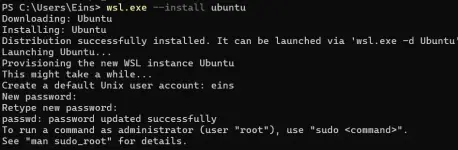
3.WSL Open Powershell and Type wsl.exe --install Ubuntu
Create a User(any name)
Create a password(1234 or anypassword)
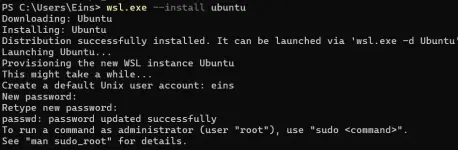
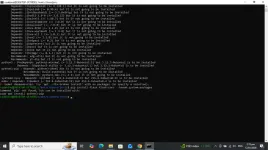
run this command:
1. sudo apt update && sudo apt upgrade -y
2. sudo apt install python3 python3-pip mpv -y
3. pip install flask flask-cors --break-system-packages
DOWNLOAD THIS FILE FIRST : You do not have permission to view the full content of this post. Log in or register now.
Once Installed go back to powershell and locate the autofarm_cfl
sample directory:
cd /mnt/c/Users/Eins/Desktop/autofarm_cfl
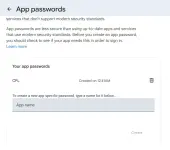
Requirements: Your gmail must have turned on two factor authentication. you can do this with google authenticator
Now go to the You do not have permission to view the full content of this post. Log in or register now. then fill up the app name and click create. it will pop up your email app password, copy it then save it for later and you should never share it.
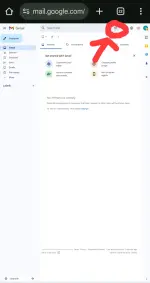
Go to the gmail.com on your browser and turn on desktop view then click the red arrow:
next, fillup the "from" put this email: LevelInfinitePass@account.levelinfinite.com
then click create filter
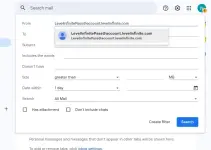
follow this and click create filter
important: cfl
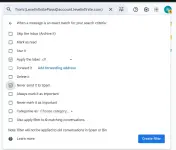
after that letsgo to another step
Open
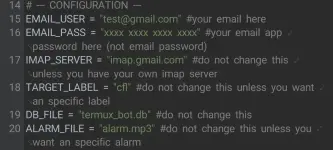
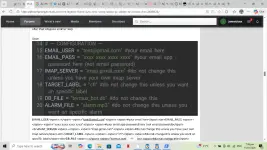
EMAIL_USER <span>=</span> <span>"test@gmail.com"</span> <span>#your email here</span><br>EMAIL_PASS <span>=</span> <span>"xxxx xxxx xxxx xxxx"</span> <span>#your email app password here (not email password)</span><br>IMAP_SERVER <span>=</span> <span>"imap.gmail.com"</span> <span>#do not change this unless you have your own imap server</span><br>TARGET_LABEL <span>=</span> <span>"cfl"</span> <span>#do not change this unless you want an specific label</span><br>DB_FILE <span>=</span> <span>"termux_bot.db"</span> <span>#do not change this</span><br>ALARM_FILE <span>=</span> <span>"alarm.mp3"</span> <span>#do not change this unless you want an specific alarm</span>
tampermonkey script:
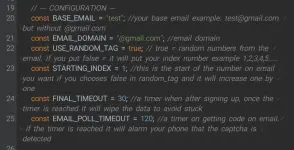
<span>// --- CONFIGURATION ---</span><br> <span>const</span> <span>BASE_EMAIL</span> <span>=</span> <span>"test"</span><span>;</span> <span>//your base email example: test@gmail.com but without @gmail.com</span><br> <span>const</span> <span>EMAIL_DOMAIN</span> <span>=</span> <span>"@gmail.com"</span><span>;</span> <span>//email domain</span><br> <span>const</span> <span>USE_RANDOM_TAG</span> <span>=</span> <span>true</span><span>;</span> <span>// true = random numbers from the email. if you put false = it will put your index number example 1,2,3,4,5.....</span><br> <span>const</span> <span>STARTING_INDEX</span> <span>=</span> <span>1</span><span>;</span> <span>//this is the start of the number on email you want if you chooses false in random_tag and it will increase one by one</span><br> <span>const</span> <span>FINAL_TIMEOUT</span> <span>=</span> <span>30</span><span>;</span> <span>//a timer when after signing up, once the timer is reached it will wipe the data to avoid stuck</span><br> <span>const</span> <span>EMAIL_POLL_TIMEOUT</span> <span>=</span> <span>120</span><span>;</span> <span>//a timer on getting code on email. if the timer is reached it will alarm your phone that the captcha is detected</span>
after editing the configuration, open tampermonkey in chrome extension
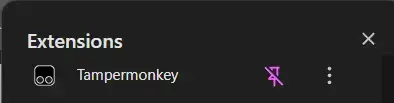
now click the tampermonkey extension and copy the tamperscript.js code on the downloaded tool and paste it on tampermonkey then enable tampermonkey and the script.
now go back to powershell run this command:
python3 server.py
you will see something like this:

you can go to the web dashbord by entering that 127.0.0.1:5000 on your browser
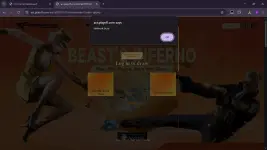
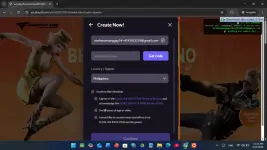
then go back to Google Chrome and enter your referral link on your edge canary then it will automatically farm your referral link powered by script.
You need to mark all as read your email before you start farming to avoid the otp/code issue
PLS NOTE THE CHROME TAB MUST BE ON YOUR SCREEN ALWAYS TO MAKE THE SCRIPT WORK SMOOTHLY
how to bypass captcha:
OPEN THE REFERRAL LINK ON YOUR CHROME INCOGNITO
Happy Farming PHC!
Comment lang kayo dito if may tanong kayo or problema para matulungan kayo
BIG CREDITS TO Chisato-Chan for the tutorial and the tool