-Free Internet- on Captive Portals - Works in Any Country -

first check the droidvpn with legit internet connection to get server's db be updated. and then disconnect it and try with the network for which u want the free internet.
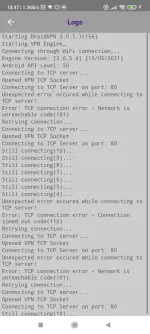
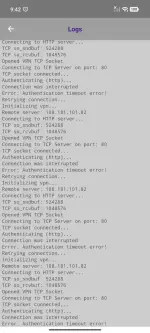
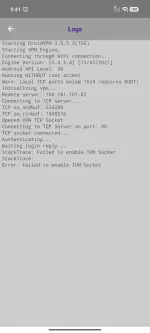
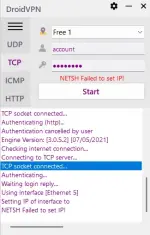
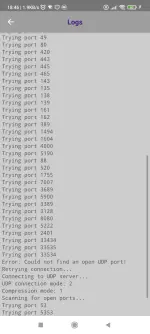
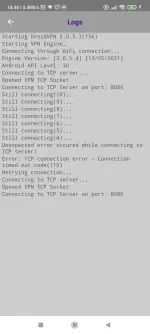
then connect the droidvpn's udp protocol, if it not have any open ports, then try with the tcp port with 80 or 8080. if it shows tcp socket connected means u have that port opned.

after that u can request for 'DPI Bypass tool'
 
Screenshot_2026-04-07-18-46-17-759_com.aed.droidvpn.webp
Screenshot_2026-04-07-18-46-48-031_com.aed.droidvpn.webp
Screenshot_2026-04-07-18-47-16-802_com.aed.droidvpn.webp

first check the droidvpn with legit internet connection to get server's db be updated. and then disconnect it and try with the network for which u want the free internet.
then connect the droidvpn's udp protocol, if it not have any open ports, then try with the tcp port with 80 or 8080. if it shows tcp socket connected means u have that port opned.

after that u can request for 'DPI Bypass tool'
 
@jakehas11

i think the droidvpn's server database list is not updated to latest version, that's why there is no connection to the port/server
first ensure that the droidvpn connects to any of the free server get connected by connecting with the legit internet connection, so that the server db is updated.
if the server list db is updated, still not connecting means there are no open ports in ur network are ur isp network is a ipv6 network. if u r using thru mobile or with wifi(mobile sim) hotspot rather than broadband/fiber nework so in the APN settings, set
APN protocol
and
APN Roaming protocol
to
IPV4 and save the APN
then try to check in droidvpn again

if still no connection means,
ur network doesn't connects with a open port to expoit for free internet,
so the solution for u is to Use a working SNI method only works, so find a working SNI which works in ur location/country and exploit the isp/network with the vpn/payload to get free internet

also try with disabling the 'send headers' in droidvpn, and connect with the 'HTTP' setting only and check
 
@jakehas11

i think the droidvpn's server database list is not updated to latest version, that's why there is no connection to the port/server
first ensure that the droidvpn connects to any of the free server get connected by connecting with the legit internet connection, so that the server db is updated.
if the server list db is updated, still not connecting means there are no open ports in ur network are ur isp network is a ipv6 network. if u r using thru mobile or with wifi(mobile sim) hotspot rather than broadband/fiber nework so in the APN settings, set
APN protocol
and
APN Roaming protocol
to
IPV4 and save the APN
then try to check in droidvpn again

if still no connection means,
ur network doesn't connects with a open port to expoit for free internet,
so the solution for it is Use a working SNI method only works, so find a working SNI which works in ur location/country and exploit the isp/network with the vpn/payload to get free internet

also try with disabling the 'send headers' in droidvpn, and connect with the 'HTTP' setting only and check
Screenshot_2026-04-07-22-09-51-329_com.android.chrome.webp
 
@jakehas11

first reread the above post which is i updated, and try to check again, means connect droidvpn with legit internet connection, so that the server db get updated

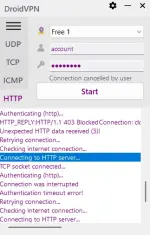
if still not connecting, try with http port 443, 8443 also
 
I already try but only "still connecting"
if already tried
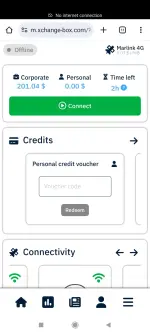
then for ur network/isp only sni trick only works, bcoz it shows, no internet connection
for using dpi bypass u need atleast some ports should be opened, if its firewalled it doesn't matter

atleast try the free homepage(captive portal page) url as the payload and check with the any tunneling apps like
http custom or netmod syna etc..,
 
if already tried
then for ur network/isp only sni trick only works, bcoz it shows, no internet connection
for using dpi bypass u need atleast some ports should be opened, if its firewalled it doesn't matter

atleast try the free homepage(captive portal page) url as the payload and check with the any tunneling apps like
http custom or netmod syna etc..,
Hello!! how to configure DPI bypass for TCP port 80 I am using ByeDPI for android?
 
@joshuatadena091001

First ensure that ur android is rooted
for legit internet connection to unblock websites, we use ByeDPI or ByeByeDPI
for if we want free internet we should use Zapret

tell if ur android is rooted or not?
 
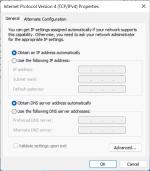
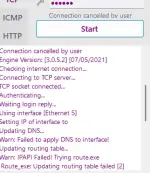
i noticed that in the screenshot that
NETSH Failed to set IP!

error showing
for this, set tcp/ip settings like this
bmjz0vZc_o.jpg

-or- open droidvpn as 'run as administrator'
-or- droidvpn settings - TAP / Routing settings - change 'Netsh/Route' to - 'IP Helper API'
==================


Note:

if working without changing any settings, if it works, dont change anything
i just saw the error, so i told u the solution
 

About this Thread

  • 179
    Replies
  • 8K
    Views
  • 29
    Participants
Last reply from:
robertxxxvirus

Online now

Members online
305
Guests online
1,205
Total visitors
1,510

Forum statistics

Threads
2,273,067
Posts
28,947,371
Members
1,236,580
Latest member
bernardopogi
Back
Top