 PH
PH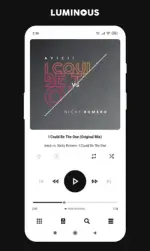
Requirements: 5.0+
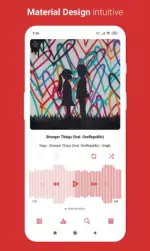
Overview: Luminous is a skin for Poweramp 3 with many customizable features included various material accent colors, alternative layout, album art styles and more. You can change almost anything to match your style.
Luminous is a skin for Poweramp 3 with many customizable features included various material accent colors, alternative layout, album art styles and more. You can change almost anything to match your style.
Features
• 6 Player UI Layouts : Default, Alternative (Left Title), Alternative (Centered Title), [AA Blur] Default, [AA Blur] Alternative (LT), [AA Blur] Alternative (CT)
• 20 Material Accent Colors : Blue Grey, Grey, Black, Brown, Red, Pink, Purple, Deep Purple, Indigo, Blue, Light Blue, Cyan, Teal, Green, Light Green, Lime, Yellow, Amber, Orange, Deep Orange
• 3 Library Icon Sets : Default, Material, Unicons
• 4 Player UI Album Art Styles : Square, Rounded, More Rounded, Circle
• 4 Library Album Art Styles : Square, Rounded, More Rounded, Circle
• 3 Seekbar Styles : Default, Static Seekbar, Divided Waveseek
• 7 Wave Seekbar Styles : Adaptive Rounded, Rounded, Rectangle (Thick), Rectangle (Thin), [White] Rounded, [White] Rectangle (Thick), [White] Rectangle (Thin)
• 2 Knob and Eq Styles : Colorful, Stroke
• Pro Buttons (w/o Simple Seekbar)
• Force Black Navigation Bar
• Small Play Button
• Hide Track Menu Button
• Adaptive Text Color
• Transparent Navigation Bar
• More Coming Soon
Note
For blur layouts, to avoid buttons or texts not visible/readable, you need to change Background Intensity (Poweramp > Settings > Background). Recommended: set to 80%
If you experience problem after an update, follow this method
• Open the skin from app launcher
• Select Open Skin Settings
• Disable the skin
• Scroll down, look for the skin settings that suddenly becomes empty, then set it again.
• Enable the skin
• Done
Notice
You must have Poweramp 3 installed to use this skin
What's New:
Luminous 10.5.1
• New Styles and Options
[Navigation]
+ Full Width Corners Radius
[Knob and Equalizer]
- Knob and Eq Style have been split into two: Knob Style and Eq Style
- 5 Eq Shape Styles
- 1 Eq Indicator Style : Disabled
• Other Changes
- Improved Material You
- Updated Translations
- Other improvements
Download
Download