❓ Help Ito na ata pinaka murang Wifi 6 with Openwrt support

Same ng firmware version sakin, RD23 1.0.31 pero pwede mo flash yung 1.0.49 (INT) kapag gusto mo bumalik sa stock firmware.

Nasubukan ko na via Mi Flash Tool [ OpenWRT to 1.0.49 (INT) ]


Ngayon nasa OpenWrt 24.10.0-rc2 version ako
Saan makikita mi flash tool? Same version kasi tayo haha

pwede ba sa router na ito gawing auto fail over or mag combine ng speed sa 2 isp?
Pwede sa OpenWRT sa stock firmware wala

Same ng firmware version sakin, RD23 1.0.31 pero pwede mo flash yung 1.0.49 (INT) kapag gusto mo bumalik sa stock firmware.

Nasubukan ko na via Mi Flash Tool [ OpenWRT to 1.0.49 (INT) ]


Ngayon nasa OpenWrt 24.10.0-rc2 version ako
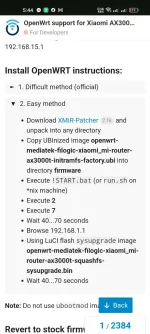
Thanks sa advice sir try ko install mamaya sakin OpenWRT then kala ko dina makakabalik sa stock firmware. Buti nakita ko to

Screenshot_2024-12-19-17-44-59-63_40deb401b9ffe8e1df2f1cc5ba480b12.webp

Itong steps ba sir walang palya? HAHAHA first time ko kasi
 
Saan makikita mi flash tool? Same version kasi tayo haha


Pwede sa OpenWRT sa stock firmware wala


Thanks sa advice sir try ko install mamaya sakin OpenWRT then kala ko dina makakabalik sa stock firmware. Buti nakita ko to

View attachment 3340074

Itong steps ba sir walang palya? HAHAHA first time ko kasi
no, old steps yan, follow mo kung ano nasa wiki You do not have permission to view the full content of this post. Log in or register now.
 
Meron Ako nyan ang Hina Ng wifi range nyan dalawang wall LNG Hindi nya na Kayang magpenetrate
pero goods na din yan pang dual or triple wan

Same ng firmware version sakin, RD23 1.0.31 pero pwede mo flash yung 1.0.49 (INT) kapag gusto mo bumalik sa stock firmware.

Nasubukan ko na via Mi Flash Tool [ OpenWRT to 1.0.49 (INT) ]


Ngayon nasa OpenWrt 24.10.0-rc2 version ako
sir wala kabang bootloop after 6 reboots?
 
1st unit (EU/1.0.31 stock firmware) xiaomi.ph/shopee
flashing/tests done: easy method since totally overwhelmed by official difficult method (been a year since last openwrt venture :))

1. easy method using official 23.05.5 as per ax3000t forum support - success but bootloop after 6 reboots
2. debrick via miwifi repair tool using 1.0.49 firmware since no downloadable 1.0.31 as of flashing
3. (1.0.49) flashing using remittor's 23.05.x - succes - bootloop gone.


2nd unit (EU/1.0.49 stock firmware) xiaomi.global/shopee
1. easy method using official 24.10.rc2 as per ax3000t forum support - success but bootloop again
2. debrick via miwifi repair tool using 1.0.49 firmware
3. flashing using remittor's 24.10.x - succes - bootloop gone.

2 units tested again and again - (forced softbrick and debricked by 1.0.49) and flashed again(easy method) using official snapshots and immortalWRT build - success and no bootloops

3rd unit came in (1.0.31) directly flashed with remittor's 24.10.x - success no problems incurred thereafter :)

di lng po ako recommend anu ba dapat o proper steps at anung openwrt versions but remittor's build worked perfect (on both default 1.0.31 and 1.0.49 EU/GLOBAL versions)

refer and read nlang po sa official forum support You do not have permission to view the full content of this post. Log in or register now. but most importantly and to be safe, silipin nyo po unit nyo and verify kung officially supported ba flash/switch chips inside
 
1st unit (EU/1.0.31 stock firmware) xiaomi.ph/shopee
flashing/tests done: easy method since totally overwhelmed by official difficult method (been a year since last openwrt venture :))

1. easy method using official 23.05.5 as per ax3000t forum support - success but bootloop after 6 reboots
2. debrick via miwifi repair tool using 1.0.49 firmware since no downloadable 1.0.31 as of flashing
3. (1.0.49) flashing using remittor's 23.05.x - succes - bootloop gone.


2nd unit (EU/1.0.49 stock firmware) xiaomi.global/shopee
1. easy method using official 24.10.rc2 as per ax3000t forum support - success but bootloop again
2. debrick via miwifi repair tool using 1.0.49 firmware
3. flashing using remittor's 24.10.x - succes - bootloop gone.

2 units tested again and again - (forced softbrick and debricked by 1.0.49) and flashed again(easy method) using official snapshots and immortalWRT build - success and no bootloops

3rd unit came in (1.0.31) directly flashed with remittor's 24.10.x - success no problems incurred thereafter :)

di lng po ako recommend anu ba dapat o proper steps at anung openwrt versions but remittor's build worked perfect (on both default 1.0.31 and 1.0.49 EU/GLOBAL versions)

refer and read nlang po sa official forum support You do not have permission to view the full content of this post. Log in or register now. but most importantly and to be safe, silipin nyo po unit nyo and verify kung officially supported ba flash/switch chips inside
ito gusto ko sa unit, pati mga comments sa official forum.
Madali lang ma debrick.
 

About this Thread

  • 94
    Replies
  • 7K
    Views
  • 25
    Participants
Last reply from:
taurexn

Trending Topics

Online now

Members online
710
Guests online
1,708
Total visitors
2,418

Forum statistics

Threads
2,291,031
Posts
29,068,253
Members
1,211,656
Latest member
hazey
Back
Top