❓ Help Ito na ata pinaka murang Wifi 6 with Openwrt support

BSPLT

Forum Guru
Naka order ako ng Xiaomi Router AX3000T sa Lazada worth 1.2k
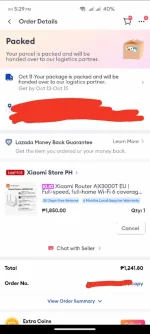
1728642846966.png


Balak ko ito gamitin with Openwrt kasi supported naman.
You do not have permission to view the full content of this post. Log in or register now.

Meron din yung TP-LINK Archer AX12 worth 1.3k with coins and voucher pero hindi supported ng Openwrt kaya hindi ko binili.


Sa mga naka Xiaomi AX3000T, kamusta experience niyo dito?
 
true, kaya nag tataka ako bakit naging mahirap i configure si OpenWrt, naka spoonfeed na lahat sa Luci.

Kung snapshot yes, very true itop, kailangan mo pa dumaan sa ssh console pra mag install ng luci, but sa stable build everything naka spoon feed na at ang defaults ay yn ang usually gingamit ng mga tao for AP use.
just to give an example sa OpenWrt vs Mikrotik..
scenario: Setup as a 3rd party router, ONT/Modem in bridged mode, naka DHCP ang bigayan ng IP, not PPPoE

OpenWrt steps:
1. Enable WiFi SSIDs
2. Done, since the defaults have masquerading and etc sa WAN Zone already. at naka DHCP client cya by default

Mikrotik steps:
1. Create an IP Pool range for your Lan
2. Create a bridge interface to bridge LAN ports and to designate ano ung WAN port
3. Create a DHCP client on WAN Interface
4. Add fast track rules on firewall
5. Add masquerading rules on WAN interface
6. Add MSS Clamping in firewall
7. Create a DHCP network for lan
8. Create a DHCP server for your LAN, confgure this server, set the IP Pool and DHCP network created in Step 1, assign this dhcp server to bridge
9.. Optional Harden your firewall, drop all incoming input traffic and invalid packets

(i might have missed something sa Mikrotik, but you get the idea)
 
just to give an example sa OpenWrt vs Mikrotik..
scenario: Setup as a 3rd party router, ONT/Modem in bridged mode, naka DHCP ang bigayan ng IP, not PPPoE

OpenWrt steps:
1. Enable WiFi access points
2. Done, since the defaults have masquerading and etc sa WAN Zone already. at naka DHCP client cya by default

Mikrotik steps:
1. Create an IP Pool range for your Lan
2. Create a bridge interface to bridge LAN ports and to designate ano ung WAN port
3. Create a DHCP client on WAN Interface
4. Add fast track rules on firewall
5. Add masquerading rules on WAN interface
6. Add MSS Clamping in firewall
7. Create a DHCP network for lan
8. Create a DHCP server for your LAN, confgure this server, set the IP Pool created in Step 1
9.. Optional Harden your firewall, drop all incoming input traffic and invalid packets
Sipag mo naman mag type hahaha
 
Sipag mo naman mag type hahaha
don't get me started on Dual/Multi-wan failover/combine and PBR. Sobrang lala ng mikrotik, sometimes days at weeks igugugol mo para ma config, kaya maraming mikrotik services sa FB Marketplace ranging from 1000-2000 pesos..

Meanwhile sa OpenWrt spoonfeeded sa iyo lahat through its packages - MWAN3 or PBR.
 
don't get me started on Dual/Multi-wan failover/combine and PBR. Sobrang lala ng mikrotik, sometimes days at weeks igugugol mo para ma config, kaya maraming mikrotik services sa FB Marketplace ranging from 1000-2000 pesos..

Meanwhile sa OpenWrt spoonfeeded sa iyo lahat through its packages - MWAN3 or PBR.
Absolutely 👌
 
just to give an example sa OpenWrt vs Mikrotik..
scenario: Setup as a 3rd party router, ONT/Modem in bridged mode, naka DHCP ang bigayan ng IP, not PPPoE

OpenWrt steps:
1. Enable WiFi SSIDs
2. Done, since the defaults have masquerading and etc sa WAN Zone already. at naka DHCP client cya by default

Mikrotik steps:
1. Create an IP Pool range for your Lan
2. Create a bridge interface to bridge LAN ports and to designate ano ung WAN port
3. Create a DHCP client on WAN Interface
4. Add fast track rules on firewall
5. Add masquerading rules on WAN interface
6. Add MSS Clamping in firewall
7. Create a DHCP network for lan
8. Create a DHCP server for your LAN, confgure this server, set the IP Pool and DHCP network created in Step 1, assign this dhcp server to bridge
9.. Optional Harden your firewall, drop all incoming input traffic and invalid packets

(i might have missed something sa Mikrotik, but you get the idea)
Thanks for the idea. Mas mahirap pala si Mikrotik setup. Baka try ko din after ko magamay si Openwrt. Ano magandang cheap device to start sa Mikrotik?

Medyo mas madali si Openwrt unlike sa Mikrotik. I will suggest to use a fully build firmware sa mga supported routers kesa sa snapshot lang, well hindi pang beginners talaga ang mga yan, you need a time to study naman hehe, anyway itatry ko yan check ko muna yung specs. thanks for sharing.


View attachment 3159303

i just checked the specs, okay lang naman specs pero mas far na sulit parin ang neWifi D2 kung hindi kasama ang wifi6.
Nakita ko kasi sa mga Chinese na meron AX3000T kaya na curious ako
 
yung ang akala mo paps na madali lang haha

baka masiraan ka ng bait kung mag reset ka tapos back to zero nanaman haha
madali lang naman mag reflash. In my 7 years experience sa openwrt, so far di pa naman ako nasiraan ng bait :) ang nega mo naman sa iba ayw mo ata matutu sila at gusto mo ikaw lang may alam o may alam ka po ba talaga? just asking lang.

Medyo mas madali si Openwrt unlike sa Mikrotik. I will suggest to use a fully build firmware sa mga supported routers kesa sa snapshot lang, well hindi pang beginners talaga ang mga yan, you need a time to study naman hehe, anyway itatry ko yan check ko muna yung specs. thanks for sharing.


View attachment 3159303

i just checked the specs, okay lang naman specs pero mas far na sulit parin ang neWifi D2 kung hindi kasama ang wifi6.
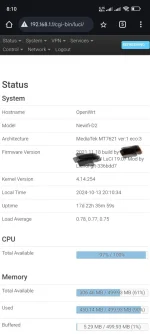
unstable newifi d2 2.4ghz sakin iwan ko kung bakit pero sa drive nung wifi nya may prob din kasi nuon pa. Daming bugs.
 
madali lang naman mag reflash. In my 7 years experience sa openwrt, so far di pa naman ako nasiraan ng bait :) ang nega mo naman sa iba ayw mo ata matutu sila at gusto mo ikaw lang may alam o may alam ka po ba talaga? just asking lang.


unstable newifi d2 2.4ghz sakin iwan ko kung bakit pero sa drive nung wifi nya may prob din kasi nuon pa. Daming bugs.
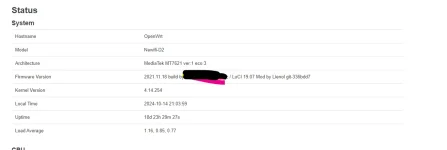
same tayu may bug 2.4G newifi, ano version yung kernel sayo?
 
madali lang naman mag reflash. In my 7 years experience sa openwrt, so far di pa naman ako nasiraan ng bait :) ang nega mo naman sa iba ayw mo ata matutu sila at gusto mo ikaw lang may alam o may alam ka po ba talaga? just asking lang.


unstable newifi d2 2.4ghz sakin iwan ko kung bakit pero sa drive nung wifi nya may prob din kasi nuon pa. Daming bugs.
Ganda pala sa OpenWrt, super worth it, na install ko na yung mga kailangan ko na software.
Maganda gamitin yung UI niya, hindi ka malilito.

Try ko pa aralin yung ibat ibang configurations neto.
 
just helping po hindi po ako nega at nag mamagaling. bakit pag nag ka problema sya tutulongan moba sya?
wag ka pong feeling bida² basa² ka muna ng mga comment bago ka mag magaling okay?
peace yow ✌️...
Sabagay need din may konting knowledge para hindi ma brick yung device kapag medyo baguhan yung gagawa niyan. May change ma sira niya yung device.

Ano bayan napaka hirap e openwrt...mas maganda pa diyan Xiaomi 4A gigabit kasi napakabasic lang mag openwrt invasion 😁 pero if want mo na basic install ng openwrt diyan need mo bumili ng programmer at 32MB dump firmware.

Yung wifi 6 kasi gusto ko sa AX3000T kaya yan binili ko. Mas maganda din yung specs for the price.
 
wow, armv8 pala yan....sulit na yan for an arm-based router...karamihan ng mura kasi mediatek cpu...bihira ang arm-based sa ganyang price range
meron naman marami sa ganyang price range pero out of stock, example RAX3000M
You do not have permission to view the full content of this post. Log in or register now. kagandahan nya meron cya USB 3.0 port upto 5gbps, so in the future, pde mo ito lagyan ng 2.5gbps ethernet adapter for 1gbps+ connectivity, mas malaki din RAM and ROM nya to accomodate for more packages (128MB ROM + 512MB RAM) MT7981B dual core You do not have permission to view the full content of this post. Log in or register now.
1728974585696.png


para hindi ma brick yung device kapag medyo baguhan yung gagawa niyan. May change ma sira niya yung device.
so far lahat ng na brick na device ko kaya i reflash through recovery bootloader (TOTP) or serial (worst case)
 

About this Thread

  • 94
    Replies
  • 7K
    Views
  • 25
    Participants
Last reply from:
taurexn

Trending Topics

Online now

Members online
1,267
Guests online
2,188
Total visitors
3,455

Forum statistics

Threads
2,271,294
Posts
28,940,840
Members
1,239,284
Latest member
ashaliusn
Back
Top