PH
PH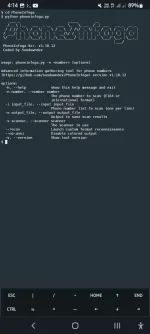
What Is PhoneInfoga?
PhoneInfoga is a highly advanced tool for examining phone numbers from around the world. It enables you to initially collect fundamental details like country, area, carrier, and line type. Afterward, it employs different methods to attempt to discover the Voice Over Internet Protocol (Voip) Provider or pinpoint the owner. The tool operates with a set of scanners that need to be set up for it to work well. It’s important io note that PhoneInfoga doesn’t automate everything; Its purpose is to assist in the investigation of phone numbers.
Basic Features Of PhoneInfoga Tool:
- Basic Information Gathering: Phoneinfoga can retrieve basic details about a phone number. Including the country, area code, carrier information, and line type.
- VoIP Provider Identification: The tool employs various techniques to attempt to identify the Voice Over Internet Protocol (VoIP) Provider associated with a given phone number.
- Owner Identification: Phoneinfoga aims to identify the owner of a phone number,though the accuracy of this information can vary. It’s important to approach it with caution.
- Scanners Configuration: Users need to configure a set of scanners within PhoneInfoga to customize the tool’s behavior and Iimprove Iits effectiveness.
- Manual Investigation Assistance: While Phoneinfoga provides useful information, It doesn’t automate the entire process. It is intended to assist investigators in gathering details about phone numbers.
- Open Source: Being open-source means that the tool’s source code is freely available. Allowing users to inspect, modify, and contribute to its development.
Install PhoneInfoga In Termux
- Update And Upgrade Termux: Open Termux And Run The Following Commands To Make Sure Your Package List Is Up To Date And All Installed Packages Are Upgraded.
pkg update && pkg upgrade -y- If this is your first time installing,then you should permission Termux in storage.
termux-setup-storageBut if you have already given the permission,just escape this process.
- Installing Python In Termux: PhoneInfoga Uses Python For Installtion So We Will Install The Python In Termux Through Below Command
pkg install python -y- Installing Git In Termux: PhoneInfoga Is Hosted On Github, And You’ll Need Git To Download It. Install Git By Running.
pkg install git -y - Clone PhoneInfoga Repository: Use Git To Clone The PhoneInfogar Repository To Your Termux Environment. This Command Will Download The PhoneInfoga Files To Your Device.
git clone https://github.com/ExpertAnonymous/PhoneInfoga- Change the directory to PhoneInfoga
cd PhoneInfoga- Give permission
chmod 777 *- Install the required python libraries
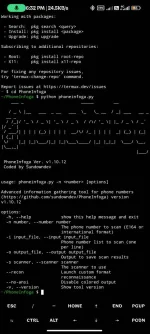
bash phoneinfoga.sh- Run PhoneInfoga: Run The Tool With The Below Command:
python phoneinfoga.pyCongratulation,you have successfully installed and started the PhoneInfoga Tool in Termux.
To execute PhoneInfoga,type;
python phoneinfoga.py -n (country code + phone #)To run again the PhoneInfoga in Termux, type;
cd PhoneInfogathen,
python phoneinfoga.pyUsage of PhoneInfoga
- Enter Phone Number: When Prompted, Enter The Phone Number You Want To Investigate.
- Configure Scanners: PhoneInfoga Works With A Collection Of Scanners. You May Need To Configure Them Based On Your Preferences. Follow The On-screen Instructions To Configure Scanners.
- Review Results: PhoneInfoga Will Attempt To Gather Information About The Provided Phone Number. Review The Results To See Details Such As Country, Area, Carrier, Line Type, And More.
Frequently Asked Question About PhoneInfoga:
What Is PhoneInfoga?PhoneInfoga is a tool that helps find information about phone numbers from around the world. It tells you things like the country, area, and type of the phone line. It can even try to figure out the owner or the company providing internet-based phone services.
What Information Can PhoneInfoga Provide?
PhoneInfoga can give you basic details about a phone number, like where it’s from and who provides the service. It also tries to tell you if it’s a special internet-based phone.
Is PhoneInfoga Legal To Use?
Whether it’s okay to use Phoneinfoga depends on the rules in your area. You have to make sure you’re allowed to investigate phone numbers, and you need to respect people’s privacy. Always use it responsibly and follow the law.
What Precautions Should I Take When Using PhoneInfoga?
When using PhoneInfoga, be responsible. follow the Law, respect people’s privacy, and always check for the latest information from the official sources of the tool.
Does PhoneInfoga Guarantee Accurate Results?
While PhoneInfoga tries to be accurate, It might not always get everything right. The kind of phone number and the data available can affect how accurate the results are.