 PH
ShigenoArchives
Elite
The Legend of Zelda: Tears of the Kingdom Recompiled Android Port
- It is recommended to have 40GB of free space on your phone.
- The game is in an experimental version; there is no guarantee that it will work at this stage.
- A Snapdragon 8 series or Mediatek Dimensity processor (or better) is recommended.
TOTK RECOMP APK
You do not have permission to view the full content of this post. Log in or register now.
You do not have permission to view the full content of this post. Log in or register now.
Installation Tutorial:
1 - Download the 2 files from the links above.
2 - Extract the ZIP file containing the game data (17GB)
It contains folder with exefs and romfs.bin
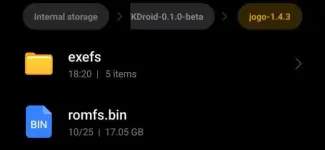
3 - Once extracted, delete the ZIP file to free up space.
4 - Install the APK.
5 - In the launcher, on the file configuration screen, click on "Game files." You can choose "Copy them" or "Use them in place
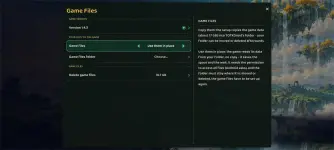
6 - in Game Files Folder Select the folder you just extracted
7 - Wait for the recompilation process to begin. IT MAY TAKE A FEW SECONDS TO START—PLEASE BE PATIENT!
8 - Wait for the recompilation to complete. This will take a long time—likely an hour or more.
If you have Snapdragon 8 series use this driver
You do not have permission to view the full content of this post. Log in or register now.
My Phone Specs
Snapdragon 8s gen 4
16/512gb
Turnip driver use:
Turnip Gen8 V38 / Turnip v27.0.0-R1