 PH
PHFreeNetNeed
Elite
UPDATE: The download links given in this topic now download the new You do not have permission to view the full content of this post.
Log in or register now. build 14393 (Version 1607).
We know that Microsoft has released You do not have permission to view the full content of this post. Log in or register now. operating system to public and Windows 7/8.1 users can free upgrade to Windows 10.
You do not have permission to view the full content of this post. Log in or register now.
To help users in upgrading to Windows 10, Microsoft has released 2 apps:
You do not have permission to view the full content of this post. Log in or register now.
Also by using these tools, you can't download the ISO file directly using any 3rd party download manager software which means you can't pause and resume the download.
Today in this topic we are going to share a very easy to use tip which can allow you to direct download Windows 10 offline ISO files from Microsoft servers legally. Yes, you heard it right. Today's article will help you in getting direct download links of Windows 10 ISO from official Microsoft website.
Actually there is a separate webpage at Microsoft website which allows users to download Windows 10 disc image (ISO files) for offline installation in various computers. The webpage link is as following:
You do not have permission to view the full content of this post. Log in or register now. (thanks RKO)
You do not have permission to view the full content of this post. Log in or register now. (thanks WildByDesign)
Once you open the link, you can select the desired Windows 10 edition from following available options:
Once you select desired Windows 10 edition from the drop-down box on the webpage, it'll ask you to select your language. If you get confused between English and International English language options, English is for EN-US edition and English International is for EN-GB edition.
That's it. You'll get direct download links of both 32-bit (x86) and 64-bit (x64) editions of selected Windows 10 edition on next page.
If you opened the webpage in a mobile phone, you can copy and send the direct download links to your PC and then you can start downloading the ISO files on your PC without any problem.
NOTE 1: Please note that these direct download links are valid for 24 hours only from the time of creation. So download within the 24 hours otherwise the links will expire.
NOTE 2: Sometimes the above mentioned webpage may automatically redirect you to Media Creation Tool download page, if you try to open it on a Windows 7 or Windows 8.1 PC.
To overcome this issue, you can open the webpage link in a PC having a different operating system such as Windows XP, Windows Vista, Mac OS or any Linux distro. If you open the link in a PC having any OS other than Windows 7 or 8.1, the webpage will not redirect and you'll get the original webpage containing direct download links of Windows 10 offline ISO files. You can also try to open the link in any mobile phone and it'll not redirect.
Redirect Web page Screenshot:

Original Web page Screenshot:
Also if you are using You do not have permission to view the full content of this post. Log in or register now. web browser, press F12 key to open Chrome Developer Tools and then click on small mobile phone icon present near the magnifying glass icon. It'll switch to mobile device mode. Now open the URL link and it'll not redirect.
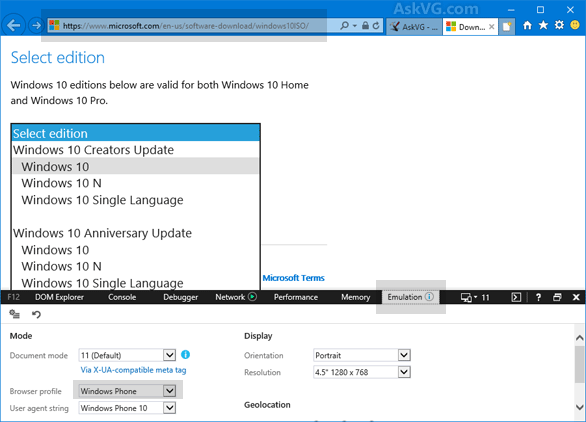
If you are using You do not have permission to view the full content of this post. Log in or register now. web browser, press F12 key to open Developer Tools and then click on Emulation tab and select "Windows Phone" from "Browser Profile" drop-down box. Now open the URL link and it'll not redirect.
We know that Microsoft has released You do not have permission to view the full content of this post. Log in or register now. operating system to public and Windows 7/8.1 users can free upgrade to Windows 10.
You do not have permission to view the full content of this post. Log in or register now.
To help users in upgrading to Windows 10, Microsoft has released 2 apps:
- You do not have permission to view the full content of this post. Log in or register now.
- You do not have permission to view the full content of this post. Log in or register now.
You do not have permission to view the full content of this post. Log in or register now.
Also by using these tools, you can't download the ISO file directly using any 3rd party download manager software which means you can't pause and resume the download.
Today in this topic we are going to share a very easy to use tip which can allow you to direct download Windows 10 offline ISO files from Microsoft servers legally. Yes, you heard it right. Today's article will help you in getting direct download links of Windows 10 ISO from official Microsoft website.
Actually there is a separate webpage at Microsoft website which allows users to download Windows 10 disc image (ISO files) for offline installation in various computers. The webpage link is as following:
You do not have permission to view the full content of this post. Log in or register now. (thanks RKO)
You do not have permission to view the full content of this post. Log in or register now. (thanks WildByDesign)
Once you open the link, you can select the desired Windows 10 edition from following available options:
- Windows 10
- Windows 10 KN
- Windows 10 N
- Windows 10 Single Language
Once you select desired Windows 10 edition from the drop-down box on the webpage, it'll ask you to select your language. If you get confused between English and International English language options, English is for EN-US edition and English International is for EN-GB edition.
That's it. You'll get direct download links of both 32-bit (x86) and 64-bit (x64) editions of selected Windows 10 edition on next page.
If you opened the webpage in a mobile phone, you can copy and send the direct download links to your PC and then you can start downloading the ISO files on your PC without any problem.
NOTE 1: Please note that these direct download links are valid for 24 hours only from the time of creation. So download within the 24 hours otherwise the links will expire.
NOTE 2: Sometimes the above mentioned webpage may automatically redirect you to Media Creation Tool download page, if you try to open it on a Windows 7 or Windows 8.1 PC.
To overcome this issue, you can open the webpage link in a PC having a different operating system such as Windows XP, Windows Vista, Mac OS or any Linux distro. If you open the link in a PC having any OS other than Windows 7 or 8.1, the webpage will not redirect and you'll get the original webpage containing direct download links of Windows 10 offline ISO files. You can also try to open the link in any mobile phone and it'll not redirect.
Redirect Web page Screenshot:
Original Web page Screenshot:
Also if you are using You do not have permission to view the full content of this post. Log in or register now. web browser, press F12 key to open Chrome Developer Tools and then click on small mobile phone icon present near the magnifying glass icon. It'll switch to mobile device mode. Now open the URL link and it'll not redirect.
If you are using You do not have permission to view the full content of this post. Log in or register now. web browser, press F12 key to open Developer Tools and then click on Emulation tab and select "Windows Phone" from "Browser Profile" drop-down box. Now open the URL link and it'll not redirect.
