PH
PHCarlos2026
Contributor

Microsoft Office 2016-2019-2021-2024-365 demonstrates well how the approach to creating documents and working with them has changed today. Many of us start working on one computer, continue it on another, and demonstrate on a third, while simultaneously managing to make minor edits on a laptop, tablet or even a smartphone. Therefore, It was made conceptually different. Almost all key elements in it were developed from scratch, and applications are focused on a single style of work regardless of the hardware platform. They are designed to provide familiar functionality on any device, automatically adjusting their interface to the parameters of the current screen and available system resources.[/B][/COLOR][/FONT]
System requirements:
- Windows 10 (x64/x86), 11 (x64)
- Windows Server 2016, 2019, 2022 and 2025 (x64)
-
- Processor: 1 gigahertz (GHz) or more.
- Free space on hard disk: 3-5 gigabytes (GB).
- Graphics adapter: graphics device Microsoft DirectX 9 or higher.
- Additional requirements for using some features.
- ouch capabilities require a tablet or monitor that supports multi-touch technology.
- To access the Windows Store to download and run apps, you need an active internet connection and a screen resolution of at least 1024 × 768 pixels.
Treatment: Included [Ohook medicine AIO (MAS 3.9) ]
 List of Office Versions in this build
List of Office Versions in this build

Microsoft Office Home Student 2016 (Retail)
Microsoft Office Home Business 2016 (Retail)
Microsoft Office Mondo 2016 (Retail/Volume)
Microsoft Office Professional Plus 2016 (Retail/Volume)
Microsoft Office Professional 2016 (Retail)
Microsoft Office Standard 2016 (Retail/Volume)
Microsoft Project Professional 2016 (Retail/Volume)
Microsoft Visio Standard 2016 (Retail/Volume)
Microsoft Project Standard 2016 (Retail/Volume)
Microsoft Visio Professional 2016 (Retail/Volume)
Microsoft Office Home Student 2019 (Retail)
Microsoft Office Home Business 2019 (Retail)
Microsoft Office Professional Plus 2019 (Retail/Volume)
Microsoft Office Professional 2019 (Retail)
Microsoft Office Standard 2019 (Retail/Volume)
Microsoft Project Professional 2019 (Retail/Volume)
Microsoft Project Standard 2019 (Retail/Volume)
Microsoft Visio Professional 2019 (Retail/Volume)
Microsoft Visio Standard 2019 (Retail/Volume)
Microsoft Office Home Student 2021 (Retail)
Microsoft Office Home Business 2021 (Retail)
Microsoft Office Professional Plus 2021 (Retail/Volume)
Microsoft Office Professional 2021 (Retail)
Microsoft Office Standard 2021 (Retail/Volume)
Microsoft Project Professional 2021 (Retail/Volume)
Microsoft Project Standard 2021 (Retail/Volume)
Microsoft Visio Professional 2021 (Retail/Volume)
Microsoft Visio Standard 2021 (Retail/Volume)
Microsoft Office Home 2024 (Retail)
Microsoft Office Home Business 2024 (Retail)
Microsoft Office Professional Plus 2024 (Retail/Volume)
Microsoft Office Professional 2024 (Retail)
Microsoft Office Standard 2024 (Retail/Volume)
Microsoft Project Standard 2024 (Retail/Volume)
Microsoft Visio Professional 2024 (Retail/Volume)
Microsoft Visio Standard 2024 (Retail/Volume)
Microsoft Office 365 (Home Premium)
Microsoft Office 365 (Education Cloud)
Microsoft Office 365 Apps for Business (Retail)
Microsoft Office 365 Apps for Enterprise (Retail)
Microsoft Office 365 Small Business Premium (Retail)
 Note: Publisher is not included in Office 2024 editions. Skype for Business is discontinued and not part of Office 2024.
Spoiler contents are visible only to Established Members.
List of Language Pack Included [104 Languages ] (Direct Link Only)
List of Language Pack Included [104 Languages ] (Direct Link Only)

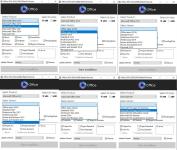

This release contains one ISO image and 104 executable SVF files . (The SVF Language files are provided on the Mega.NZ Direct Link only) (The main ISO file on torrent/user drive is in English only)
All EXE files are created from the original ISO files for each language.
This is done using SmartVersion, a program that calculates the difference between two files (one of which is used as the source) and then creates an SVF file based on this difference.
The EXE files must be located next to the ISO image.
To get the original ISO image with the interface language of your choice, run the executable file and wait until the operation is complete.
In a few minutes (depending on your computer's performance), you will receive the original ISO image.
For example, to get an image with the Russian localization, you need to run the file ru_office_2016-2024_ret_16.0.19426.20186_aio_v25.12.09_by_adguard.exe .
After Installation Medicine it by using MAS 3.9 Ohook (By running it as administrator)
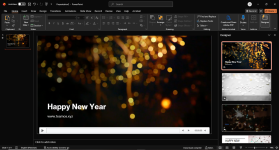
Microsoft 365 can also be act**ated using Ohook but you will require a dummy / any Microsoft outlook account to run 365 special feature such as Design Ideas and Dictate.
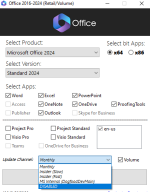
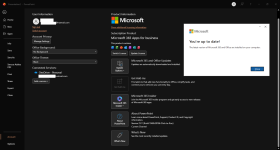
You can select any update channel (monthly, Insider SLOW, Insider FAST, MSDev), or disable updates altogether.
You do not have permission to view the full content of this post. Log in or register now.