👨‍🏫 Tutorial R281 Modified Custom Dashboard Web UI Orbit PR0 Lock Band & Lock Cell ID with USSD

Status
Not open for further replies.
mga idol ask lang r051 user here... baka pwede maka hingi ng tulong sa new firmware nya. na merong lock cellid. openline band locking lang kasi Yung r051 ko. baka may tut kayo

Sa ssh yan ginagamitan cell Id, Lods using ubus commands, mag search ka dito sa phc


Eto ung At commands r051, Cell id lock kung may nginx ka na pang r051 or pc mode yung usb emulator via huawei emulator apps

at
SHOW CURRENT BAND STATUS:

AT*BANDIND?


*CELL:<mode>,<act>,<band>,<freq>,<cellId>
at*celllock=1,3,3,1350

at*celllock=1,3,41,1350
at*celllock=2,41,3,1350,37

LTE BAND LOCKING R051


at*celllock=1,3,3,1350
at*celllock=1,3,28,9485
at*celllock=1,3,1,150

CELL LOCKING R051:


at*celllock=2,3,3,1350,230


CELL LOCK UNLOCKING:

at*celllock=0


band 1
at*celllock=1,3,1,150

Band 28
at*celllock=1,3,28,9485

band 5
at*celllock=1,3,5,2460

band 3
at*celllock=1,3,3,1350

at*celllock=1,3,41,1350

Kapag open na Telnet/ssh
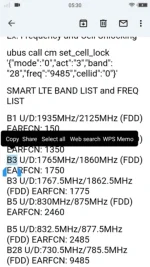
Tingnan sa image Ubus commands cell id lock sa r051
pc mode putty.exe gamit
Sa Smartphone Telnet/Mobile ssh/termux
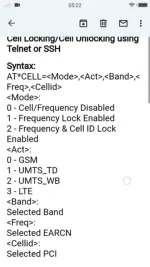
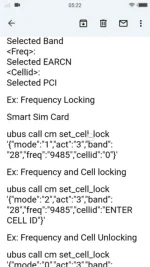
Screenshot_2022-07-22-14-29-22-17.webp Screenshot_2022-07-22-14-29-27-26.webp Screenshot_2022-07-22-14-30-31-75.webp Screenshot_2022-07-22-14-30-51-68.webp

mga idol ask lang r051 user here... baka pwede maka hingi ng tulong sa new firmware nya. na merong lock cellid. openline band locking lang kasi Yung r051 ko. baka may tut kayo

May nakita ako Nyan, Lods pang r051
kaya lang For sale remote service
Si Lucas Liam, aka Marukoy dito sa phc merong celid lock gaya sa r281, try mo i mmesage sa messenger

Ung manual mag login ka sa Telnet/ssh

Using ubus commands
 
sa sunod na lang ako gawa thread dito mga lods yung extreme webui ng R281..pag di na bz

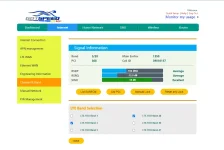
gotspeed blue label them with signal bars..version1 sa webui 4.2 WEBUI moded smooth theme

ito share ko na...

open Putty SSH at Winscp

Upload file to winscp, tmp folder

then punta sa Open SSH
copy and paste this code

sysupgrade -r /tmp/wwwsmart.tgz

ito yung file....download & extract zipfile no pass
You do not have permission to view the full content of this post. Log in or register now.

"""mawawala kapag nagreset..."""

password:Smartbro@1234

kayo na bahala gumawa ng permanent...binfile..

next webui 5.2 naman with signal bars and change imei..""extreme webui mode...""

credits sa gumawa ng signal bars at nag share..

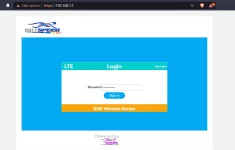
Screenshot_6.webp Screenshot_8.webp Screenshot_10.webp
 
Sa ssh yan ginagamitan cell Id, Lods using ubus commands, mag search ka dito sa phc


Eto ung At commands r051, Cell id lock kung may nginx ka na pang r051 or pc mode yung usb emulator via huawei emulator apps

at
SHOW CURRENT BAND STATUS:

AT*BANDIND?


*CELL:<mode>,<act>,<band>,<freq>,<cellId>
at*celllock=1,3,3,1350

at*celllock=1,3,41,1350
at*celllock=2,41,3,1350,37

LTE BAND LOCKING R051


at*celllock=1,3,3,1350
at*celllock=1,3,28,9485
at*celllock=1,3,1,150

CELL LOCKING R051:


at*celllock=2,3,3,1350,230


CELL LOCK UNLOCKING:

at*celllock=0


band 1
at*celllock=1,3,1,150

Band 28
at*celllock=1,3,28,9485

band 5
at*celllock=1,3,5,2460

band 3
at*celllock=1,3,3,1350

at*celllock=1,3,41,1350

Kapag open na Telnet/ssh
Tingnan sa image Ubus commands cell id lock sa r051
pc mode putty.exe gamit
Sa Smartphone Telnet/Mobile ssh/termux
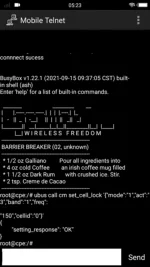
View attachment 2042142 View attachment 2042143 View attachment 2042145 View attachment 2042146


May nakita ako Nyan, Lods pang r051
kaya lang For sale remote service
Si Lucas Liam, aka Marukoy dito sa phc merong celid lock gaya sa r281, try mo i mmesage sa messenger

Ung manual mag login ka sa Telnet/ssh

Using ubus commands
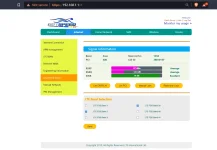
yun..... maraming salamat idol sa complete guide. maraming salamat.. last idol pwde din ba itong manual setup via smartphone lang yung procedures idol?
 
na try ko na lods....ok na ....

gumawa uli ako ng bagong them para maiba naman.. para sa v4.2 WEBUI

yung smooth lang at suave....sa panlasa ng makagamit nito..

credit sa gumawa ng signal bar notion na si sir rus at sa nagshare nito..sir renzkiedaren

share ko ito mamaya inaayos ko pa....

gotspeed blue label them..version1 sa webui 4.2

salamat...

View attachment 2041900 View attachment 2041901 View attachment 2041902 View attachment 2041903
nice ang ganda paturo din sir paano yung process.thanks
 
sa sunod na lang ako gawa thread dito mga lods yung extreme webui ng R281..pag di na bz

gotspeed blue label them with signal bars..version1 sa webui 4.2 WEBUI moded smooth theme

ito share ko na...

open Putty SSH at Winscp

Upload file to winscp, tmp folder

then punta sa Open SSH
copy and paste this code

sysupgrade -r /tmp/wwwsmart.tgz

ito yung file....download & extract zipfile no pass
You do not have permission to view the full content of this post. Log in or register now.

"""mawawala kapag nagreset..."""

password:Smartbro@1234

kayo na bahala gumawa ng permanent...binfile..

next webui 5.2 naman with signal bars and change imei..""extreme webui mode...""

credits sa gumawa ng signal bars at nag share..

View attachment 2042345 View attachment 2042347 View attachment 2042352
wow ang ganda ng webui super....pa try lods salamat...sa share
 
yun..... maraming salamat idol sa complete guide. maraming salamat.. last idol pwde din ba itong manual setup via smartphone lang yung procedures idol?

Pwede Lods, pero enable mo muna Telnet at ssh via kiwi browser
Ad extension ka web spy or tamper monkey

Telnet/ssh enabled mo muna r051 bago magamit mga ubus commands pang bandlock, frequency lock at cell id lock

sa sunod na lang ako gawa thread dito mga lods yung extreme webui ng R281..pag di na bz

gotspeed blue label them with signal bars..version1 sa webui 4.2 WEBUI moded smooth theme

ito share ko na...

open Putty SSH at Winscp

Upload file to winscp, tmp folder

then punta sa Open SSH
copy and paste this code

sysupgrade -r /tmp/wwwsmart.tgz

ito yung file....download & extract zipfile no pass
You do not have permission to view the full content of this post. Log in or register now.

"""mawawala kapag nagreset..."""

password:Smartbro@1234

kayo na bahala gumawa ng permanent...binfile..

next webui 5.2 naman with signal bars and change imei..""extreme webui mode...""

credits sa gumawa ng signal bars at nag share..

View attachment 2042345 View attachment 2042347 View attachment 2042352

Ang Bilis, Lodi

Yun oh

God Bless sa pagbahagi ng FREE
 
sa sunod na lang ako gawa thread dito mga lods yung extreme webui ng R281..pag di na bz

gotspeed blue label them with signal bars..version1 sa webui 4.2 WEBUI moded smooth theme

ito share ko na...

open Putty SSH at Winscp

Upload file to winscp, tmp folder

then punta sa Open SSH
copy and paste this code

sysupgrade -r /tmp/wwwsmart.tgz

ito yung file....download & extract zipfile no pass
You do not have permission to view the full content of this post. Log in or register now.

"""mawawala kapag nagreset..."""

password:Smartbro@1234

kayo na bahala gumawa ng permanent...binfile..

next webui 5.2 naman with signal bars and change imei..""extreme webui mode...""

credits sa gumawa ng signal bars at nag share..

View attachment 2042345 View attachment 2042347 View attachment 2042352
not workng yung pass lods
 
Nakita ko lang sa yt
Bandlock and band 8 ng R281
at panu palitan ng firmware optus pldt orbit at band 8
You do not have permission to view the full content of this post. Log in or register now.

You do not have permission to view the full content of this post. Log in or register now.

Nasa page1 yung instruction, Lods
Kelangan ma open muna, Telnet at ssh ng r281 bago mo flash Dashboard Ui
Optus V2 or Notion with Signal Bar for v52/53 or Modified Smart Notion fo v42

Magback read nalang, Lods

Kung sa android phone gagawin mag download kiwi browser at mag add extension webspy, mobile ssh, andftp

Eto madali sundan Lods, R281 Telnet open using webspy

Watch Yt vid by Free Connect


Codes
You do not have permission to view the full content of this post. Log in or register now.


<?xml version="1.0" encoding="US-ASCII"?>
<RGW>
<param>
<method>call</method>
<session>000</session>
<obj_path>wireless</obj_path>
<obj_method>wifi_ate_enable</obj_method>
</param>
</RGW>

Ssh enabled and Dashboard Ui Flash


PC/Android Smartphone & Google Chrome are needed

Add modified R281 webui ORBIT PRO with Bandlocking

Files required can be downloaded from link below
Tgz file, Winscp, putty or Andftp

Tgz Dashboard file
Dropmb Free File Hosting | www2.tgz

1. install extention WebSpy for Chrome
2. open web ui 192.168.8.1 and login
3. in Google Chrome, open Menu Developer Tools and click SPY
4. open wireless menu on Web UI and double click on last of POST method (green box on right side window)
5. paste to the Request Body using webspy for chrome in Developer Mode
change wifi_get_detail to wifi_ate_enable
6. Click SEND
7. open telnet with putty, open 192.168.1.1/192.168.8.1 port 23
8. paste this command
fw_printenv
9. paste this command to enable telnet and SSH
fw_setenv dropbear_mode 1 && fw_setenv dropbear_key_type 99 && fw_setenv dropbear_password root123
/etc/init.d/dropbear start
10. SSH activated, username : root then password : root123
11. open WinSCP, login to 192.168.8.1 port 22, input username & password above
12. copy file www2.tgz to folder /tmp in Orbit
13. Login via telnet/ssh using putty, and paste this command
# backup your webui to /root/www_backup.tgz
tar -cvzf /root/www_backup.tgz /www
# Add modified webui
tar -C / -xvzf /tmp/www2.tgz
 
not workng yung pass lods
1. kung pldt yan na 4.2...dito k pumunta..sa pics tingnan mo...search mo lang sa yt

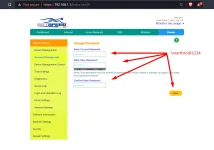
2. pero yung kay sir rus na binfile 4.2,,,..log in ka muna sa dashboard ng r281 mo bago mo i flash...pagnatapos na flash..wag mo muna ilog out...tingnan mo sa pics..doon mo palitan kung naiba pass...ito kasi nilagay ko sa akin..

password: Smartbro@1234 pumasok naman...

smartbro kasi ito akin r281 hindi pldt..

Screenshot_4.png Screenshot_6.png
 
1. kung pldt yan na 4.2...dito k pumunta..sa pics tingnan mo...search mo lang sa yt

2. pero yung kay sir rus na binfile 4.2,,,..log in ka muna sa dashboard ng r281 mo doon mo palitan kung naiba pass...ito kasi nilagay ko sa akin..

password: Smartbro@1234 pumasok naman...

smartbro kasi ito akin r281 hindi pldt..

View attachment 2042744 View attachment 2042745

Ayos Lods, kaw din ung raffy sa Yt, hehe. madami Matutuwa sa custumized Dashboard Ui mo. Medyo tago lang, hehhe

Pag gumawa ka new Thread, baka 1 week lang, mag Viral post mo dito s phc

May new updates muli r281 Smart v54 baseband 3.3
 
Ayos Lods, kaw din ung raffy sa Yt, hehe. madami Matutuwa sa custumized Dashboard Ui mo. Medyo tago lang, hehhe

Pag gumawa ka new Thread, baka 1 week lang, mag Viral post mo dito s phc

May new updates muli r281 Smart v54 baseband 3.3
ang bilis mag update si smarte bakit kaya? baka may inaayos..?
 
parang nabutas uli ni idol jerom...bago lang... ☺️

Alam nila yan, Lods. Trabaho nila

Pag di nagana yung v53 downgrade

Baka sa Adb naman nila idaan downgrade

Ang lakas yung naka openwrt firmware na Zte mf986ra, isang band llang 96mbps ung new post Lodi Jhowel Huerto sa Yt
 
Alam nila yan, Lods. Trabaho nila

Pag di nagana yung v53 downgrade

Baka sa Adb naman nila idaan downgrade
Alam nila yan, Lods. Trabaho nila

Pag di nagana yung v53 downgrade

Baka sa Adb naman nila idaan downgrade

Ang lakas yung naka openwrt firmware na Zte mf986ra, isang band llang 96mbps ung new post Lodi Jhowel Huerto sa Yt
balita ko nga lods....nag order na nga ako para ma try ko din...hehe..
 
1. kung pldt yan na 4.2...dito k pumunta..sa pics tingnan mo...search mo lang sa yt

2. pero yung kay sir rus na binfile 4.2,,,..log in ka muna sa dashboard ng r281 mo bago mo i flash...pagnatapos na flash..wag mo muna ilog out...tingnan mo sa pics..doon mo palitan kung naiba pass...ito kasi nilagay ko sa akin..

password: Smartbro@1234 pumasok naman...

smartbro kasi ito akin r281 hindi pldt..

View attachment 2042744 View attachment 2042745
ok na lods. salamat ng marami
 
sa sunod na lang ako gawa thread dito mga lods yung extreme webui ng R281..pag di na bz

gotspeed blue label them with signal bars..version1 sa webui 4.2 WEBUI moded smooth theme

ito share ko na...

open Putty SSH at Winscp

Upload file to winscp, tmp folder

then punta sa Open SSH
copy and paste this code

sysupgrade -r /tmp/wwwsmart.tgz

ito yung file....download & extract zipfile no pass
You do not have permission to view the full content of this post. Log in or register now.

"""mawawala kapag nagreset..."""

password:Smartbro@1234

kayo na bahala gumawa ng permanent...binfile..

next webui 5.2 naman with signal bars and change imei..""extreme webui mode...""

credits sa gumawa ng signal bars at nag share..

View attachment 2042345 View attachment 2042347 View attachment 2042352
niceee

mukang malabo na pala remote sa 5.4 as of now

1. kung pldt yan na 4.2...dito k pumunta..sa pics tingnan mo...search mo lang sa yt

2. pero yung kay sir rus na binfile 4.2,,,..log in ka muna sa dashboard ng r281 mo bago mo i flash...pagnatapos na flash..wag mo muna ilog out...tingnan mo sa pics..doon mo palitan kung naiba pass...ito kasi nilagay ko sa akin..

password: Smartbro@1234 pumasok naman...

smartbro kasi ito akin r281 hindi pldt..

View attachment 2042744 View attachment 2042745
delete niyo data folder
 
Status
Not open for further replies.

About this Thread

  • 131
    Replies
  • 14K
    Views
  • 27
    Participants
Last reply from:
renzkiedaren

Online now

Members online
360
Guests online
987
Total visitors
1,347

Forum statistics

Threads
2,272,652
Posts
28,944,393
Members
1,237,321
Latest member
agahahaha
Back
Top