PH
PHoblivion85
Journeyman
And hopefully everyone is following your posts para hindi ma lock out hopefully pag nag update na, ang dami useful tips. Thanks!sana nga mag work

And hopefully everyone is following your posts para hindi ma lock out hopefully pag nag update na, ang dami useful tips. Thanks!sana nga mag work
pano to iedit paps? putty lang gamit ko sa lahat lahat eh telnet ssh pero naka set na ko ssh tas triny ko lang yung latest mong code ng pass para lang surena edit ko na yan..
babalik lang yan sa default pag nag reboot.
mas magandang eh edit yung /etc/init.d/services.init
View attachment 1613192
gamit ka ng vimpano to iedit paps? putty lang gamit ko sa lahat lahat eh telnet ssh pero naka set na ko ssh tas triny ko lang yung latest mong code ng pass para lang sure
vim /etc/init.d/services.init
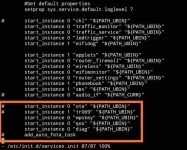
walang need baguhin na perms to paps? rekta edit nalang pati after edit?
Master LENAR sana gumana kasi na try na namin dati yan Baseband 2.1 pa lang. Firmware at software ang may cwmp may iba pa akong nakita na tr069 dati nasa isang thread.
derecta edit na yan wala ng iba gagalawin pa.walang need baguhin na perms to paps? rekta edit nalang pati after edit?
hindi rin ba na block auto update kahit na edit na services.init?Master LENAR sana gumana kasi na try na namin dati yan Baseband 2.1 pa lang. Firmware at software ang may cwmp may iba pa akong nakita na tr069 dati nasa isang thread.
alam ko walang nag edit dati. kampante pa kasi na open yung panel nung module eh tas work at codes tsaka openline noon. kung open lang ulit sana ports sa kabila mas maganda if sabay ma edit lahathindi rin ba na block auto update kahit na edit na services.init?
maganda sana kung may mag dump ng lumang version ng r281alam ko walang nag edit dati. kampante pa kasi na open yung panel nung module eh tas work at codes tsaka openline noon. kung open lang ulit sana ports sa kabila mas maganda if sabay ma edit lahat
DISABLE TR069 Disclaimer: Not yet proven but until now modem not updated. Perform at your own risk. So far walang negative effect sa modem ko. 1. ssh 192.168.8.1 2. type cd // 3. type cd etc/config 4. type vim tr069 (vim is a linux text editor). below text will appear on console: config tr069 option tr069_enable '1' option dimcomplete '0' option boot_state '0' option acs_mreboot '0' option conn_name 'roy' option conn_psw 'roy' option acs_url 'You do not have permission to view the full content of this post. Log in or register now.' option acs_username 'notion' option acs_password 'notion' option inform_enable '1' option inform_interval '300' option manufacturer 'Mavell' option model 'L20_1826_p704' option oui '123456' 5. edit option tr069_enable '1' here's how to edit vim. - press insert - move cursor to the text to edit using arrow keys - edit text to option tr069_enable '0' - press ESC -type :wq (that's colon + "wq") 6. DONE! -Other options I think is to comment out everything using "#" or delete the tr069 file but I haven't done these 2 yet. - there's also a file named " Firewall" in the same directory (etc/config), you can also use vim to edit the text and edit "ACCEPT" to "REJECT" or again comment out all the text using "#" yan ung last lodshindi rin ba na block auto update kahit na edit na services.init?
Mismong tar file may cwmp Lods.hindi rin ba na block auto update kahit na edit na services.init?
nabura ko na din sa pc ko mga config nung luma. encrypted lang yung sa main panel pero open yung sa module.maganda sana kung may mag dump ng lumang version ng r281
yung firmware sana ng lumang r281.nabura ko na din sa pc ko mga config nung luma. encrypted lang yung sa main panel pero open yung sa module.
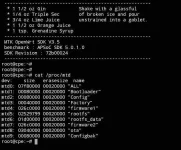
hindi tayo segurado kung hindi ma disable ang ssh after ng updateMga Lods nag restore ako ng modem parang permanent na ssh access kahit mag update sila may paraan parin tayo para sa band and cell id locking.
pwede parin ma restore mga values ng inedit kapag nag pa ota pldt ng di padin fully disable yung ota tsaka cwmp nya. pag nag flash ng files yan kung ano laman nung update papatungan eh. pag kasama sa update yung services.init, balewala dinMga Lods nag restore ako ng modem parang permanent na ssh access kahit mag update sila may paraan parin tayo para sa band and cell id locking.
Mga may ganito taas kamay pa extract ng firmware niyo.
| Current Software Version: | P28PLDT_AP_R281_V004 |
| Current Software Date: | 20200720_16_02 |
| Base band version: | P28M26HAPLDT_CP_R281_V002 |
| Base band Date: | 20200604_14_20 |