 PH
PHMga sir, sinubukan kong i-dump ung mga .bin files gamit yung mobile telnet ng sofware v4.1 baseband 2.2. Kaso, dko mahugot ung mtd0, masyado malaki ung file. Anu kya pwede gawin dito para ma-unlock na ung r281?
-
Welcome to PHCorner Forums! Sign up for free to unlock full access and exclusive privileges, including:
- Asking questions about computer and mobile issues
- Discovering internet tips for your mobile network and computer
You are using an out of date browser. It may not display this or other websites correctly.
You should upgrade or use an alternative browser.
You should upgrade or use an alternative browser.
PLDT Boosteven R281 (Band Locking)
- Thread starter L E N A R
- Start date
- Status
- Not open for further replies.
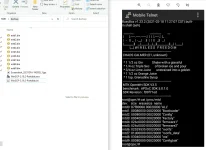
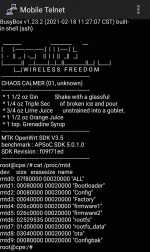
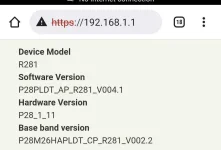
Mga sir, sinubukan kong i-dump ung mga .bin files gamit yung mobile telnet ng sofware v4.1 baseband 2.2. Kaso, dko mahugot ung mtd0, masyado malaki ung file. Anu kya pwede gawin dito para ma-unlock na ung r281?
Mukhang matatagalan pa pag unlock jan, Lods basta baaeband 22
Ang mahanap sana dapat jan, ay mahanap yung command jan(enabling Bridge mode) sa 192.168.1.1 port 22 kung papaano ma enabled ang Bridge mode. Para mapasok yung 192.168.8.1 port 23
Para madokot, ma modify baseband(para makuha ang bagong mep code like 123456), para ma downgrade baseband 22 to baseband20
Sa Firmware Vesion 40(mediatek chipset) kac nadudukot sa 192.168.1.1 port 22
Tapos yung Baseband 20, nadudukot baseband(marvel chipset) firmware sa 192.168.8.1 port 23
Sa old version, madali ma enabled telnet/ssh pag nag login ka sa dashboard ng 192.168.1.1, enabled mo lang bridge mode. Tapos pwede mo ng pasukin telnet ad dukutin firmwares sa baseband
Un nga sir. Sinubukan ko din pasukin ung 192.168.8.1 ayaw talaga kahit anong subok ko para sana madukot ung firmware. Hintay hintay nlng cguro muna ako.Mukhang matatagalan pa pag unlock jan, Lods basta baaeband 22
Ang mahanap sana dapat jan, ay mahanap yung command jan(enabling Bridge mode) sa 192.168.1.1 port 22 kung papaano ma enabled ang Bridge mode. Para mapasok yung 192.168.8.1 port 23
Para madokot, ma modify baseband(para makuha ang bagong mep code like 123456), para ma downgrade baseband 22 to baseband20
Sa Firmware Vesion 40(mediatek chipset) kac nadudukot sa 192.168.1.1 port 22
Tapos yung Baseband 20, nadudukot baseband(marvel chipset) firmware sa 192.168.8.1 port 23
Sa old version, madali ma enabled telnet/ssh pag nag login ka sa dashboard ng 192.168.1.1, enabled mo lang bridge mode. Tapos pwede mo ng pasukin telnet ad dukutin firmwares sa baseband
Ano po alternative pangflash pag di available yung mtd command?You do not have permission to view the full content of this post. Log in or register now.
Dalawa kaya partition mga Lods, sa r281 isang partition para sa mediatek 192.168.1.1
Tapos sa next partition Sa Marvel chipset pxa1826 (192.168.8.1)
Pag aralan kaya lahat ng mtd commands
Gaya dto
jffs2write <file> append <file> to the jffs2 partition on the device
mtd is a utility we use to write to an MTD (Memory Technology Device). Please read the Notes to learn more.
Invocation
Usage: mtd [<options> ...] <command> [<arguments> ...] <device>[:<device>...]
Writing to MTD
unlock <dev> unlock the device
refresh <dev> refresh mtd partition
erase <dev> erase all data on device
write <imagefile>|- write <imagefile> (use - for stdin) to device
jffs2write <file> append <file> to the jffs2 partition on the device
fixtrx <dev> fix the checksum in a trx header on first boot
Options
-q quiet mode (once: no [w] on writing, twice: no status messages)
-n write without first erasing the blocks
-r reboot after successful command
-f force write without trx checks
-e <device> erase <device> before executing the command
-d <name> directory for jffs2write, defaults to “tmp”
-j <name> integrate <file> into jffs2 data when writing an image
-o offset offset of the image header in the partition(for fixtrx)
-F <part>[:<size>[:<entrypoint>]][,<part>…] alter the fis partition table to create new partitions replacing the partitions provided as argument to the write command (only valid together with the write command)
Examples
Download linux.bin from Internet (it's not safe to do so, here is for demonstration purpose only), then write linux.bin to a MTD partition labeled as linux (could be mtd4) and reboot afterwards:
cd /tmp
wget You do not have permission to view the full content of this post. Log in or register now.
mtd -r write /tmp/linux.bin linux
Example (flash u-boot from OpenWrt)
Tested on Marvell EspressoBinBoard based on MVEBU, (see forum topic) Download flash-image.bin for your specific hardware from SnapShots
You can checks your mtd partitions from proc :
root@EBIN:~# cat /proc/mtd
dev: size erasesize name
mtd0: 003f0000 00010000 "firmware"
mtd1: 00010000 00010000 "u-boot-env"
(it's not safe to do so, here is for demonstration purpose only),
then write flash-image.bin to a MTD partition labeled as spi0.0 (could be mtd0 or firmware) and reboot afterwards :
cd /tmp
wget You do not have permission to view the full content of this post. Log in or register now.
mtd -r write /tmp/flash-image.bin /dev/mtd0
Ano po alternative pangflash pag di available yung mtd command?
Mtd lang, Lods. Kung r281, putty ssh lang naman need mo kung sa pc saka yung telnet enabled mo sa windows.
Inde kac magiging available ang Telnet sa r281 na latest firmware v42/4.0 kung inde mo pa na enabled ang telnet sa 192.168.1.1 port 42. Kaya mag backread ka page 22 to 40 kung gusto mo masundan kac kelangan mo rin kiwi browser
Kung pc mode ka pala, yung latest nginx nI Master Lenar sa page1, meron na pala shortcut jan pang enabled Telnet. Basta mag back read ka page 22 to 40 para makita mo yung commands enabling ssh naman Para ma enabled dropbear ubus commands kasama na mtd commands

Ba't po may diagnostics na kahit sa original 192 .168.1.1 na address?
Meron talaga yan, Lods. Jan ka magpasok Bandlock commands, cell id locking, frequency locking, tingin kana lang sa page1 para makapili ka bands na gusto mo
so di na po pala kailangan nginx master pag mag lolock?Meron talaga yan, Lods. Jan ka magpasok Bandlock commands, cell id locking, frequency locking, tingin kana lang sa page1 para makapili ka bands na gusto mo
so di na po pala kailangan nginx master pag mag lolock?
Kelangan pa rin, Lods. Mas madali kac gamitin puro copy paste at click lang
Kung Ubus Commands naman pwede rin basta naka enabled na Telnet at Ssh
ito po ibig sabihin ko pag routerlocalhost nasa bandang "internet" yung diagnostics makikita tas pag normal na 192,168,1,1 nasa bandang "router" naman makikita yung diagnostics. Ang tanong san sa dalawa ako maglolock, sa routerlocalhost o 192,168,1,1 ? SalamatKelangan pa rin, Lods. Mas madali kac gamitin puro copy paste at click lang
Kung Ubus Commands naman pwede rin basta naka enabled na Telnet at Ssh
Attachments
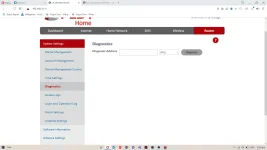
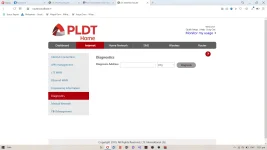
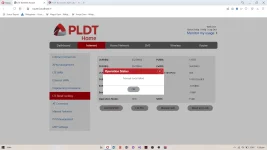
pa help po
Both pwede Lods, Basta sa pc mode ka. Basta naka enabled na Telnet/ssh para d magka aberya
Pero mas sure sa router.localhost:8080
Ano pala version firmwade mo at baseband
4.2Both pwede Lods, Basta sa pc mode ka. Basta naka enabled na Telnet/ssh para d magka aberya
Pero mas sure sa router.localhost:8080
Ano pala version firmwade mo at baseband
2.2
Both pwede Lods, Basta sa pc mode ka. Basta naka enabled na Telnet/ssh para d magka aberya
Pero mas sure sa router.localhost:8080
Ano pala version firmwade mo at basebanano
Ano po purpose nung ssh telnet?Both pwede Lods, Basta sa pc mode ka. Basta naka enabled na Telnet/ssh para d magka aberya
Pero mas sure sa router.localhost:8080
Ano pala version firmwade mo at baseband
Ano po purpose nung ssh telnet?
Lods, gamit yanPara makabandlocking ka via Dropbear Ubus command
Para makabackup and flash firmware din
mas secured kac ang ssh compared sa Telnet, Lods
4.2
2.2
Kelangan mo yung latest nginx sa page 1
ano po page ng tutorial sa ssh gamit pc?Lods, gamit yanPara makabandlocking ka via Dropbear Ubus command
Para makabackup and flash firmware din
mas secured kac ang ssh compared sa Telnet, Lods
ano po page ng tutorial sa ssh gamit pc?
Halos same method sa smartphone, Lods. Magback read ka page 22 to 38 para makita mo mga commands
Salamat po try ko poHalos same method sa smartphone, Lods. Magback read ka page 22 to 38 para makita mo mga commands
Tanong ko lang po, ano po yung flash firmware?Lods, gamit yanPara makabandlocking ka via Dropbear Ubus command
Para makabackup and flash firmware din
mas secured kac ang ssh compared sa Telnet, Lods
- Status
- Not open for further replies.
About this Thread
-
5KReplies
-
439KViews
-
368Participants
Last reply from:
-Synntaxx
-Synntaxx
New Topics
-
Help Pa Admin Access po B312-939
- Started by DtctiveConan
- Replies: 0
- 📡 Broadband, Modem, & Networking
-
PLDT FiberHome HG6245D Brazilian Firmware
- Started by weah05
- Replies: 1
- 📡 Broadband, Modem, & Networking
-
-
Admin at password para sa ZTE model ZXHN F679D
- Started by TOpKILL
- Replies: 1
- 📡 Broadband, Modem, & Networking
-
FREE RAIN 101 UNLOCKER FW BUGOK 101
- Started by donamicvelazkiz
- Replies: 0
- 📡 Broadband, Modem, & Networking
-
[FREE] [APK] Rain101 Unlocker + BUGOK101 CFW [SUPER EZ]
- Started by bugok101
- Replies: 49
- 📡 Broadband, Modem, & Networking
-
Youtube No Ads DNS
- Started by cleverian
- Replies: 15
- 📡 Broadband, Modem, & Networking
-
Public DNS Tutorial
- Started by VCODE
- Replies: 15
- 📡 Broadband, Modem, & Networking
Trending Topics
-
-
-
-
-
Rain101 (Anti TTL) Bypass Datamaxx 5GUnli / Sayall 5G Unli ( No Connection )
- Shuuuuuuuun
Replies: 69 -
-
-
-
Online now
- Members online
- 648
- Guests online
- 7,156
- Total visitors
- 7,804