 PH
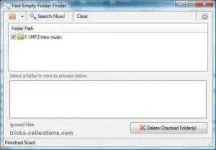
PHBy deleting empty folder can free up any size in the hardisk. With fast empty folder finder you can quickly find and delete empty folder. Fast Empty Folder Finder was designed to allow the fastest preview method available – since every empty folder should be confirmed. There is a built in preview window, allowing you to immediately see an Explorers view inside of the selected folder!
Empty folder finder word under windows XP and Vista but in windows XP you required net.framework intalled.
How to use fast empty folder finder
Empty folder finder word under windows XP and Vista but in windows XP you required net.framework intalled.
How to use fast empty folder finder
- After installing this software, run the software.
- Click filder icon the select the or icon to find.
- Click search now and wait untul finish. If any empty folder will be displayed.
- To delete the folder chek folder to delete then click Delete Checked Folder button.
