 PH
PH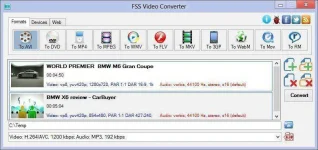
FSS Video Converter is a free and powerful tool that allows convert all popular video formats, including HD video. Converter provides you optimized output profiles, you can easily convert video for PC, digital devices and websites.
Supported output video formats:
AVI, DVD, MP4, MPEG, WMV, FLV, MKV, 3GP, WEBM, MOV, RM, M4V
Supported devices:
- Apple(iPod, iPhone, iPad)
- Amazon Kindle
- Android phones and tablets
- BlackBerry
- Sony(PSP, PS3)
- Microsoft XBox360
- Nintendo Wii
- Archos players
- Creative ZEN Vision players
- Microsoft Zune players
- SanDisk Sansa View players
- Iriver palyers
- Palm
Below are the list of websites where you can upload your converted videos directly from the convertor.
- YouTube
- Vimeo
- DailyMotion
- TwitVid
- Flickr
- Dropbox

Version: 1.0.1.1
License: Freeware[?]
Size: 11.1 Mb
Supports: Windows XP/Vista/7/8/2000/2003/2008
How To Use:
- Run FSS Video Converter and select your input video file.
- To select a video you would like to convert hit the Add file button.
- After you have selected the video input file, click one of the following buttons on the Formats tab of the Main Toolbar.
- Click the Browse button and select a location on your HDD for the output video files.
- After you have set up all the conversion parameters, click the Convert button to start converting. You can visually judge the conversion process for every file.
- That's it!
