 PH
PHIn this post I am telling you how to find ip address of your computer. For different operating system you have to follow different steps. So follow the steps as written below and get your computer’s ip address.
To find ip address for windows XP
1.Click the Start button, select Run
2.Type CMD and press Enter.
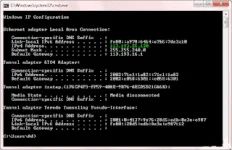
3.A Command prompt window will open. Type ipconfig and press Enter.
4.Between the lines of information the network adapter's IP address will be listed next to the IPv4 Address it will look like "159.72.71.224"
To find ip address for windows vista
1.Open Network and Sharing Center by clicking the Start button > Control Panel > Network and Internet> Network and Sharing Center.
2.Under Connection, click View status.
3.Click Details.
4.Your computer's IP address appears in the Value column, next to "IPV4 IP Address."
To find ip address for windows 7
1.Click the Start button
2.Type CMD in search box and press Enter.
3.A Command prompt window will open. Type ipconfig and press Enter.
4.Between the lines of information the network adapter's IP address will be listed next to the IPv4 Address it will look like "159.72.71.224"
In this way now you know how to find ip address of your computer
To find ip address for windows XP
1.Click the Start button, select Run
2.Type CMD and press Enter.
3.A Command prompt window will open. Type ipconfig and press Enter.
4.Between the lines of information the network adapter's IP address will be listed next to the IPv4 Address it will look like "159.72.71.224"
To find ip address for windows vista
1.Open Network and Sharing Center by clicking the Start button > Control Panel > Network and Internet> Network and Sharing Center.
2.Under Connection, click View status.
3.Click Details.
4.Your computer's IP address appears in the Value column, next to "IPV4 IP Address."
To find ip address for windows 7
1.Click the Start button
2.Type CMD in search box and press Enter.
3.A Command prompt window will open. Type ipconfig and press Enter.
4.Between the lines of information the network adapter's IP address will be listed next to the IPv4 Address it will look like "159.72.71.224"
In this way now you know how to find ip address of your computer


