PH
PHIf you have never changed your router's settings before, you are in luck! This means your router is still using its factory default settings, which makes finding the login details very straightforward.
PS: If you are using a router provided by a local ISP like PLDT, Globe, or Converge, and the standard defaults don't work, search the PhCorner forums for your specific router model (e.g., "PLDT Fibr AN5506-04-A default admin password"). Local ISPs often use hidden "Superadmin" accounts to lock down settings, and those passwords change depending on the firmware version!
What if the default password doesn't work?
𝗠𝗲𝘁𝗵𝗼𝗱 𝟭: 𝗧𝗵𝗲 𝗦𝘁𝗶𝗰𝗸𝗲𝗿 𝗠𝗲𝘁𝗵𝗼𝗱 (𝗘𝗮𝘀𝗶𝗲𝘀𝘁)
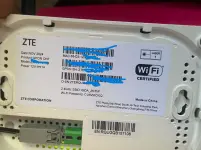
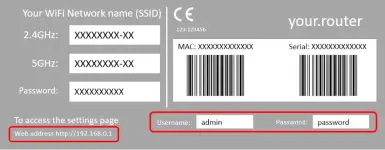
Grab your physical router and look at the sticker on the back or bottom. Most manufacturers print everything you need right there. Look for:- Web Address / Router IP: This is usually
192.168.1.1,192.168.0.1, or sometimes a web link likerouterlogin.net. - Username: Often just
admin. - Password: Commonly
admin,password, or a random string of numbers and letters unique to your device.
𝗠𝗲𝘁𝗵𝗼𝗱 𝟮: 𝗙𝗶𝗻𝗱 𝗧𝗵𝗲 𝗜𝗣 𝗔𝗱𝗱𝗿𝗲𝘀𝘀 𝗗𝗶𝗴𝗶𝘁𝗮𝗹𝗹𝘆
If the sticker is scratched off or missing, you can find the IP address (known technically as the Default Gateway) using a device that is already connected to the WiFi:- Using WiFiman: Since you already installed WiFiman for the previous tutorial, simply open the app. Go to the Discovery tab, and your router will usually be the very first device at the top of the list, complete with its IP address.
- On Windows: Press the
Windows Key, typecmd, and hit Enter. In the black Command Prompt window, typeipconfigand press Enter. Look for the number next to Default Gateway. - On Mac: Go to System Settings > Wi-Fi. Click the Details button next to your connected network, and look for the IP address next to Router.
𝗠𝗲𝘁𝗵𝗼𝗱 𝟯: 𝗧𝗿𝘆 𝗧𝗵𝗲 𝗦𝘁𝗮𝗻𝗱𝗮𝗿𝗱 𝗙𝗮𝗰𝘁𝗼𝗿𝘆 𝗖𝗿𝗲𝗱𝗲𝗻𝘁𝗶𝗮𝗹𝘀
If you successfully found the IP address using Method 2, but still don't know the password, you can almost always get in by trying these universal default combinations:| Username | Password | Common Router Brands |
| admin | admin | TP-Link, Asus, PLDT (some models) |
| admin | password | Netgear, Linksys |
| admin | [Leave Blank] | Older D-Link and Linksys models |
| user | user | Globe Telecom / Huawei (some models) |
What if the default password doesn't work?