 PH
PHIt is common observation that some times our computer slows down due to low performance of hard drive. This problem happens due to the slow performance or poor speed of hard drive. When we say about poor performance, actually we mean, poor speed of reading/writing of hard drive. This problem can be solved by increasing the hard drive speed. Follow these steps to solve your problem.
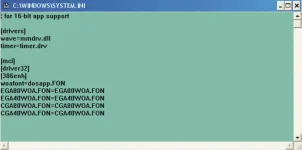
- Click Start menu and select run.
- Now type (sysedit.exe) in run and press enter.
- System configuration editor will appear.
- Here you can see some multiple windows but you will select (system.ini).
- This window contains a line (386enh)
- Now after this line type (irq14=4096)
- Now close this window and save it.
- Reboot your computer now.
- You will surely feel better performance of your computer.


