PH
PH
About this App:
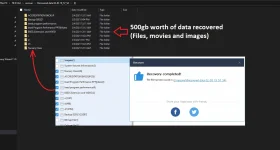
EaseUS Data Recovery Wizard is able to recover deleted, formatted or otherwise inaccessible data from your hard drive. You can recover documents, photos, music, videos, emails, folders, and archive files etc from Windows laptops and desktop computers. The app also supports multiple storage devices including external hard drives, USB drives, SD cards, memory cards, digital cameras, and MP3/MP4 players, etc.
The app has a fresh, modern looking interface, which is easy to navigate. Upon startup it asks you what type of files do you want to recover? You have various options to choose from, including Graphics, Audio, Email, Document, Video, Archive and Other. Simply choose which type of files you need and click Next. The next screen shows your connected drives and storage media etc. From here you can perform the scan to recover your data. Once scanned, if your requested data is not shown, then you can undertake a Deep Scan to try again. If you do locate it, you have to option to Export it to another storage area.
Overall, EaseUS Data Recovery Wizard is a helpful tool that can perform a really useful service. If you have ever been in the situation where you have ‘lost’ your data.
Key Features include:
Supports all types of lost files, including photos, documents, videos, audio, emails, archives etc.
Recover deleted, formatted or inaccessible data.
Recover lost data from deleted volumes & partitions.
Recover lost data from Windows notebooks, desktops, Windows server, hard drives, USB drives, SD cards, memory cards, and digital cameras.
Supports RAW recovery.
Support for Windows 10.
NOTE: NO REQUEST FOR MIRROR PLEASE!
You do not have permission to view the full content of this post. Log in or register now.
You do not have permission to view the full content of this post. Log in or register now.
You do not have permission to view the full content of this post. Log in or register now.
Pass: lace12
- This All File is Compressed based on 7zip 17.00 beta and later so use latest You do not have permission to view the full content of this post. Log in or register now. (Recommended) or You do not have permission to view the full content of this post. Log in or register now. (Very Recommended)
Tutorial: (version 11.9)
para po sa lahat
1. install easeus (do not run after)
2. copy config.dat
3. restart computer
4. copy license code and activate
5. success. enjoy!
All credits to LaCe12
Like

 pa help po