PH
PH
P
PurpleFox
Main Features:
- Play games from hard drive at 200X speed without the actual CD/DVD
- Play your favorite games and disc-based applications as virtual CDs while original discs remain safely in their cases.
- Make your own customized virtual CD containing favorite tracks, video, and custom programs
- Custom Virtual CD/DVD Creation
- Burn virtual CD/DVD image to physical CD/DVD
- Mount a virtual CD/DVD on any virtual CD/DVD drives
- No noise, no tear and no lost CD/DVD
- Useful for UltraBook, Netbook and PC without physical CD drive
- Play up to 23 virtual CD/DVDs simultaneously
- Share CD/DVDs on a network
- Hot-key for hard-core CD/DVD users and gamers
- Automatically load and insert virtual CD/DVDs upon system startup
- Support unlimited number of Virtual CD/DVD images
- Support CD/DVD/Blu-ray
- VirtualDrive Network is available for easy management for multiple users
Optimal Performance
- Run games and applications as virtual CDs with access rates more than 200 times faster. Plus, there’s no spin-up delay, no wear and tear!
Multiple CD Play
- Pre-load up to 23 virtual CDs and toggle back and forth between games or virtual CDs without having to wait for physical CDs to spin up.
Custom virtual CD Creation
- Make a virtual CD from music, video, photos, files, documentations and folders, ; and share it over a network.
Clone, Burning, Archive
- Make backup copies of your favorite game CD preventing damage or lost.
CD/DVD Backup
- Protect your CDs/DVDs/BDs from loss, theft, and damage by using virtual CD on VirtualDrive.
Portability and Convenience
- Transport your virtual CDs on a laptop, an external hard drive, and other common digital storage media.
CD/DVD/BD Archiving
- Organize your virtual CDs in a searchable Virtual CD library.
CD Cover Flow Mode
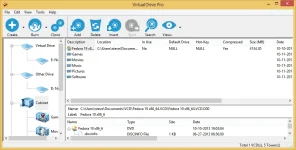
- Cover flow UI provides an intuitive visual interface to manage virtualized CD/DVD/Blu-ray cabinets
Touch screen support
- Enlarged icons makes the program easy to use with touch screen
Intuitive GUI
- VirtualDrive's new user-friendly Cover-Flow interface gets you up and running in no time!
Wizard UI
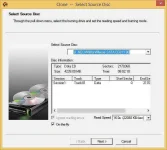
- Create and burn CDs/DVDs/BDs with easy clicks
Customizable Cover
- Users can create a custom cover picture for every virtual CD
Blu-ray Support
- VirtualDrive enables you to easily read, burn, record, clone unprotected Blu-ray discs
Ideal for PC without CD/DVD drive
- Best add-on value for Ultrabook, netbook and laptop
Operating System Supported
- New: Windows 10
- Windows 8 & Windows 8.1(64 & 32 bits)
- Windows 7 (64 & 32 bits)
- Windows Vista (64 & 32 bits)
- Windows XP (64 & 32 bits)
- Windows Server 2012 (all versions)
- Windows Server 2008 (all versions)
- Windows Server 2003 (all versions)
Languages supported in one package:
English, German, Chinese-Trad, Chinese-Sim, and Japanese.
File Size | 25.1 Mb