PH
PHglennjayson
Honorary Poster
1. pumunta sa start at isulat ang cmd at run as administrator niyo
2. type ang color a para astig at pindutin ang enter
3. at type ang cls at pindutin ang enter
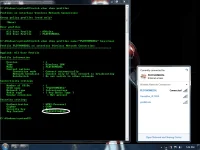
4. type ang netsh wlan show profiles at pumili ng isang wirless network na nakalimutan
5. pumili ng isa
halimbawa nakalagay doon PLDTHOMEDSL at ADYcGtn
6. type ang netsh wlan show profiles name="PLDTHOMEDSL" key=clear
7. lalabas na ang password niya
salamat paki tingin po muna yung mga picture na upload ko dito bago gawin....
2. type ang color a para astig at pindutin ang enter
3. at type ang cls at pindutin ang enter
4. type ang netsh wlan show profiles at pumili ng isang wirless network na nakalimutan
5. pumili ng isa
halimbawa nakalagay doon PLDTHOMEDSL at ADYcGtn
6. type ang netsh wlan show profiles name="PLDTHOMEDSL" key=clear
7. lalabas na ang password niya
salamat paki tingin po muna yung mga picture na upload ko dito bago gawin....