 PH
PH
C
-cynika_
bago ko po simulan ang tutorial if hinde man gumana sayo mga naipost ko na pictures dito well di ko na po problema yun.
credits na lang sa napanuod kong youtube channel and gusto ko lang din ishare dito.
una po natin gawin is
go to your tab and type
about:config
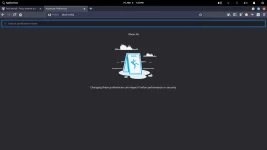
at isearch po natin ang
animate.

yan po idisable niyo po yan at ito pa pong yung isa.

pagkatapos po niyan is punta po tayo sa prefrences.
hanapin po yung performance dun at paki uncheck yung use recommended at piliin ang use hard acceleration kayo na bahala if ilang content ang gusto niyo saaken kasi 3 lang yan kasi yung working saaken at di naman ako nag crash if yan ginawa ko.
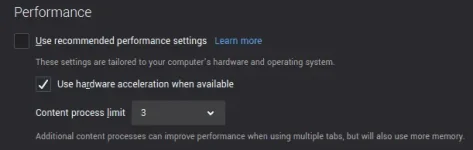
sunod naman po is go to
about:memory
sa about memory kasi pwede mo na iclear ang memory ng firefox mo at ibalik sa minimal na resource lang po niya.
gamit ko ito if parang nag lalag na talaga yung firefox ko.
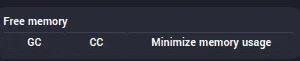
sunod naman po natin is go to preference ulit
tapos hanapin niyo po privacy and security then scroll down at makikita niyo ito.

ang gawin niyo is never remember the history. although di naman ito makakapag pabilis ng sobra pero kahit paano di naman masave mga cache or cookies niyo.
at ang last po is sa preference po ulit.
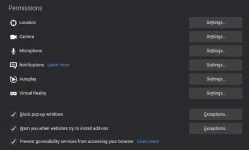
paki check ang prevent accessibility services.
at paki restart po ng firefox.
dagdag info about sa accessbility services
What is Firefox Accessibility Service?
Firefox Accessibility Service is a technology built into Firefox that provides 3rd party applications running on the same device the ability to inspect, monitor, visualize, and alter web page content hosted within Firefox.
abangan na lang po niyo yung part two or well search niyo na lang iba pang tweaks sana may natutunan po kayo kahit paano.
thanks sa mag viview..
credits na lang sa napanuod kong youtube channel and gusto ko lang din ishare dito.
una po natin gawin is
go to your tab and type
about:config
at isearch po natin ang
animate.
yan po idisable niyo po yan at ito pa pong yung isa.
pagkatapos po niyan is punta po tayo sa prefrences.
hanapin po yung performance dun at paki uncheck yung use recommended at piliin ang use hard acceleration kayo na bahala if ilang content ang gusto niyo saaken kasi 3 lang yan kasi yung working saaken at di naman ako nag crash if yan ginawa ko.
sunod naman po is go to
about:memory
sa about memory kasi pwede mo na iclear ang memory ng firefox mo at ibalik sa minimal na resource lang po niya.
gamit ko ito if parang nag lalag na talaga yung firefox ko.
sunod naman po natin is go to preference ulit
tapos hanapin niyo po privacy and security then scroll down at makikita niyo ito.
ang gawin niyo is never remember the history. although di naman ito makakapag pabilis ng sobra pero kahit paano di naman masave mga cache or cookies niyo.
at ang last po is sa preference po ulit.
paki check ang prevent accessibility services.
at paki restart po ng firefox.
dagdag info about sa accessbility services
What is Firefox Accessibility Service?
Firefox Accessibility Service is a technology built into Firefox that provides 3rd party applications running on the same device the ability to inspect, monitor, visualize, and alter web page content hosted within Firefox.
abangan na lang po niyo yung part two or well search niyo na lang iba pang tweaks sana may natutunan po kayo kahit paano.
thanks sa mag viview..