 PH
PH-
Welcome to PHCorner Forums! Sign up for free to unlock full access and exclusive privileges, including:
- Asking questions about computer and mobile issues
- Discovering internet tips for your mobile network and computer
You are using an out of date browser. It may not display this or other websites correctly.
You should upgrade or use an alternative browser.
You should upgrade or use an alternative browser.
🔒 Closed BootMgr
- Thread starter Mikomik04
- Start date
- Status
- Not open for further replies.
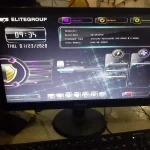
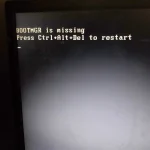
_Chunchunmaru_
Eternal Poster
Madami pong possible reason yan. Baka may nagalaw ka sa partition or may nagcorrupt lang. Open mo to You do not have permission to view the full content of this post.
Log in or register now.
Thank you lodi tignan koMadami pong possible reason yan. Baka may nagalaw ka sa partition or may nagcorrupt lang. Open mo to You do not have permission to view the full content of this post. Log in or register now.
ICE Coffee
⭐⭐☕⭐⭐
meron ka ba installer?? try mo mag startup repair, salpak mo yung installer mo tapos punta ka dun sa "REPAIR YOUR COMPUTER" tapos try mo mag startup repair,
RamonNonsol
Fanatic
Fix #3: Use bootrec.exe to rebuild the BCD
bootrec.exe is a tool built in the Windows Recovery Environment (Windows RE) that you can use to troubleshoot and repair the error.
bootrec.exe can repair boot configuration data and master boot records. BCD, which stands for Boot Configuration Data, contains boot configurations options and controls how Windows is started.
Here are the steps for accessing bootrec.exe to rebuild the master boot sector:
bootrec.exe is a tool built in the Windows Recovery Environment (Windows RE) that you can use to troubleshoot and repair the error.
bootrec.exe can repair boot configuration data and master boot records. BCD, which stands for Boot Configuration Data, contains boot configurations options and controls how Windows is started.
Here are the steps for accessing bootrec.exe to rebuild the master boot sector:
- *********** Windows 7 or Vista install disc
- Restart your computer and boot from the CD
- Press any key at the “Press any key to boot from CD or DVD” message
- Choose Repair your computer after you select the language, time and keyboard method
- Select your Windows installation drive (usually C:\)
- Click Next
- Select Command Prompt in the System Recovery Options box
- Write the following command and press Enter:bootrec /rebuildbcd
arsenal1205
Rarely opens PHC
Format mo na lang ts baka nag corrupt na ung partition ng hdd mo

- Status
- Not open for further replies.
Similar threads
-
-
-
-
👨🏫 Tutorial Create Bootable USB using CMD (without third party apps)
- Started by Paul25
- Replies: 1
-
❓ Help Looking for anyone who can fix Infinix X6836 orange state bootloop 1.5k budget
- Started by Anchora
- Replies: 10
About this Thread
-
12Replies
-
338Views
-
8Participants
Last reply from:
Mikomik04
Mikomik04
New Topics
-
Calculator Emulator (Canon F789SGA I or II)
- Started by DDankii
- Replies: 0
- ❓ Computer Discussion & Support
-
Laptop Price for 2027
- Started by sisig with egg
- Replies: 0
- ❓ Computer Discussion & Support
-
Is this graphic card issue?
- Started by markjson
- Replies: 2
- ❓ Computer Discussion & Support
-
SoungHub No Sound Encountered
- Started by pow_tah
- Replies: 2
- ❓ Computer Discussion & Support
-
Apk to ipk any idea how to make it?
- Started by a s a r k a n a b a
- Replies: 1
- ❓ Computer Discussion & Support
-
TEMPORARY EMAIL NA HINDI NADEDETECT AS TEMPORARY EMAIL
- Started by 21banana
- Replies: 1
- ❓ Computer Discussion & Support
-
Looking for CSI ETABS Ultimate 2026 v23.2 Acïvâør
- Started by talaotep
- Replies: 0
- ❓ Computer Discussion & Support
-
I need help about my pc
- Started by lex2133
- Replies: 7
- ❓ Computer Discussion & Support
-
Start up boot so slow?
- Started by babyoriokiko
- Replies: 24
- ❓ Computer Discussion & Support
Trending Topics
Online now
- Members online
- 355
- Guests online
- 8,275
- Total visitors
- 8,630