 PH
PHjamesiswizard_1
Elite
Sa mga Connected Pero No Browse kay Blue ito gamtin nyo.,
Para Sa Mga Newbie
Procedure:
Connect si Blue The Open Nyo yung Nasa Zip File sa proxifier
proxfier.,Boss saan ito e Paste
salamat nga pala dito boss
proxfier yan.,dl ka meron nyan dito.,boss .ppx panu gamitin yan dko po alam
Blue Lantern Po wala atang Proxfier ehproxfier yan.,dl ka meron nyan dito.,
basat dl mo lang yung proxifer.,pag connected na si blue saka namana si profierBoss anf
Blue Lantern Po wala atang Proxfier eh
Ang Spt lantern lang ata pyde din ba gamitin yan duon?
Pa try bossingFeedback nalang po ako kapag gumana sakin
Keep Sharing po Maraming Salamat
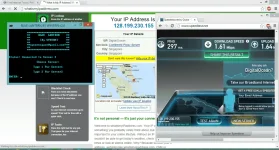
BLUE LANTERN FREE INTERNET FOR GLOBE BROADBAND

Features:
Auto-proxy in Internet dôwnlôad Manager (IDM) no need to edit proxy settings manualy
Auto-proxy in Browsers no need to edit proxy settings manualy
GLOBE BROADBAND SETTINGS:
Profile name: Blue Lantern
Dial#: *99***1#
APN: http.globe.com.ph
Authentication mode: PAP or CHAP
Connect your broadband after creating that profile
HOW TO USE:
1. Open/Run Blue Lantern.bat it will ask for password just type
trickshare then hit enter
2. Choose Server type 1 or 2 then enter
3. Wait for the confirmation message "CONNECTED" if it will fail then select another server
4. If it is connected then you can start browsing/dôwnlôading
5. You can close/exit the CMD window after
6. Enjoy!!
CONNECTED BUT NO BROWSE?
usually incountered by windows7/8 users, yan ay dahil sa hindi nag-aauto proxy ang inyong mga browser/dôwnlôader
HOW TO FIX?
open browser or IDM go to settings> then change the proxy settings to
http/https protocols
socks5 type of protocols
ALL IP: 127.0.0.1 AND PORT: 80
CREDITS:
Thanks to DrioMatriX for this great idea
D0WNL0AD LINKS:
like my post to see the attachment below and to dôwnlôad the file
RELATED FREE INTERNET TRICKS:
SPT Lantern + Proxifier Free Internet

BLUE LANTERN FREE INTERNET FOR GLOBE BROADBAND
Features:
Auto-proxy in Internet dôwnlôad Manager (IDM) no need to edit proxy settings manualy
Auto-proxy in Browsers no need to edit proxy settings manualy
GLOBE BROADBAND SETTINGS:
Profile name: Blue Lantern
Dial#: *99***1#
APN: http.globe.com.ph
Authentication mode: PAP or CHAP
Connect your broadband after creating that profile
HOW TO USE:
1. Open/Run Blue Lantern.bat it will ask for password just type
trickshare then hit enter
2. Choose Server type 1 or 2 then enter
3. Wait for the confirmation message "CONNECTED" if it will fail then select another server
4. If it is connected then you can start browsing/dôwnlôading
5. You can close/exit the CMD window after
6. Enjoy!!
CONNECTED BUT NO BROWSE?
usually incountered by windows7/8 users, yan ay dahil sa hindi nag-aauto proxy ang inyong mga browser/dôwnlôader
HOW TO FIX?
open browser or IDM go to settings> then change the proxy settings to
http/https protocols
socks5 type of protocols
ALL IP: 127.0.0.1 AND PORT: 80
CREDITS:
Thanks to DrioMatriX for this great idea
D0WNL0AD LINKS:
like my post to see the attachment below and to dôwnlôad the file
RELATED FREE INTERNET TRICKS:
SPT Lantern + Proxifier Free Internet
Wag mo i run as adminsir pa help nga dito or mahina lang connection koView attachment 25680
You do not have permission to view the full content of this post. Log in or register now.pa mediafire naman po or kahit anung link na working maidôwnlôad lang thanks ulit
You do not have permission to view the full content of this post. Log in or register now.