 PH
PH-
Welcome to PHCorner Forums! Sign up for free to unlock full access and exclusive privileges, including:
- Asking questions about computer and mobile issues
- Discovering internet tips for your mobile network and computer
You are using an out of date browser. It may not display this or other websites correctly.
You should upgrade or use an alternative browser.
You should upgrade or use an alternative browser.
🌐 G·TM Blue lantern free internert for globe broadband
- Thread starter VERNzanize
- Start date
-
- Tags
- free internet globe lantern wyvern
- Status
- Not open for further replies.
LQ yata si parol sa Torrent. Noon ok, pero ngayon hindi na friendly.
Yung torrent proxy settings ay yung ginagamit mo sa browser/IDM using Blue lantern - 127.0.0.1:80 ALL PROTOCOLS.
Mag-experiment ka muna using additional http trackers using blue lantern only at ayaw sya magka-peers using UDP.
Pag-ayaw, pasukan mo ng bitvise tunnelier sya, or Tor , or psiphon, or ultrasurf. Baka gumana alin dyan sa'yo. Yung tatlo with parol, gumana sakin sa torrent GUI (utorrent), pero mabagal at papitik-pitik lang. Di ko na sinubukan at naghanap na lang ako ng paraan for direct links sa files na gusto ko.
Yung torrent proxy settings ay yung ginagamit mo sa browser/IDM using Blue lantern - 127.0.0.1:80 ALL PROTOCOLS.
Mag-experiment ka muna using additional http trackers using blue lantern only at ayaw sya magka-peers using UDP.
Pag-ayaw, pasukan mo ng bitvise tunnelier sya, or Tor , or psiphon, or ultrasurf. Baka gumana alin dyan sa'yo. Yung tatlo with parol, gumana sakin sa torrent GUI (utorrent), pero mabagal at papitik-pitik lang. Di ko na sinubukan at naghanap na lang ako ng paraan for direct links sa files na gusto ko.
Working po ito ma'am. Just read carefully the instruction on the first page.working paba to ts?
no browse po...........
Tsaka, meron time po ma'am na bigla siyang mabagal connection kaya siguro ganyan.
win8 ka siguro mam,basa basa lang sa first mam makukuha mo din yanworking paba to ts?
no browse po...........
Mahirap talaga ang mga baguhan kung hindi pinag-aaralan yung software at umintindi ng instructions. Nauuna siguro "Like" at download he he at na-miss yung important item - yung guide. Spoonfeeding na nga kung tutuusin yung binibigay dito. Kailangan lang ang pasensya para lahat ay enjoy.win8 ka siguro mam,basa basa lang sa first mam makukuha mo din yan
jamesiswizard_1
Elite
Merry Christmass to all
monnomnom17
Leecher
working po thanks! 
BLUE LANTERN FREE INTERNET FOR GLOBE BROADBAND

Features:
Auto-proxy in Internet dôwnlôad Manager (IDM) no need to edit proxy settings manualy
Auto-proxy in Browsers no need to edit proxy settings manualy
GLOBE BROADBAND SETTINGS:
Profile name: Blue Lantern
Dial#: *99***1#
APN: http.globe.com.ph
Authentication mode: PAP or CHAP
Connect your broadband after creating that profile
HOW TO USE:
1. Open/Run Blue Lantern.bat it will ask for password just type
trickshare then hit enter
2. Choose Server type 1 or 2 then enter
3. Wait for the confirmation message "CONNECTED" if it will fail then select another server
4. If it is connected then you can start browsing/dôwnlôading
5. You can close/exit the CMD window after
6. Enjoy!!
CONNECTED BUT NO BROWSE?
usually incountered by windows7/8 users, yan ay dahil sa hindi nag-aauto proxy ang inyong mga browser/dôwnlôader
HOW TO FIX?
open browser or IDM go to settings> then change the proxy settings to
http/https protocols
socks5 type of protocols
ALL IP: 127.0.0.1 AND PORT: 80
CREDITS:
Thanks to DrioMatriX for this great idea
D0WNL0AD LINKS:
like my post to see the attachment below and to dôwnlôad the file
melvinr2fast
Honorary Poster
pasilip nga n2 boss salamas ^_^
jamesiswizard_1
Elite
try mo i set manula yung port.,connected but no browse po ..working pa po ba ?
jamesiswizard_1
Elite
sa mismong folder ka mag clik at wag mo i run as admin.boss bat kapag naclick ako ng server ang lumalabas the system cannot find the path specified.
anjon bermejo
Journeyman
salamat po dito connected po hihihi 
pano po kaya gamitin to kung maglalaro ka ng Online games?
pano po kaya gamitin to kung maglalaro ka ng Online games?
jamesiswizard_1
Elite
CONFIRMED: Mag Ingat,May Virus Yung Ibang Lantern,Kaya Nabagal Net Mo at Lumalaki Ang Nakakain Na Files Sa HArdDisk (Solution: Format PC)
pero si Blue wala.,
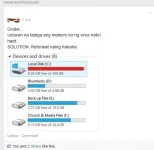
pero si Blue wala.,
edsheil_22
Leecher
maraming salamat dito.. working po
ok po ba ang torrent?
ok po ba ang torrent?
Worki
ng yan tol sundin mo lng ang instraction pag no browsconnected but no browse po ..working pa po ba ?
- Status
- Not open for further replies.
About this Thread
-
555Replies
-
90KViews
-
272Participants
Last reply from:
K r A T o S
K r A T o S
New Topics
-
LOOKING FOR WIREGUARD SETUP IN MIKROTIK (WILLING TO PAY )
- Started by moreinformation
- Replies: 2
- 🚀 Freenet & Tunneling
-
MGa BOSS FREE VPN NA MAY PH SERVER PARA DITO SA AFRICA?
- Started by Junbiel 26
- Replies: 0
- 🚀 Freenet & Tunneling
-
PISOWIFI NO HULOG | (26-09-30) | NPV TUNNEL
- Started by Calcifeer
- Replies: 8
- 🚀 Freenet & Tunneling
-
[NOW WORKING] Youtube No Ads & Other Sites! via DNS
- Started by Lerps
- Replies: 31
- 🚀 Freenet & Tunneling
-
Free vpn can bypass captive portal
- Started by Darz2468
- Replies: 6
- 🚀 Freenet & Tunneling
-
Ano po gagawin pag ganto po?
- Started by jokejoke
- Replies: 3
- 🚀 Freenet & Tunneling
-
C pasabit pls need lang po sa edting
- Started by racetrack21
- Replies: 0
- 🚀 Freenet & Tunneling
-
Pasabit po sana vpn
- Started by Lloyde21
- Replies: 0
- 🚀 Freenet & Tunneling
Trending Topics
-
-
-
WIFI häçk using NodeMCU V3 ESP8266 Deauther + Evil Twin Attack (low badget 200 pesos)
- PHC H3XGAMING
Replies: 576 -
-
Multi-hop VLESS + Cloudflare WARP config (XHTTP + REALITY + TLS), privacy-focused
- Noahclanman
Replies: 4 -
-
Online now
- Members online
- 434
- Guests online
- 7,493
- Total visitors
- 7,927