PH
PHVERNzanize
Forum Veteran
BLUE LANTERN FREE INTERNET FOR GLOBE BROADBAND

Features:
Auto-proxy in Internet Download Manager (IDM) no need to edit proxy settings manualy
Auto-proxy in Browsers no need to edit proxy settings manualy
GLOBE BROADBAND SETTINGS:
Profile name: Blue Lantern
Dial#: *99***1#
APN: http.globe.com.ph
Authentication mode: PAP or CHAP
Connect your broadband after creating that profile
HOW TO USE:
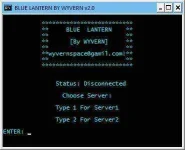
1. Open/Run Blue Lantern.bat it will ask for password just type
trickshare then hit enter
2. Choose Server type 1 or 2 then enter
3. Wait for the confirmation message "CONNECTED" if it will fail then select another server
4. If it is connected then you can start browsing/downloading
5. You can close/exit the CMD window after
6. Enjoy!!
CONNECTED BUT NO BROWSE?
usually incountered by windows7/8 users, yan ay dahil sa hindi nag-aauto proxy ang inyong mga browser/downloader
HOW TO FIX?
open browser or IDM go to settings> then change the proxy settings to
http/https protocols
socks5 type of protocols
ALL IP: 127.0.0.1 AND PORT: 80
CREDITS:
Thanks to DrioMatriX for this great idea
D0WNL0AD LINKS:
like my post to see the attachment below and to download the file
RELATED FREE INTERNET TRICKS:
SPT Lantern + Proxifier Free Internet
Features:
Auto-proxy in Internet Download Manager (IDM) no need to edit proxy settings manualy
Auto-proxy in Browsers no need to edit proxy settings manualy
GLOBE BROADBAND SETTINGS:
Profile name: Blue Lantern
Dial#: *99***1#
APN: http.globe.com.ph
Authentication mode: PAP or CHAP
Connect your broadband after creating that profile
HOW TO USE:
1. Open/Run Blue Lantern.bat it will ask for password just type
trickshare then hit enter
2. Choose Server type 1 or 2 then enter
3. Wait for the confirmation message "CONNECTED" if it will fail then select another server
4. If it is connected then you can start browsing/downloading
5. You can close/exit the CMD window after
6. Enjoy!!
CONNECTED BUT NO BROWSE?
usually incountered by windows7/8 users, yan ay dahil sa hindi nag-aauto proxy ang inyong mga browser/downloader
HOW TO FIX?
open browser or IDM go to settings> then change the proxy settings to
http/https protocols
socks5 type of protocols
ALL IP: 127.0.0.1 AND PORT: 80
CREDITS:
Thanks to DrioMatriX for this great idea
D0WNL0AD LINKS:
like my post to see the attachment below and to download the file
RELATED FREE INTERNET TRICKS:
SPT Lantern + Proxifier Free Internet